
YouTube Video SEO Checker
Audit a public YouTube video's title, description, tags, captions, chapters, quality and target keyword with a clear SEO score and actionable checks.
This tool just saved you time!
This tool is completely free — a small coffee helps keep it running for everyone 🙏
No subscriptions. No paywalls. Just coffee if you feel like it.
Checks
Suggestions
Details
The YouTube Video SEO Checker audits the on-page optimization of a public YouTube video and gives it a clear SEO score. Paste a video URL or ID, optionally enter a target keyword, and check the video's title, description, tags, captions, chapters, hashtags, quality and other available details from one report.
The score is a SanishTech diagnostic score based on the checks described below. It is not an official YouTube score and does not predict where a video will rank.
What Does the YouTube Video SEO Checker Analyze?
The checker turns publicly available video information into an on-page SEO audit. Instead of opening the title, description, tags and other details separately, you can review them together and quickly identify items that meet or miss the tool's optimization criteria.
If you enter a target keyword, the audit also checks whether that phrase appears in the title and description. Leave the keyword field empty and keyword-specific checks can be treated separately from the rest of the audit.
What Is Included in the YouTube SEO Score?
The current YouTube SEO checker evaluates several measurable on-page signals:
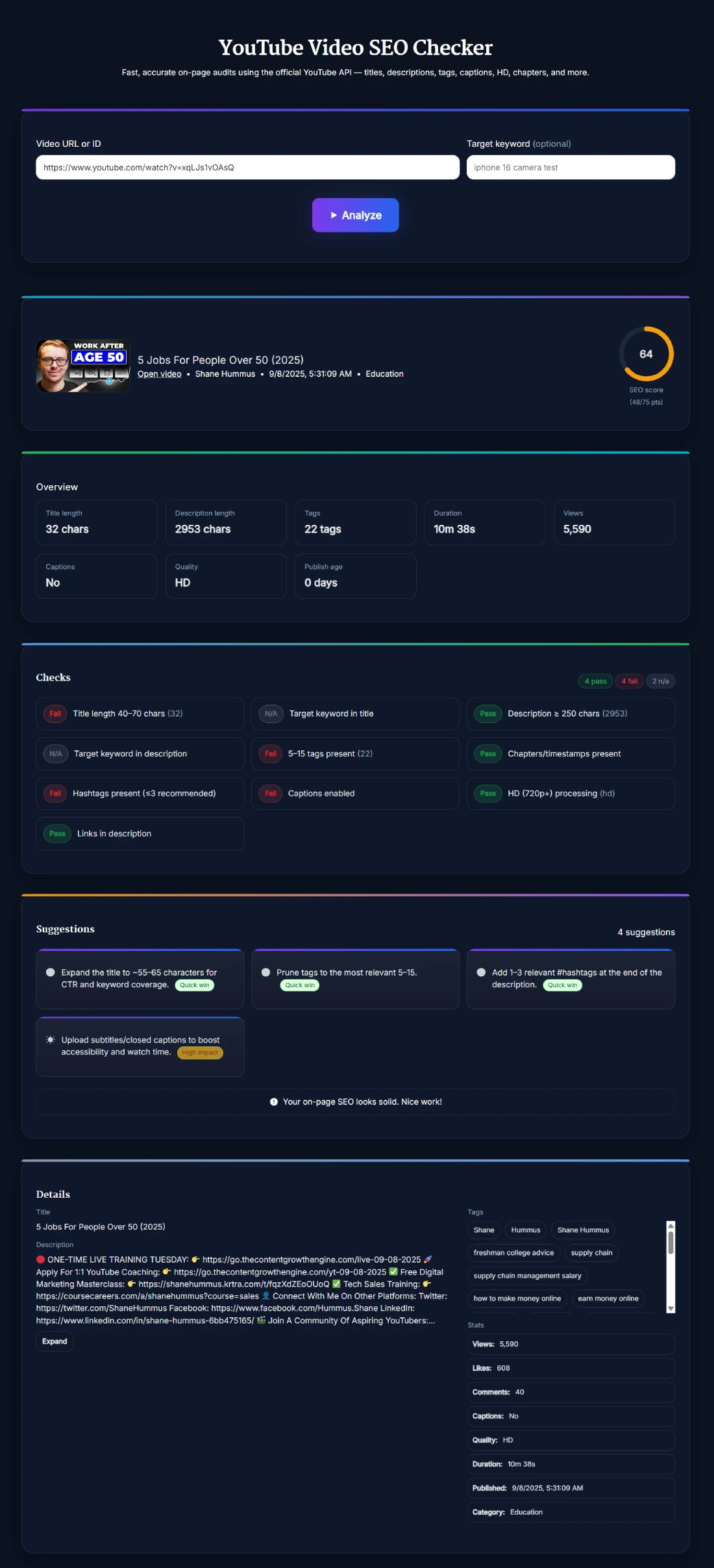
- Title: Checks whether the title falls within the tool's 40 to 70 character range.
- Target keyword: Checks whether an optional keyword appears in the video title and description.
- Description: Checks whether the description contains at least 250 characters.
- Tags: Checks whether the video has between 5 and 15 tags under SanishTech's scoring criteria.
- Video setup: Detects available chapters or timestamps, hashtags, captions and HD quality.
- Description links: Checks whether links are present in the video's description.
These checks are best treated as an optimization checklist rather than a formula for YouTube rankings. YouTube explains that Search considers relevance, engagement and quality, including how well the title, description, tags and video content match a query.
How to Check a YouTube Video's SEO
- Enter a video: Paste the YouTube video URL or video ID into the input field.
- Add a target keyword: Enter the search phrase you want to evaluate. This step is optional.
- Click Analyze: Wait while the tool retrieves the available video information and runs its checks.
- Review the score and checks: See the overall SEO score together with pass, fail and N/A results.
- Review suggestions and details: Use the recommendations to identify possible improvements, then inspect the full title, description, tags and available video statistics.
If the title itself needs closer attention, the YouTube Title Length Checker gives you a dedicated way to review its length before making changes.
How to Read Your YouTube SEO Score
A higher score means the video satisfies more of the on-page checks used by this tool. For example, a video may pass checks for a sufficiently detailed description, captions, HD quality and chapters while failing the tool's recommended title or tag ranges.
Don't treat 100/100 as a guarantee of more views. Likewise, a lower score does not automatically mean a video cannot perform well. The audit examines measurable on-page elements, while actual YouTube performance can also depend on viewer response, query relevance, competition, watch behavior, personalization and other signals.
Why Target Keyword Analysis Matters
The optional target keyword gives the report more context. Without one, the checker can evaluate the structure of your metadata, but it cannot determine whether the specific phrase you're targeting appears in your title and description.
For example, if your video is about “beginner home workouts,” entering that phrase lets the tool check for its presence in important metadata instead of only evaluating character counts and other structural factors.
That does not mean an exact keyword must be repeated everywhere. YouTube recommends writing accurate titles and descriptions for viewers, and its search systems evaluate more than simple keyword matching.
Are YouTube Tags Still Important for SEO?
Tags are included in the SanishTech SEO audit, but they should be interpreted carefully. The checker currently passes videos with 5 to 15 tags and can recommend reducing a larger tag set.
However, YouTube states that titles, thumbnails and descriptions are more important metadata for discovery and that tags generally play a minimal role unless they help with cases such as commonly misspelled terms. So don't chase a perfect tag count at the expense of a clear title, useful description or strong content.
What the SEO Checker Can and Cannot Tell You
- It can audit public metadata: Review available titles, descriptions, tags, captions and other supported video information.
- It can identify checklist gaps: See which SanishTech SEO checks pass or fail.
- It can check target keyword placement: Evaluate keyword presence in the title and description when you provide one.
- It cannot guarantee rankings: A high score does not guarantee a particular YouTube Search position.
- It cannot replace private analytics: The checker works with available video information and should not be confused with private YouTube Studio analytics.
A Practical Way to Use the Audit
Suppose your report scores 71/100. Most checks pass, but the title exceeds the tool's preferred range and the video has more tags than its scoring criteria recommend.
Instead of immediately rewriting everything to chase 100/100, review the failed checks in context. A slightly longer title may still be clear and useful. A large tag list may deserve cleanup, but YouTube says tags normally play only a minimal discovery role.
Start with changes that genuinely improve clarity and relevance for viewers. Then monitor real performance data in YouTube Studio. If you also want to inspect available public metadata and statistics from a video URL, use the YouTube Data Viewer.
Tips for Using a YouTube SEO Audit
- Enter a real target keyword: This makes the keyword checks more useful than running a purely structural audit.
- Read individual checks: Don't judge the video only by its overall score.
- Prioritize viewers: Keep titles and descriptions accurate, readable and relevant instead of changing them solely to gain audit points.
- Use tags realistically: Treat the tag check as a housekeeping recommendation rather than a major ranking factor.
- Compare with actual results: After making changes, use YouTube Studio performance data to judge whether they helped your real audience.
FAQ
What is the YouTube Video SEO Checker?
The YouTube Video SEO Checker is a free tool that audits available on-page elements of a public YouTube video, produces a SanishTech SEO score, shows pass or fail checks, and provides suggestions based on those checks.
What does the YouTube SEO score measure?
The score measures how well the video satisfies SanishTech's current checklist for title length, description length, tags, target keyword placement, chapters, hashtags, captions, HD quality and description links. It is not an official score from YouTube.
Do I have to enter a target keyword?
No. The target keyword is optional. Adding one allows the checker to test whether that phrase appears in the video title and description.
Can I check a competitor's YouTube video?
Yes. You can audit a public YouTube video that the tool can retrieve, making it useful for comparing publicly available metadata and on-page optimization approaches.
Do I need to log in or connect my YouTube channel?
No. The current tool lets you analyze a video without signing in or connecting your YouTube channel.
Does a high SEO score guarantee higher YouTube rankings?
No. The score reflects this tool's on-page checklist. YouTube Search also considers factors such as relevance, engagement and quality, so a high SanishTech score cannot guarantee rankings or views.
What factors matter for YouTube SEO?
YouTube says Search considers relevance, engagement and quality. Relevance can include how well the title, tags, description and video content match a search query, while viewer engagement also helps YouTube assess relevance.
Are YouTube tags important for ranking?
Tags can provide descriptive information, but YouTube says they generally play a minimal role in discovery except in cases such as commonly misspelled terms. Titles, thumbnails and descriptions are more important metadata.
What is the best length for a YouTube title?
There is no universal title length that guarantees rankings. This checker currently uses 40 to 70 characters as its audit range, but clarity, accuracy and how well the title communicates the video's value are more important than chasing an exact character count.
Can changing a video's SEO score increase views?
Improving weak metadata may make a video clearer and more relevant, but increasing the audit score itself does not guarantee more views. Judge changes using actual viewer and performance data rather than the score alone.