
YouTube Playlist Link Extractor
Paste a public YouTube playlist URL and extract all video links in seconds.
This tool just saved you time!
This tool is completely free — a small coffee helps keep it running for everyone 🙏
No subscriptions. No paywalls. Just coffee if you feel like it.
You just extracted 0 videos in seconds!
Doing this manually would've taken ~0 minutes. This tool is completely free — a small coffee helps keep it running for everyone 🙏
No subscriptions. No paywalls. Just coffee if you feel like it.
Download Your CSV
This tool is 100% free. If it saved you time, support with a small coffee to unlock your CSV download.
One-time $3 — no account needed.
☕ Support & Download — $3✅ Thank you! Your download will start in a moment...
The YouTube Playlist Link Extractor turns a supported public YouTube playlist into a list of individual video URLs. Paste a playlist URL or raw playlist ID, click Extract, and the tool displays the available video titles, links, video IDs, and published timestamps in one place.
It is useful when you need multiple YouTube video links without opening every playlist item and copying URLs one by one. You can review the extracted videos directly and use the Download CSV option when you want the results in a spreadsheet-friendly format.
What Is a YouTube Playlist Link Extractor?
A YouTube playlist link extractor takes a playlist and separates it into the individual video URLs contained within that playlist. Instead of keeping only one playlist URL, you get a separate link for each available video returned by the tool.
The result is more useful when you need to organize videos for research, create a resource list, review a playlist, document video URLs, or move playlist information into another workflow.
How to Extract Video Links From a YouTube Playlist
- Copy the playlist URL: Open the public YouTube playlist you want to process and copy its URL.
- Paste the URL: Enter the playlist link in the field above. You can also enter a supported raw playlist ID.
- Click Extract: The tool processes the playlist information it can retrieve.
- Check the number of videos: The results show the playlist ID and how many videos were found.
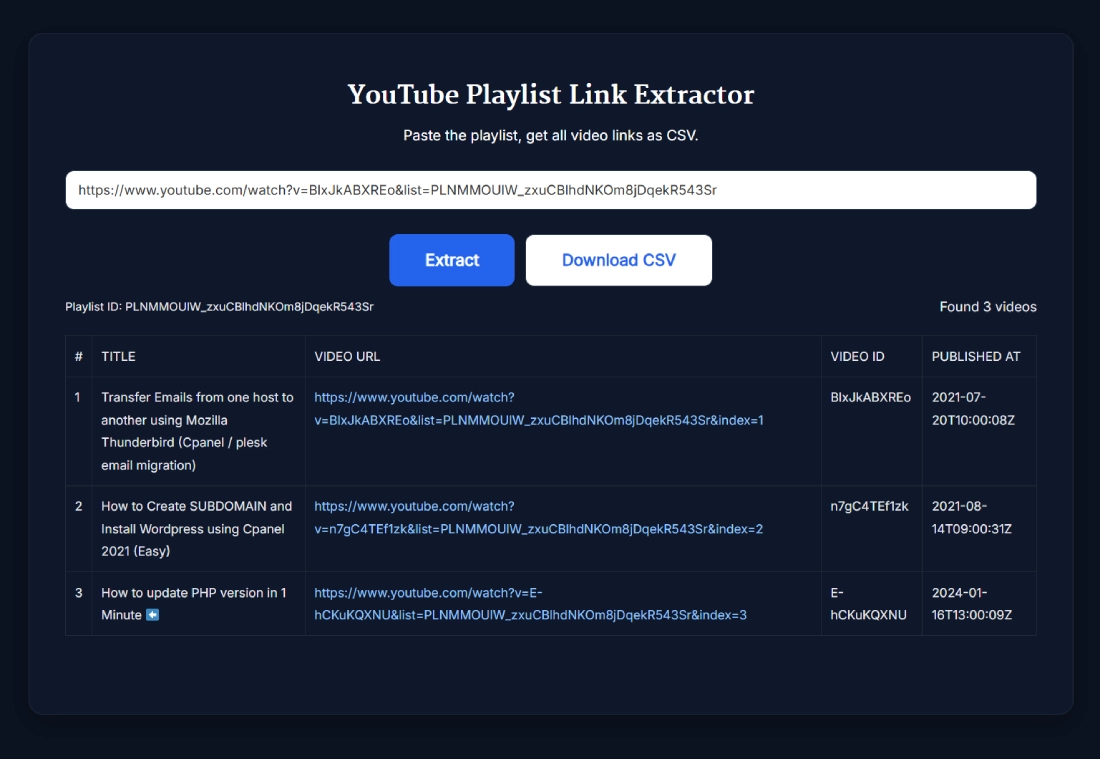
- Review the links: Each result includes the video title, video URL, video ID, and Published At timestamp.
- Export if needed: Use the Download CSV button after a successful extraction when you want to work with the results outside the page.
You do not need to sign in to a YouTube account for supported publicly accessible playlists.
What Does the YouTube Playlist Extractor Show?
After a successful extraction, the tool organizes the returned playlist items into a table. The current results include:
- Video number: The video's position in the displayed results.
- Title: The available title associated with the video.
- Video URL: A clickable YouTube link for the individual video.
- Video ID: The video's unique YouTube identifier.
- Published At: The publication timestamp returned and displayed by the tool.
- Playlist ID: The playlist identifier being processed.
- Found videos: The number of video items returned by the extraction.
The Download CSV control becomes available after the tool successfully returns playlist results.
Playlist URL vs Video URL vs Playlist ID
These three values are related, but they serve different purposes.
- Playlist URL: Opens the playlist as a collection of videos.
- Video URL: Opens an individual video contained in the playlist.
- Playlist ID: Identifies the playlist itself and normally appears as the value associated with the playlist's list parameter.
The YouTube Playlist URL Extractor workflow starts with the playlist URL or supported raw playlist ID and gives you the individual video URLs returned for that playlist.
This is particularly handy when your final goal is a YouTube playlist to URL list rather than a link that opens the whole playlist.
Playlist Links vs Channel Video Links
A playlist and a YouTube channel are not the same input. A playlist contains a particular collection of videos, while a channel can publish videos across multiple playlists or leave videos outside playlists entirely.
Use the YouTube Playlist Link Extractor when you already have a playlist URL or playlist ID. If you want video links from a channel instead, use the YouTube Channel Video Links Extractor.
Keeping these searches separate also gives you more predictable results. Extracting one playlist should not be treated as the same thing as collecting every available video from its creator's channel.
Why Extract YouTube Playlist Video Links?
Turning a playlist into individual links can save a lot of repetitive copying, particularly when you need the URLs as data rather than simply want to watch the playlist.
- Playlist audits: Review the available videos in a playlist from an organized table.
- Research: Build a working collection of video URLs around a subject or project.
- Educational resources: Organize links from tutorials, lectures, lessons, or course playlists.
- Competitor research: Review how videos have been grouped into a particular public playlist.
- Resource pages: Collect individual URLs before deciding which videos belong in an article or resource collection.
- Spreadsheet workflows: Move the returned playlist information into a CSV-based workflow when needed.
Extraction gives you the links and available playlist information. It does not download the actual YouTube video files.
YouTube Playlist Links vs CSV Export
The main purpose of this page is extracting individual video links. CSV is an additional way to work with those results.
If your primary goal is specifically turning playlist data into a CSV workflow, you can also use the dedicated Export YouTube Playlist to CSV tool.
This distinction matters for search intent. Someone looking for individual playlist links usually wants a clean URL list, while someone searching for playlist export may care more about working with the returned data in a spreadsheet.
Public, Private and Unavailable Playlist Items
The tool is designed around publicly accessible playlist information. It does not provide a YouTube account sign-in flow for accessing private account-restricted playlists.
Individual playlist items can also become unavailable, private, deleted, or restricted. When complete public information is not available for an item, the extractor may not be able to return the same details it can show for a normal accessible video.
The current interface does not state a fixed maximum number of playlist videos, so it is better not to assume unlimited extraction. For larger playlists, check the number of videos reported by the tool and review the returned results before relying on the list.
Frequently Asked Questions
How do I extract all video links from a YouTube playlist?
Paste a supported public playlist URL into the YouTube Playlist Link Extractor and click Extract. The tool returns the available playlist videos as individual YouTube URLs along with supporting video information.
Can I paste a raw YouTube playlist ID instead of a URL?
Yes. The tool accepts supported raw playlist IDs as well as YouTube playlist URLs. Enter the playlist ID in the same input field and click Extract.
What information does the playlist extractor show?
The results show the available video title, individual video URL, video ID, and Published At timestamp. The tool also displays the playlist ID and the number of videos found.
Can I download the extracted playlist links as CSV?
The results interface includes a Download CSV button that becomes available after a successful playlist extraction.
Do I need a YouTube account to use the extractor?
No. A YouTube account sign-in is not required when using the tool with supported publicly accessible playlists.
Can the tool extract private YouTube playlists?
The tool is designed for publicly accessible playlists and does not provide a YouTube sign-in flow for private account-restricted playlists.
What is the difference between a playlist URL and a video URL?
A playlist URL opens a collection of videos, while an individual video URL points to one particular video. The extractor turns the supported playlist into separate video URLs.
Can I extract links from an entire YouTube channel with this tool?
This tool is designed for playlist URLs and playlist IDs. A channel-wide video extraction is a different task because a channel can contain videos outside the playlist you are processing.
Does the YouTube Playlist Link Extractor download videos?
No. It extracts available YouTube video URLs and related information from the playlist. It does not download the actual video files.
Why might a playlist item be missing or unavailable?
Deleted, private, restricted, or otherwise unavailable items may not expose the same public information as normal accessible videos, so the extractor may not be able to return complete details.