
YouTube Profile Picture Downloader
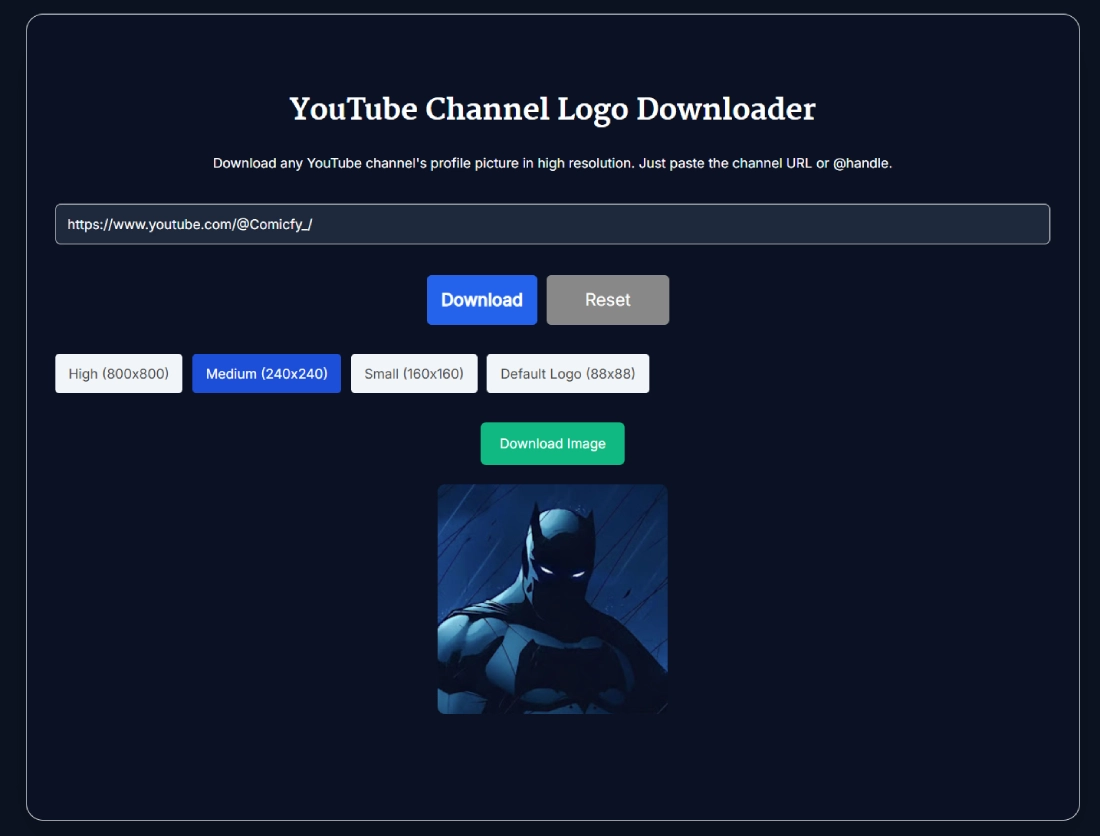
Paste a supported YouTube channel or video URL to preview its profile picture in 800, 240, 160, or 88 px and download the size you need.
Fetching logo
This tool just saved you time!
This tool is completely free — a small coffee helps keep it running for everyone 🙏
No subscriptions. No paywalls. Just coffee if you feel like it.
The YouTube Profile Picture Downloader retrieves the public profile image associated with a YouTube channel and lets you save it in four square sizes: 800×800, 240×240, 160×160, or 88×88. Paste a supported channel or video URL, select Download, preview the image, choose a size, and select Download Image. No login or user-supplied API key is required.
The same image is often called a YouTube PFP, avatar, channel icon, profile photo, or channel logo. This tool downloads that existing image. It does not create a new logo, remove its background, edit it, or upscale it beyond 800×800.
What the YouTube Profile Picture Downloader Provides
The tool processes one YouTube URL and displays one channel profile-picture preview at a time. After the image loads, the four size buttons let you switch between the available square versions before downloading.
- URL input: Accepts supported YouTube channel and video links.
- Profile-picture preview: Shows the channel image before you save it.
- Four size options: Provides 800×800, 240×240, 160×160, and 88×88 images.
- Download Image: Downloads the currently selected size.
- Reset: Clears the input and removes the previous result.
- Input validation: Displays an error for empty, invalid, or unsupported URLs.
There is no batch mode, file-format selector, image editor, or Copy URL control. Each channel and image size must be handled individually.
How to Use the YouTube Profile Picture Downloader
- Copy a supported URL: Use a full YouTube channel-ID URL, a standard video URL, or a youtu.be link.
- Paste the URL: Add the link to the input field above.
- Select Download: The tool identifies the associated channel and retrieves its public profile image.
- Confirm the preview: Check that the result belongs to the intended channel.
- Choose an image size: Select High, Medium, Small, or Default Logo.
- Save the image: Select Download Image to download the chosen version.
- Check another channel: Select Reset before entering the next URL.
Supported YouTube URL Formats
Live testing confirmed that the downloader works with the following URL formats:
- Channel-ID URL: youtube.com/channel/UC...
- Standard video URL: youtube.com/watch?v=VIDEO_ID
- Shortened video URL: youtu.be/VIDEO_ID
A video URL returns the profile picture of the channel that published that video. This can be useful when you have a video link but do not know the channel's full URL.
Handle URLs and Other Inputs That May Fail
Bare handles and handle-based channel URLs did not work reliably during testing. Inputs such as @ChannelName and youtube.com/@ChannelName returned Unable to fetch logo. Try again.
Legacy /user/ URLs and YouTube embed URLs also failed during testing. A raw channel ID without the complete YouTube URL produced a validation error.
If a handle URL fails, try a video published by that channel. You can also use the YouTube Channel ID Finder to locate its permanent UC-style channel ID, then use the full youtube.com/channel/UC... URL.
Understanding the Four Profile-Picture Sizes
- High: 800×800 pixels.
- Medium: 240×240 pixels.
- Small: 160×160 pixels.
- Default Logo: 88×88 pixels.
Google's YouTube Data API documentation identifies 800×800, 240×240, and 88×88 as the high, medium, and default channel-thumbnail sizes. The 160×160 option is an additional size provided by the SanishTech tool.
These options do not represent four separate images uploaded by the channel owner. They are differently sized versions of the channel's public profile image. The YouTube Profile Picture Downloader does not recover the original source file used during upload.
Which Image Size Should You Choose?
- 800×800: Choose this when you need the largest available version for an authorised design, archive, or presentation.
- 240×240: Suitable for smaller reports, profile cards, or reference documents.
- 160×160: Useful when a compact square image is sufficient.
- 88×88: Best for lightweight layouts where the image will remain small.
Start with 800×800 when you are uncertain. A larger image can be reduced later, while enlarging an 88×88 image usually makes it look soft or pixelated.
Downloaded Size and YouTube Display Size Are Different
The downloaded image is square, but YouTube may crop and scale it when displaying it across channel pages, videos, comments, and other public actions.
YouTube's channel-branding guidance says that a profile picture renders at 98×98 pixels in the channel interface. This is why a detailed 800×800 image can still appear as a small circle on YouTube.
If you also need the wide artwork shown at the top of the channel, use the YouTube Channel Banner Downloader. A profile picture and a channel banner are separate images with different shapes and purposes.
Troubleshooting Profile-Picture Downloads
Please enter a valid YouTube channel URL
This appears when the field is empty, contains unrelated text, or contains a raw channel ID without a complete YouTube URL. Paste the full link, including the YouTube domain.
Unable to fetch logo. Try again.
The URL structure may not be supported, the channel may be unavailable, or its public image may not have been retrieved. Try a standard video URL or a full /channel/UC... URL.
The previous logo is still visible
An unsuccessful submission can leave an earlier successful preview on the screen. Treat the accompanying error as the current result. Select Reset before trying the next URL so you do not download the previous channel's image by mistake.
A new channel has no usable image
Google's channel documentation notes that thumbnail images may be empty for newly created channels and can take up to one day to populate. Trying again later may help when the channel was created or updated recently.
Using Downloaded Channel Logos Responsibly
Downloading a public profile picture does not transfer copyright, trademark, or other usage rights. Your own channel image can be useful for backups and authorised design work. When the image belongs to another channel, confirm that your intended use is permitted.
YouTube's Terms of Service classify photos, graphics, trade names, trademarks, and logos as content. The terms explain that independent use can require permission from YouTube and, where applicable, the relevant rights holder.
Current Tool Limitations
- The tool processes one URL and one selected image at a time.
- There is no bulk channel-list or ZIP download option.
- It does not provide a Copy Image URL button.
- Bare handles and handle-based channel URLs did not work reliably in testing.
- Legacy user URLs and embed URLs failed during testing.
- A raw channel ID must be placed inside a complete YouTube channel URL.
- An invalid submission can leave the previous successful result visible.
- The largest available option is 800×800 pixels.
- The tool does not edit, recreate, or upscale profile pictures.
- Downloading an image does not provide permission to reuse it.
FAQ
How do I download a YouTube profile picture with this tool?
Paste a supported YouTube channel or video URL, select Download, choose 800×800, 240×240, 160×160, or 88×88, then select Download Image. The current tool processes one URL at a time.
Which YouTube URLs work with the downloader?
Live testing confirmed a full youtube.com/channel/UC... URL, a standard youtube.com/watch?v=... URL, and a youtu.be short link. Handle-based, legacy /user/, and embed URLs failed during testing.
Does the tool work with @handles?
Not reliably at present. A bare @handle and full youtube.com/@handle URLs returned Unable to fetch logo during live testing. Use a supported video URL or a full /channel/UC... URL instead.
What image sizes can I download?
The tool provides 800×800, 240×240, 160×160, and 88×88 options. Each size is shown as a square preview and can be downloaded separately.
Can I download several channel logos at once?
No. The current YouTube profile picture downloader handles one URL and one selected image at a time. Use Reset before checking another channel.
Do I need a YouTube account or API key?
No. The page does not ask you to sign in or supply an API key. You only need a supported public YouTube URL.
Is a YouTube channel logo the same as a profile picture or PFP?
Usually, yes. Channel logo, profile picture, PFP, avatar, and channel icon are common names for the square image associated with a YouTube channel. YouTube's official help documentation calls it a profile picture.
What is the highest profile picture size available here?
The largest option in this tool is 800×800 pixels. Google's YouTube Data API documentation identifies 800×800 as the high-resolution channel thumbnail size.
Why does YouTube display the profile picture as a small circle?
The downloaded file is square, but YouTube crops and scales it for different placements. YouTube's branding guidance says the profile picture renders at 98×98 pixels in the channel interface, so small text and edge details may be hard to see.
Can I reuse another channel's logo commercially?
Downloading a public image does not grant permission to reuse it. YouTube's Terms classify logos and other branding as content, and independent use may require permission from YouTube and the relevant rights holder. Check the intended use and applicable law.