
YouTube Views Live Count
Track YouTube video views, likes, and comments with a live counter that refreshes automatically every 5 seconds.
Fetching live data
This tool just saved you time!
This tool is completely free — a small coffee helps keep it running for everyone 🙏
No subscriptions. No paywalls. Just coffee if you feel like it.
The YouTube Views Live Count is a free online YouTube view counter that tracks the publicly available views, likes, and comments for a video. Paste a YouTube video URL or video ID, start the counter, and the tool automatically checks for updated statistics every 5 seconds without requiring you to refresh the page.
It is useful for monitoring a new upload, Shorts performance, a growing video, or a promotional campaign. For channel-level tracking, you can also use the YouTube Subscriber Live Count.
What Is YouTube Views Live Count?
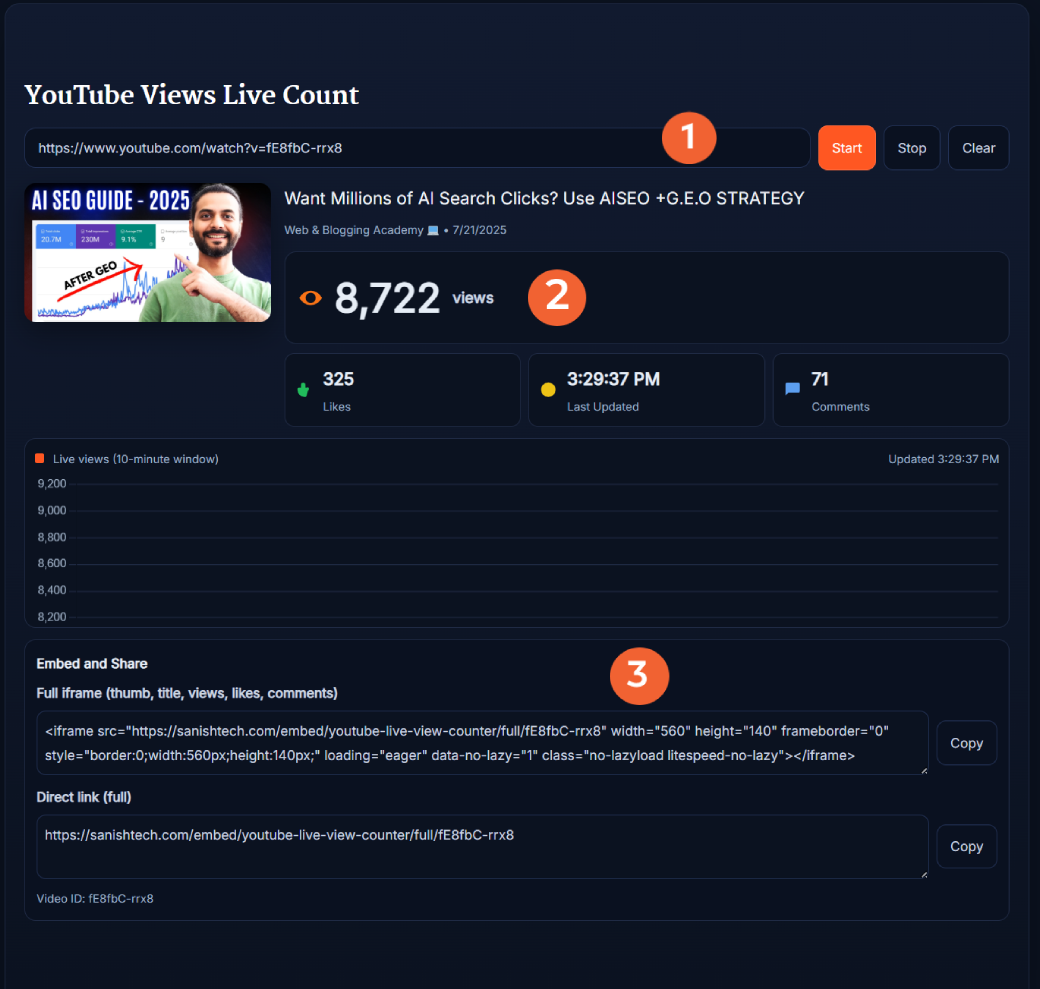
YouTube Views Live Count is a browser-based tool for repeatedly checking a video's public view count and engagement statistics. It displays the video's current views, likes, comments, title, channel information, thumbnail, and last-updated time in one place.
The important distinction is that this is a live-refreshing public view counter. The tool requests fresh statistics every 5 seconds, but YouTube controls when its underlying public numbers change. Therefore, the displayed number may stay the same across several refreshes before YouTube reports a new total.
This is different from the private real-time analytics available to channel owners inside YouTube Studio. You do not need to connect your YouTube account or provide your own API key to use this counter.
What the Live YouTube View Counter Shows
Once a valid video is loaded, the tool gives you a quick snapshot of its publicly available performance data:
- Video views: The current public view count reported for the video.
- Likes: The video's publicly available like count when that statistic is available.
- Comments: The current public comment count when available.
- Video title: Helps confirm that you are monitoring the correct video.
- Channel information: Shows which YouTube channel published the video.
- Video thumbnail: Displays the video's thumbnail for quick identification.
- Last updated time: Shows when the tool most recently checked the statistics.
- View history graph: Helps you see changes detected while the counter is running.
If you want to compare the view count with a channel's typical performance, run the numbers through the YouTube Average Views Calculator.
How to Use the YouTube Views Live Count
You can start tracking a video in a few simple steps:
- Copy the YouTube video URL: Open the video you want to monitor and copy its link.
- Paste the URL: Add it to the input field at the top of this page. You can also enter a valid 11-character YouTube video ID.
- Click Start: The tool fetches the video's public statistics and begins monitoring them.
- Watch the counter: Views, likes, comments, and the update time appear in the results area.
- Leave it running: The tool checks for refreshed statistics approximately every 5 seconds.
- Click Stop when needed: This pauses automatic checking without clearing your current result.
- Use Clear to start over: Remove the existing result and enter another video.
What YouTube URLs Does the Counter Support?
The counter can identify a video from common YouTube URL formats, including standard watch URLs, shortened youtu.be links, Shorts URLs, embed URLs, and a valid 11-character video ID.
- Standard video: youtube.com/watch?v=VIDEO_ID
- Short link: youtu.be/VIDEO_ID
- YouTube Shorts: youtube.com/shorts/VIDEO_ID
- Embed URL: youtube.com/embed/VIDEO_ID
- Video ID: Enter the 11-character ID directly.
How Often Does the YouTube View Count Update?
The SanishTech counter requests updated statistics approximately every 5 seconds while tracking is active. That does not mean YouTube itself changes a video's public view count every 5 seconds.
If YouTube reports the same view total during several checks, the counter will correctly continue showing that number. When YouTube's public statistic changes, the updated value can appear on the next successful refresh.
This distinction matters when monitoring rapidly growing or viral videos. Treat the tool as a frequently refreshed view counter rather than a replacement for the channel owner's private YouTube Analytics.
YouTube Shorts Live View Count
You can also use the counter with public YouTube Shorts. Paste a Shorts URL just as you would a regular video URL and start tracking.
There is one important detail when interpreting Shorts data. Starting March 31, 2025, YouTube changed how Shorts views are counted. According to the YouTube Data API documentation, a Shorts view count includes each time a Short starts to play or replay, with no minimum watch-time requirement. This means Shorts view counts should not be interpreted exactly the same way as older Shorts metrics.
When Is a Live YouTube View Counter Useful?
A frequently refreshing counter is most useful when the current direction of a video's performance matters more than a long-term analytics report.
- New video launches: Monitor how the public view count develops after publishing.
- YouTube Shorts: Watch for changes while a Short is receiving new exposure.
- Marketing campaigns: Monitor a video while it is being promoted through social media, email, or advertising.
- Competitor research: Observe public growth on videos in your niche without accessing private analytics.
- Milestone tracking: Keep the counter open when a video is approaching a major view milestone.
- Content experiments: Observe public performance after changes to a title or thumbnail, while remembering that the counter alone cannot prove what caused a change.
For optimization research, use the counter alongside the YouTube Video SEO Checker to review the video's SEO elements, or use the YouTube Thumbnail Downloader when comparing thumbnail strategies.
Why Is My YouTube View Count Not Changing?
Seeing the same number after several refreshes does not necessarily mean the counter has stopped working. The counter can request statistics every 5 seconds, but the result can only change when updated public data is available.
A stable count may simply mean the video has not received additional validated views or the publicly reported statistic has not changed yet. YouTube also controls how views are counted and reported, so a third-party counter cannot force the number to update faster.
Live View Count vs YouTube Studio
These two options serve different purposes. SanishTech is designed for quick monitoring of publicly available video statistics without signing in. YouTube Studio is designed for channel owners and contains private analytics that a public counter cannot access.
- SanishTech Live View Count: Public views, likes, comments, video details, automatic refreshing, and a monitoring graph.
- YouTube Studio: Private creator analytics such as watch time, audience retention, traffic sources, revenue data, and other channel-owner metrics.
Use this tool when you need a convenient public YouTube view counter. Use YouTube Studio when you own the channel and need detailed performance analysis.
Tips for Monitoring YouTube Views
- Keep the counter running during important periods: This makes the graph more useful for seeing changes during your monitoring session.
- Look beyond views: Likes and comments add context to the raw view total.
- Compare similar videos: A view count is more meaningful when compared with videos from the same channel or niche.
- Do not assume causation: A spike after changing a title, thumbnail, or promotion does not automatically prove that action caused the increase.
- Analyze comments separately: If you need the actual public comments rather than the comment total, use the YouTube Comment Downloader.
Frequently Asked Questions
What is YouTube Views Live Count?
YouTube Views Live Count is a free online tool that repeatedly checks a video's publicly available views, likes, and comments. It displays the latest statistics and automatically checks for updates approximately every 5 seconds while the counter is running.
How often does the YouTube live view counter refresh?
The counter requests updated statistics approximately every 5 seconds while tracking is active. YouTube controls when its underlying public statistics change, so the displayed view count may remain the same across multiple refreshes.
Is this the same as YouTube Studio real-time analytics?
No. This tool monitors publicly available video statistics and does not access private YouTube Studio analytics. YouTube Studio provides channel owners with additional metrics such as watch time, audience retention, traffic sources, and revenue data.
Does YouTube Views Live Count work for Shorts?
Yes. You can paste a valid YouTube Shorts URL and monitor its publicly available views, likes, and comments. YouTube changed how Shorts views are counted on March 31, 2025, so current Shorts view totals include starts and replays with no minimum watch-time requirement.
What YouTube links can I use?
You can use a standard YouTube watch URL, a youtu.be shortened URL, a YouTube Shorts URL, an embed URL, or a valid 11-character YouTube video ID.
Why is the view count not changing every 5 seconds?
The tool can refresh every 5 seconds, but YouTube's public statistics do not necessarily change at the same interval. If YouTube reports the same total during successive checks, the counter will continue displaying that number until updated public data becomes available.
Does the counter show likes and comments?
Yes, when those statistics are publicly available for the video. The tool displays likes and comments alongside the view count so you can monitor several public engagement signals in one place.
Can I use YouTube Views Live Count for livestreams?
It can monitor public playback statistics available for a YouTube video, including a processed livestream video. It does not provide the private concurrent-viewer analytics available to a channel owner inside YouTube Studio.
Does checking a video with this tool affect its views?
No. Checking a video's statistics does not add views, likes, comments, or watch time. The tool reads available statistics and does not interact with the video as a viewer.
Is YouTube Views Live Count free?
Yes. The tool is free to use and does not require you to sign in to a YouTube account or provide your own YouTube API key.