
YouTube Region Restriction Checker
Check where a YouTube video is available or blocked by country using its region restriction data.
Checking region restrictions
Allowed Countries
Blocked Countries
This tool just saved you time!
This tool is completely free — a small coffee helps keep it running for everyone 🙏
No subscriptions. No paywalls. Just coffee if you feel like it.
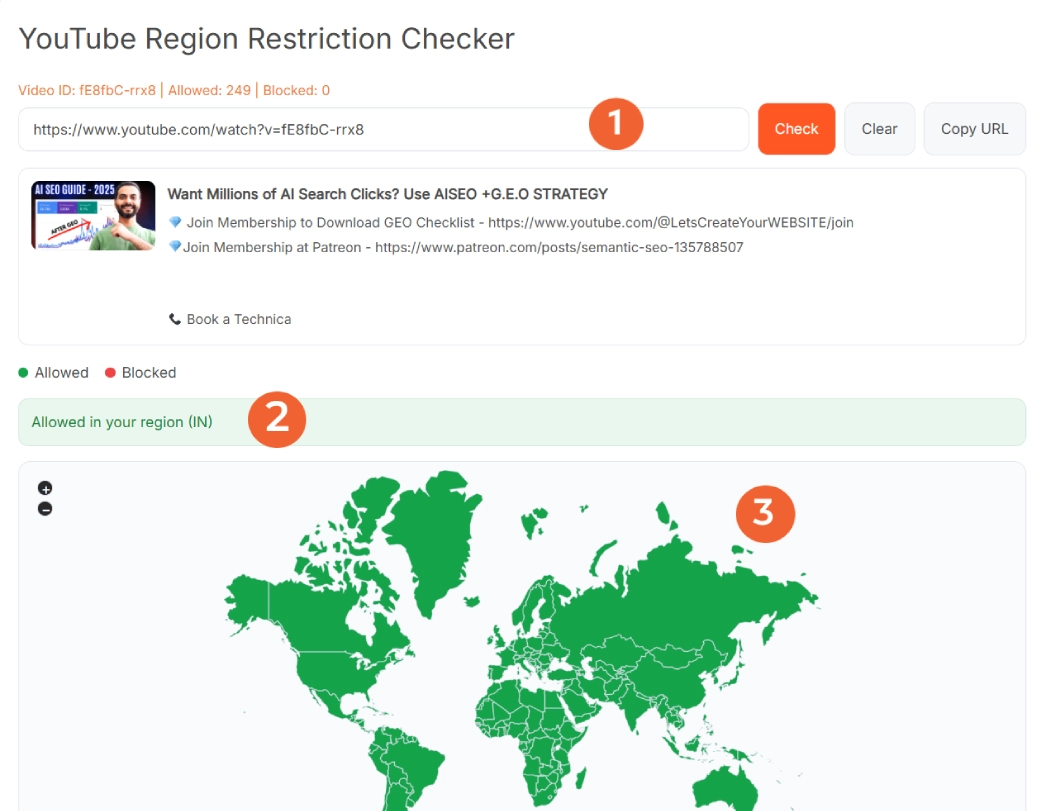
The YouTube Region Restriction Checker shows where a YouTube video is available and where it is blocked. Paste a YouTube video URL or video ID, click Check, and the tool displays the video's region availability on a color-coded world map with separate allowed and blocked country lists.
It's useful when you need to answer a simple question: Can people in a specific country watch this YouTube video? Creators can check international availability, marketers can verify campaign videos, and viewers can investigate whether geographic restrictions may explain why a video is unavailable.
What Is a YouTube Region Restriction?
A YouTube region restriction controls the countries or regions where a particular video can or cannot be viewed. A video might be available worldwide, limited to selected countries, or blocked in specific locations.
YouTube's video data can contain an allowed list or a blocked list. When an allowed list is provided, the listed countries can access the video and countries outside that list are restricted. When a blocked list is provided, the listed countries are restricted while other countries are allowed.
This distinction matters because a video doesn't need a huge blocked-country list to be geographically limited. Sometimes YouTube specifies only the countries where the video is allowed.
What the YouTube Region Restriction Checker Shows
The tool turns YouTube's region availability information into an easier visual report. After checking a video, you can see:
- Allowed countries: Countries where the video is shown as available based on its region restriction data.
- Blocked countries: Countries identified as restricted for that video.
- World map: Green highlights allowed locations, red highlights blocked locations, and neutral areas represent unknown or unclassified locations where applicable.
- Country counts: See how many locations fall into the allowed and blocked groups.
- Your region status: The result can indicate whether the video is allowed or blocked in your detected region.
- Video details: The result can also display identifying information such as the video's title, description, and thumbnail.
- Country search: Search the results instead of scrolling through a long list.
- Copy option: Copy an allowed or blocked country list for reports, research, or sharing.
If you also need broader metadata about the same video, the YouTube Data Viewer can help you inspect additional video information.
How to Use the YouTube Region Restriction Checker
Checking a video's country availability takes only a few steps:
- Copy the YouTube URL: Open the video you want to check and copy its link.
- Paste it into the tool: Standard YouTube URLs, youtu.be links, Shorts URLs, embed URLs, and valid 11-character video IDs are supported.
- Click Check: The tool requests the video's available region restriction information.
- Review the world map: Use the colors to quickly identify allowed and blocked locations.
- Check the country lists: The allowed and blocked sections provide a more precise country-by-country view.
- Search for a country: Type a country name into the relevant search field when you need one specific location.
- Copy your results: Use the Copy button when you need to save or share a country list.
You don't need to use only a full YouTube watch URL. The current tool also understands shortened links, Shorts links, embed links, and raw video IDs. If you want a clean shareable URL afterward, use the YouTube URL Cleaner.
How to Read Allowed and Blocked YouTube Regions
The results are easiest to understand once you know how YouTube represents region restrictions.
- Allowed list: If YouTube provides an allowed-country list, countries on that list are permitted and locations outside it are treated as blocked.
- Blocked list: If YouTube provides a blocked-country list, those locations are restricted and countries outside the list are treated as allowed.
- Worldwide availability: If no geographic restriction applies, the tool can show the video as broadly available across its supported country and region set.
- Worldwide blocking: A restriction policy can also indicate that the video is unavailable across the country and region set used by the checker.
This is more reliable than assuming a video is globally available simply because it works from your current location.
Why Are Some YouTube Videos Blocked by Country?
Region restrictions can appear for several reasons. YouTube states that video owners may limit availability to particular countries or regions, commonly because of licensing rights. YouTube may also restrict content in specific locations to comply with local laws.
Copyright policies can be geographic too. For example, rights to music, sports footage, television programs, or movies may differ between countries. A video that plays normally in one location can therefore be unavailable somewhere else.
The checker tells you where a region restriction applies. It cannot tell you the exact contractual, copyright, or legal reason behind every restriction unless YouTube separately provides that information.
Who Should Use a YouTube Country Availability Checker?
- YouTube creators: Check whether an uploaded video is geographically limited before sharing it with an international audience.
- Digital marketers: Verify that a campaign video is available in the countries being targeted.
- Brands: Check regional availability before sending a YouTube link to customers or partners in different markets.
- Educators: Verify whether students in different countries are likely to have access to a YouTube resource.
- Researchers: Compare the geographic availability of videos without manually testing each location.
- Viewers: Check whether a geographic restriction may explain why someone in another country cannot access a video.
Example: Checking Whether a YouTube Video Is Available in India
Suppose you want to share a YouTube tutorial with viewers in India, the United States, Germany, and Japan. Instead of asking someone in each country to open the link, paste the video into the region checker.
If India appears in the allowed list and is colored green on the map, the video's region restriction data does not identify India as blocked. If India appears in the blocked list and is colored red, the video has a geographic restriction for that location.
You can repeat the same check for any country listed in the results. If you're monitoring a newly published video at the same time, the YouTube Views Live Count can help you follow its publicly reported views and engagement.
Does an Allowed Country Guarantee the Video Will Play?
Not necessarily. This checker focuses specifically on geographic availability data. A video can still be unavailable for another reason, such as being private, removed, or otherwise inaccessible.
Think of the result as a region restriction check, not a complete simulation of every viewer's YouTube experience. A green country means the region data does not indicate that location as blocked under the video's reported restriction policy.
Tips for Checking YouTube Video Availability
- Check the exact video: Region restrictions apply to individual videos, so don't assume every upload from the same channel has identical availability.
- Recheck important campaign videos: Availability can change if rights or restriction settings change.
- Use the country lists for precision: The map is useful for a quick visual check, while the lists make individual countries easier to verify.
- Save important results: Use the Copy option when you need a record for campaign planning or research.
- Separate region issues from SEO issues: Geographic availability and discoverability are different problems. Use the YouTube Video SEO Checker when you want to review optimization instead.
Frequently Asked Questions
What is a YouTube Region Restriction Checker?
A YouTube Region Restriction Checker shows which countries or regions are allowed or blocked for a particular YouTube video. It converts the video's available region restriction data into a world map and separate country lists.
How does the YouTube Region Restriction Checker work?
The tool checks the region availability information associated with the YouTube video. It interprets allowed and blocked region data and displays the results as a color-coded map, country lists, and country counts.
Can I check if a YouTube video is available in a specific country?
Yes. Check the video and then search the allowed or blocked country lists for the country you want to verify. The map also provides a quick visual indication of the video's geographic availability.
Why is a YouTube video blocked in my country?
A video owner may restrict availability in certain countries because of licensing rights, and YouTube may also restrict content to comply with local laws. Copyright and distribution agreements can therefore make the same video available in one country but unavailable in another.
What does the allowed country list mean?
When YouTube provides an allowed-region list, the video is available in the countries on that list and blocked in countries outside it. The checker converts that information into its allowed and blocked results.
What does the blocked country list mean?
When YouTube provides a blocked-region list, the video is restricted in the countries on that list and considered available in countries outside it based on the geographic restriction data.
Can I check YouTube Shorts for region restrictions?
Yes. The tool accepts supported YouTube Shorts URLs and extracts the video ID so it can check the video's available region restriction information.
Can I check private or unlisted YouTube videos?
Private videos generally cannot be checked because their video data is not publicly accessible. An unlisted video may be checkable when its video ID and required region information are accessible, but availability can depend on what YouTube returns for that video.
Does an allowed result guarantee that the video will play?
No. The checker reports geographic restriction information. A video can still be unavailable for another reason, such as being private, removed, or otherwise inaccessible. An allowed result means the video's reported region restriction data does not identify that country as blocked.
Is the YouTube Region Restriction Checker free?
Yes. The YouTube Region Restriction Checker is free to use and does not require you to sign in to a YouTube account.