
YouTube Channel Monetization Checker
Analyze public channel data and monetization signals using a YouTube URL or @handle.
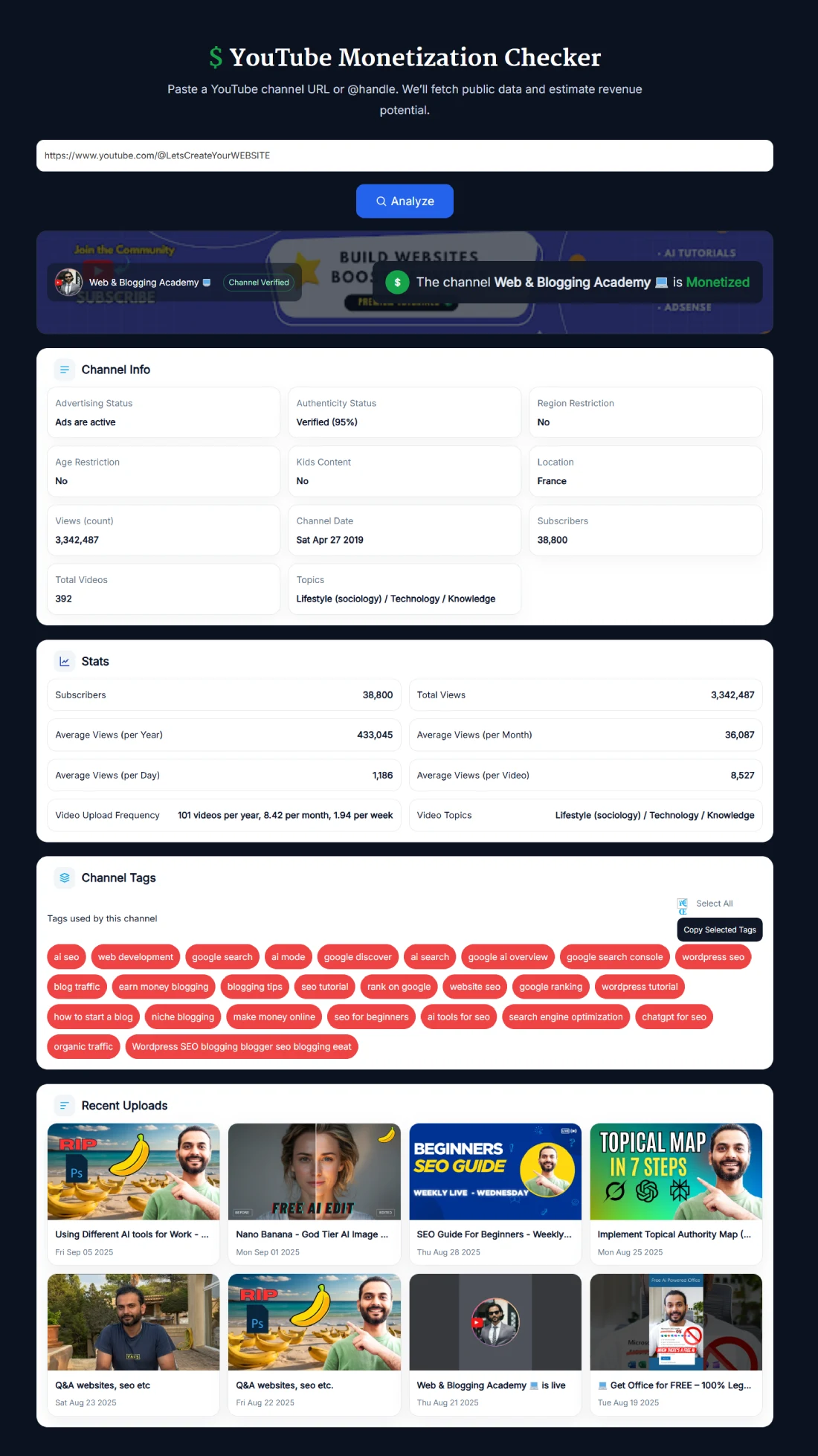
The YouTube Monetization Checker analyzes publicly available channel data to help you assess a YouTube channel's monetization signals. Enter a channel URL or @handle to review subscribers, total views, videos, topics, upload activity, tags, and other available channel information.
The checker is useful for creators, marketers, agencies, and researchers who want a quick overview of a channel without manually collecting its public statistics. For deeper video-level analysis, you can also use the YouTube Video SEO Checker.
What Does the YouTube Monetization Checker Do?
The tool analyzes available public signals and presents them in one dashboard. This can help you understand whether a channel appears to meet important monetization-related milestones and how active the channel is.
Depending on the available channel data, the results can include:
- Monetization indicator: A status based on the signals available to the checker.
- Subscriber count: The channel's publicly available subscriber information.
- Total views: Available channel-level view statistics.
- Total videos: The number of published videos reported for the channel.
- Channel age: Information based on the channel creation date.
- Topics and tags: Available information that can provide context about the channel's niche.
- Upload activity: Recent uploads that help you understand how active the channel is.
- Performance estimates: Calculated averages based on available public channel statistics.
Can You Really Check if a YouTube Channel Is Monetized?
Public channel data can provide useful monetization signals, but it cannot give the same private confirmation available to the channel owner inside YouTube Studio. YouTube does not publicly expose a simple channel-level field that confirms a creator's current YouTube Partner Program membership or private ad revenue.
For that reason, the status shown by this tool should be treated as an indicator based on available public information, not private confirmation from the creator's YouTube Studio account.
Seeing ads is also not definitive proof that a creator receives advertising revenue. YouTube states that ads may appear on videos even when the uploader has not monetized the videos themselves, including videos from channels that are not in the YouTube Partner Program. You can read YouTube's explanation about ads on non-partner videos for more information.
How to Use the YouTube Monetization Checker
- Enter a channel: Paste a supported YouTube channel URL or @handle into the checker.
- Click Analyze: The tool collects the available public channel information.
- Review the monetization indicator: Check the status shown by the tool alongside the supporting channel data.
- Check channel statistics: Review subscribers, total views, video count, channel date, topics, and other available information.
- Review activity: Look at recent uploads and other displayed metrics for additional context.
No YouTube login is required to run the public channel analysis.
How YouTube Monetization Eligibility Works
For advertising revenue sharing through the YouTube Partner Program, YouTube currently lists two main audience thresholds. A channel can qualify through long-form video watch time or eligible Shorts views.
- Long-form route: 1,000 subscribers plus 4,000 valid public watch hours during the previous 12 months.
- Shorts route: 1,000 subscribers plus 10 million valid public Shorts views during the previous 90 days.
Reaching a subscriber, watch-hour, or Shorts-view threshold does not automatically mean a channel has been approved for monetization. YouTube reviews channels against its eligibility requirements and monetization policies before approving participation in the YouTube Partner Program.
Because approval information is private to the creator, subscriber count alone should never be treated as proof that a channel is currently monetized. You can check the latest requirements on YouTube's official YouTube Partner Program eligibility page.
What the Channel Statistics Can Tell You
Monetization is only one part of the picture. Public channel statistics can help you understand the size, age, activity, and general performance of a channel.
- Subscribers: Useful for understanding audience size and whether a channel has crossed important subscriber milestones.
- Total views: Provides context about the channel's overall viewing history.
- Video count: Helps put subscriber and view numbers into perspective.
- Channel date: Shows how long the channel has existed.
- Recent uploads: Helps you see whether the channel is currently active.
- Topics and tags: Can provide additional context about the subjects the channel covers.
These signals are particularly useful for competitor research. A channel with a large subscriber count but relatively little recent activity tells a different story from a channel publishing regularly and attracting consistent views.
Public Channel Data vs YouTube Studio Data
There is an important difference between public YouTube information and private YouTube Analytics.
Public tools can analyze information that is available outside the channel owner's account. They cannot see private financial metrics such as actual ad revenue, RPM, CPM paid to the creator, or the channel owner's private YouTube Studio monetization settings.
Any averages or monetization indicators displayed by this checker should therefore be interpreted as calculated insights from available data, not as private analytics supplied by YouTube Studio.
If you own the channel, YouTube Studio remains the authoritative place to confirm your actual monetization status, eligibility progress, revenue, and account-specific restrictions.
Who Can Use This YouTube Monetization Checker?
- YouTube creators: Review your public channel statistics and compare them with other creators in your niche.
- Competitor researchers: Compare subscriber counts, views, uploads, topics, and other public signals across channels.
- Brands and agencies: Use public channel information as an initial research step when evaluating creators.
- SEO and content teams: Study channels connected with topics, competitors, or potential content partnerships.
- Viewers: Explore publicly available statistics for channels they follow.
For brands, public data should be a starting point rather than final proof of a creator's income or monetization status. If monetization is important to a commercial decision, ask the creator for appropriate first-party confirmation.
Monetization Status vs Estimated YouTube Earnings
Checking monetization signals and estimating earnings are two different tasks. A channel may appear eligible for monetization, but public statistics cannot tell you its exact advertising revenue.
Actual earnings can vary significantly depending on audience location, niche, advertiser demand, video format, views, ad availability, and other factors.
If you want to explore hypothetical earnings based on views and revenue assumptions, use the YouTube Money Calculator. Treat those figures as estimates rather than private creator revenue.
Frequently Asked Questions
What is a YouTube Monetization Checker?
A YouTube Monetization Checker analyzes publicly available channel information and monetization-related signals to help you assess a channel. It cannot access the private monetization settings or revenue data available to the channel owner in YouTube Studio.
Can I confirm whether a YouTube channel is monetized?
Public information can provide useful monetization signals, but it cannot definitively confirm a channel's private YouTube Partner Program status. Only the channel owner can see authoritative account-level monetization information inside YouTube Studio.
Does seeing ads mean a YouTube channel is monetized?
No. YouTube states that ads may appear on videos even when the uploader has not monetized them, including videos from channels that are not in the YouTube Partner Program. Ads alone are therefore not proof that a creator receives advertising revenue.
Can I check a channel using its @handle?
Yes. Enter a supported YouTube channel URL or @handle into the checker and click Analyze to retrieve the available public channel information.
Is the YouTube Monetization Checker free?
Yes. The checker is free to use and does not require you to sign in to a YouTube account to analyze public channel data.
What are the YouTube monetization requirements for ad revenue?
YouTube currently lists 1,000 subscribers plus 4,000 valid public watch hours in the previous 12 months, or 1,000 subscribers plus 10 million valid public Shorts views in the previous 90 days, as the main audience thresholds for YPP advertising revenue sharing. Channels must also satisfy YouTube's other eligibility requirements and policies.
Does reaching 1,000 subscribers mean a channel is monetized?
No. Subscriber count is only one part of YouTube Partner Program eligibility. A channel must meet the applicable requirements and successfully complete YouTube's review before monetization is approved.
Does this checker show exact YouTube earnings?
No. Exact revenue, RPM, and other private financial analytics are available to the channel owner through YouTube Studio. Public channel information cannot reveal a creator's exact earnings.
Can I use this tool for competitor research?
Yes. The tool can help you compare publicly available information such as subscribers, views, video count, channel age, topics, and recent activity across YouTube channels.
Is this checker as accurate as YouTube Studio?
No public monetization checker can replace YouTube Studio for account-level monetization information. YouTube Studio provides the channel owner with private eligibility, monetization, restriction, and revenue data that public tools cannot access.