

Quick verdict: vidIQ is worth trying if YouTube research is part of your regular publishing workflow. Its strongest features are keyword research, competitor intelligence, Outliers, content ideas, AI Coach, and the browser extension. It can save considerable research time, but it cannot predict the YouTube algorithm or guarantee more views.
| Product | vidIQ |
|---|---|
| Best for | YouTube research, topic discovery, competitor analysis, video ideas, and optimization |
| Main plans | Free, Boost, and Max |
| Free plan | Yes, with 150 monthly AI credits |
| Works on | Web app, browser extension, iOS, and Android |
| Biggest strength | Brings YouTube research, competitors, ideas, and AI assistance into one workflow |
| Main limitation | AI features consume credits quickly and recommendations still require human judgment |
| Our verdict | Start with Free. Consider Boost only when the free research limits regularly slow you down. |
Want to try vidIQ before paying?
Start with the free plan and use it on real video research before deciding whether the higher limits are worth paying for.
Try vidIQ FreeYouTube software tends to make growth sound easier than it actually is. Install an extension, find a high-scoring keyword, optimize a few fields, and supposedly the views follow.
Real YouTube growth does not work that neatly.
We have used vidIQ, and the reason we find it useful is less dramatic. It reduces research friction.
Instead of jumping between YouTube Search, competitor channels, analytics, spreadsheets, idea documents, and separate AI tools, vidIQ brings many of those tasks into one workflow.
That becomes genuinely useful when you publish consistently.
This vidIQ review examines the platform as it exists in 2026, including keyword research, Outliers, AI Coach, competitors, content ideas, AI credits, pricing, the browser extension, mobile access, Instagram features, its newer AI integrations, and how it compares with TubeBuddy.
What Is vidIQ?
vidIQ is a YouTube research, analytics, optimization, and creator-assistance platform.
It combines a web dashboard, browser extension, and mobile apps to help creators research keywords, study competing channels, identify unusually successful videos, generate ideas, improve titles and thumbnails, and ask AI-powered questions about their channel.
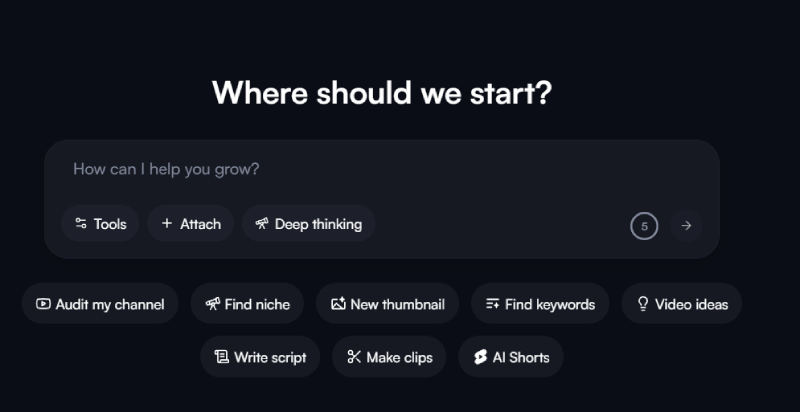
The platform has expanded considerably beyond traditional YouTube SEO. Current tools include AI Coach, thumbnails, script generation, clipping, Shorts creation, competitor analysis, Outliers, channel insights, and content-planning tools.
vidIQ has also expanded beyond YouTube in selected areas. Its current Instagram tools can analyze public Reels, identify outliers, generate ideas, and help create Reel covers.
The important distinction is that vidIQ is a decision-support tool. It cannot make viewers click a video, keep watching it, or recommend it to others.
Our Hands-On Experience With vidIQ
Our overall experience with vidIQ has been positive, particularly for research.
The platform becomes most useful when you start with a specific question.
Asking:
“What video should I make?”
is too broad.
A better workflow is to begin with a topic, investigate related searches, examine rising keywords, study unusually successful competing videos, and then decide whether you have a useful angle of your own.
vidIQ makes that investigation faster.
We would not blindly follow every keyword score, title suggestion, AI answer, or video idea. Treat the numbers as signals and the AI output as a draft. Human judgment still matters.
We are also deliberately avoiding claims such as “vidIQ increased our views by X percent.”
That would be difficult to prove because YouTube performance is influenced by many variables. The benefit we can reasonably support is simpler: vidIQ can make research, comparison, and planning easier.
vidIQ Features That Matter Most
1. YouTube Keyword Research
vidIQ’s keyword research tool helps creators explore search terms, related keywords, questions, rising keywords, estimated search volume, competition, and its proprietary keyword score.
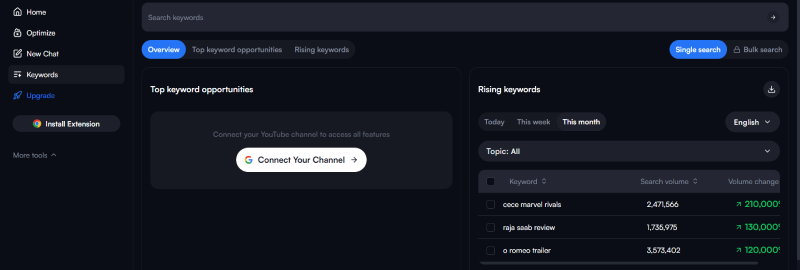
This is particularly useful for channels publishing tutorials, product reviews, educational videos, software content, and other videos that can attract search traffic.
Smaller channels can also use the related-keyword data to move away from a highly competitive broad phrase and find a more specific question.
One limitation is worth understanding: vidIQ’s search-volume numbers and keyword scores are estimates and proprietary metrics. They should help you compare opportunities, not convince you that a keyword automatically deserves a video.
YouTube itself emphasizes elements such as the title, thumbnail, description, viewer response, and the quality of the video. Tags are far less important than many old YouTube SEO tutorials suggest.
2. Outliers and Trend Research
Outliers is one of the more interesting parts of vidIQ.
Instead of simply showing videos with enormous view counts, the tool looks for videos performing unusually well relative to a channel’s normal performance.
That distinction matters.
A video receiving 100,000 views on a channel that normally receives 5,000 views may tell you more about an emerging opportunity than a million-view video from a giant channel.
vidIQ can display information such as Outlier Score, views, views per hour, engagement, subscriber count, and the channel’s average views.
Paid users also receive additional filtering options.
The goal should not be to copy an outlier. Look for the reason it may have overperformed: an unusual question, an emerging topic, a better packaging angle, or a format viewers currently respond to.
3. Video Ideas and Content Planning
vidIQ provides personalized ideas based partly on channel context and YouTube data.
This can be useful when your biggest problem is deciding what to publish next.
Quantity should not be confused with quality, though.
An idea still needs to fit your audience, expertise, channel positioning, and production ability. A creator publishing specialized software tutorials, for example, should not chase an unrelated trending topic simply because a tool says it has potential.
4. AI Coach
AI Coach is vidIQ’s built-in AI assistant for YouTube creators.
It can help with video ideas, titles, hooks, descriptions, scripts, competitor questions, channel analysis, and broader strategy questions.
The quality of the answer depends heavily on the question.
Asking:
“How do I grow my YouTube channel?”
is likely to produce broader advice.
A more useful prompt would be something like:
“Compare these three video topics for my channel and explain which one appears to have the strongest combination of audience fit and current demand.”
vidIQ itself acknowledges that AI Coach may occasionally misunderstand a request or provide information that needs review. That matches the way we recommend using it: as a research and brainstorming partner rather than an unquestionable strategist.
5. Competitor Tracking and Video Scorecards
Competitor research is another practical reason to use vidIQ.
The platform lets you follow competing channels and inspect their performance alongside your own research.
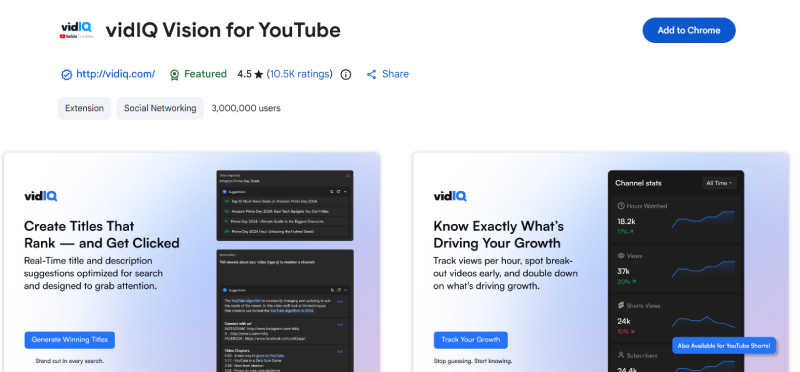
The browser extension is particularly convenient because vidIQ adds useful information directly to YouTube rather than forcing you to open a separate analytics platform every time.
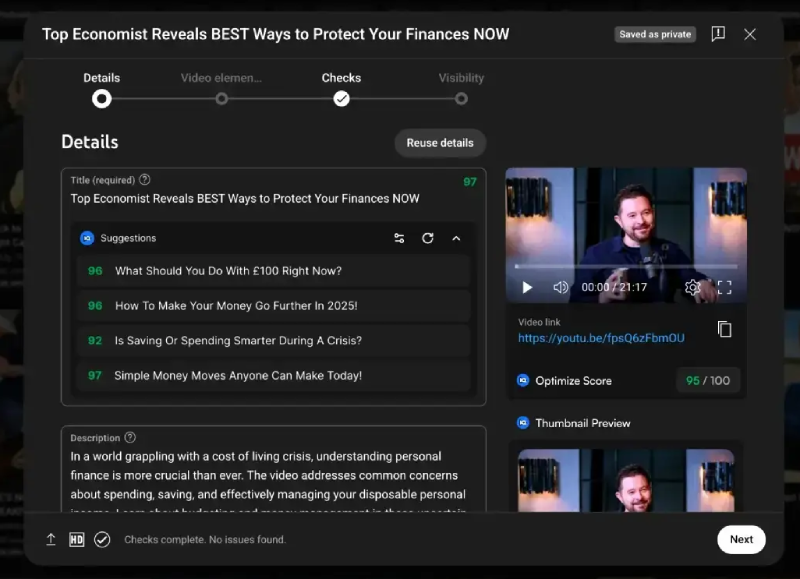
Depending on the page and feature, you may see information such as views per hour, Outlier Scores, keyword data, optimization information, and video scorecards.
6. AI Creation Tools
vidIQ now uses a shared AI-credit system for several resource-intensive features.
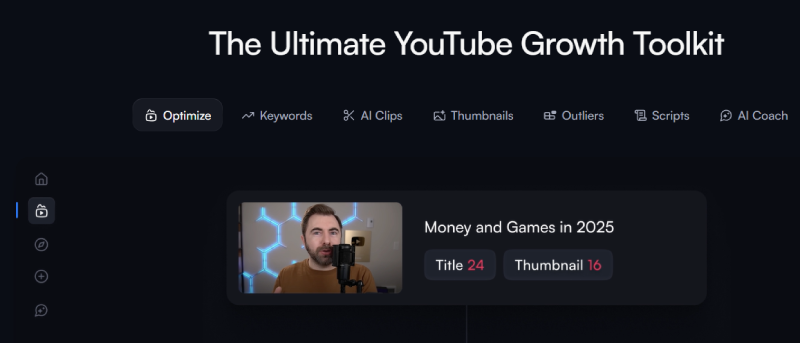
Credit-using tools currently include AI Coach, thumbnail generation, scripts, clipping, Shorts generation, title generation, descriptions, Remix, and selected comment features.
This makes the credit allowance an important part of deciding which paid plan represents good value.
Lightweight text actions use relatively few credits. Thumbnail generation, clipping, generated Shorts, and deeper AI Coach conversations can consume the balance much faster.
7. Channel Audit and Optimization
vidIQ also organizes channel and video data into optimization and audit workflows.
These are useful for identifying questions worth investigating.
Avoid treating every warning or low score as something that must automatically be fixed.
A useful audit should lead to an experiment. That might mean testing a clearer title, making a follow-up to a successful topic, improving the first 30 seconds of a weak-retention format, or reconsidering how thumbnails are packaged.
8. Mobile and Instagram Support
vidIQ is no longer primarily a desktop-only research tool.
The platform has iOS and Android apps, and several research features can be accessed from mobile.
Its newer Instagram functionality can also analyze public Reels, generate ideas, score content, identify Reel outliers, and assist with cover images.
Instagram-related AI usage draws from the same overall AI-credit system.
9. vidIQ MCP and AI Assistant Integration
One of vidIQ’s more interesting additions in 2026 is its MCP integration.
vidIQ MCP can connect supported AI assistants such as ChatGPT, Claude, Cursor, and Codex with vidIQ’s YouTube and Instagram intelligence.
That means creators can ask natural-language questions while giving the AI access to vidIQ’s current data instead of relying only on the assistant’s existing knowledge.
During vidIQ’s current launch period, MCP access is available across Free, Boost, and Max plans, although using it draws from the same monthly AI-credit allowance.
This is potentially useful for creators who already prefer working inside an AI assistant and do not want every research task to begin inside another dashboard.
Want to explore the tools yourself?
Use the free account for keyword research, ideas, AI Coach, and competitor research before deciding whether a paid plan fits your workflow.
Explore vidIQ FreeWhat We Like About vidIQ
- Research is centralized. Keywords, competitors, Outliers, ideas, and optimization tools live in one ecosystem.
- The browser extension is convenient. Research information appears while you are already browsing YouTube.
- The free plan lets you evaluate the workflow. You do not need to pay before deciding whether the platform is useful.
- Outliers provide useful context. Relative performance can reveal opportunities that raw view counts hide.
- AI Coach can use channel context. That gives it an advantage over asking a completely generic chatbot about your YouTube strategy.
- There is a useful combination of research and creation tools. The platform has moved beyond being a basic keyword extension.
- New AI integrations are promising. MCP support makes vidIQ data available inside compatible AI assistants.
Where vidIQ Could Be Better
- AI credits can disappear quickly. Heavy thumbnail, clipping, Shorts, and AI Coach usage can consume much more than simple title or description generation.
- Monthly plan credits do not roll over. Unused monthly credits reset at the end of the billing cycle.
- AI output still needs judgment. Ideas, titles, scripts, and strategic recommendations can sometimes be too generic or need refinement.
- The amount of information may overwhelm beginners. More scores and metrics do not automatically produce better videos.
- Bulk channel management is not its main strength. Creators managing a large existing video catalog may prefer TubeBuddy for some bulk operations.
- It does not provide a dedicated TubeBuddy-style A/B testing workflow. YouTube Studio now includes native testing features for eligible videos.
vidIQ Pricing in 2026
vidIQ’s main individual creator lineup currently consists of Free, Boost, and Max.
The public pricing and checkout amount can vary by region, promotion, billing cycle, platform, and number of connected channels.
The US pricing referenced during our review listed Boost at $19 per month or $199 per year and Max at $49 per month or $468 per year. Always verify the amount shown in your own checkout before subscribing because pricing can change.
| Plan | Monthly AI credits | Best for |
|---|---|---|
| Free | 150 | Testing vidIQ and occasional research |
| Boost | 2,000 for one channel | Regular creators who need deeper research and higher limits |
| Max | 6,000 for one channel | Creators making heavier use of AI Coach and generation features |
Multi-channel plans include larger monthly allowances. Boost currently provides 2,000, 2,500, or 3,000 credits for one, two, or three channels. Max provides 6,000, 8,000, or 10,000.
How vidIQ AI Credits Work
Monthly plan credits are shared across supported AI-powered features.
| AI action | Current credit cost |
|---|---|
| AI Coach Fast message | 10 credits |
| AI Coach Deep Thinking message | 25 credits |
| AI Coach Max Mode message | 35 credits |
| Thumbnail generation, regeneration, or edit | 22 credits |
| Script Writer | 1 credit per selected script minute |
| Clipping | 9 credits per input-video minute |
| Shorts Generator | 20 credits per output second |
| Title Generator | 3 credits for up to three titles |
| Description Generator | 1 credit per description |
| Remix | 3 credits per use |
Monthly plan credits refresh during the billing cycle and unused plan credits do not roll over.
vidIQ now also supports additional Top-Up Credits on eligible accounts. Purchased add-on credits are separate from normal monthly plan credits and remain in the account instead of disappearing during the normal monthly refresh.
This fixes one limitation of the older credit system, although frequent generation can still become expensive enough that a higher plan may make more sense.
Compare vidIQ plans before upgrading
Start free and check the latest Boost and Max pricing available for your region and billing cycle before purchasing.
Check Current vidIQ PlansIs the Free vidIQ Plan Enough?
For many beginners, yes.
The Free plan is enough to understand how vidIQ works and determine whether its research approach fits the way you create videos.
It currently includes 150 monthly AI credits and access to selected research, ideas, AI Coach, and creator tools with lower limits.
Keyword research on the free plan also limits the number of results shown for several keyword sections.
Stay on Free if you publish infrequently or rarely find yourself blocked by the limits.
Boost makes more sense when you research virtually every video, frequently investigate competing channels, use Outliers regularly, or repeatedly hit free-plan limitations.
Max is harder to justify for casual creators. Its larger AI allowance and higher-end features are more valuable when AI-assisted research and generation are part of your regular workflow.
Can vidIQ Actually Help You Get More Views?
Yes, indirectly, but vidIQ cannot guarantee additional views.
It can help identify a promising search term, uncover an emerging topic, find an unusually successful competing video, improve a title, compare packaging ideas, or highlight gaps in your content strategy.
Those decisions may improve a video’s opportunity.
They do not make viewers click.
You still need a worthwhile topic, compelling packaging, a strong opening, and a video that holds attention.
That is why we recommend treating vidIQ as a research assistant rather than an algorithm-hacking tool.
SanishTech users can also combine vidIQ with our free YouTube tools. For example, our YouTube Channel Comparison tool provides a quick side-by-side channel comparison, while the YouTube Shorts Trend Analyzer can support Shorts research.
What Real vidIQ Customers Say
It is worth looking beyond any affiliate review, including ours.
At the time of this September 2026 update, vidIQ had a Trustpilot score of approximately 3.9 out of 5 from more than 1,300 reviews.
Positive feedback frequently mentions useful creator tools, YouTube optimization features, education, and customer support.
Negative feedback is more mixed. Recurring complaints include AI-credit consumption, dissatisfaction with some automated recommendations, billing or subscription experiences, and frustration when AI-generated results do not fit a creator’s niche.
This mixed feedback reinforces our main recommendation: use the free account before paying.
The tool is far easier to evaluate when you apply it to your own channel, niche, and research process rather than judging it from screenshots or marketing claims.
Who Should Use vidIQ?
- You publish YouTube content consistently.
- You research topics before investing time in production.
- You create tutorials, reviews, educational videos, or other search-friendly content.
- You regularly study competing channels.
- You want to discover unusually successful videos and emerging topics.
- You struggle to turn YouTube data into the next content decision.
- You want research and AI assistance connected to your channel context.
- You would benefit from a browser extension, web app, and mobile workflow.
Who Should Skip a Paid vidIQ Plan?
- You upload only occasionally.
- You have not developed a consistent publishing habit yet.
- You primarily need analytics already provided by YouTube Studio.
- You expect AI to build your entire content strategy automatically.
- You rarely conduct keyword or competitor research.
- You mainly need bulk management for a large existing video library.
- You would not use enough paid features to justify a recurring subscription.
vidIQ vs TubeBuddy
vidIQ and TubeBuddy overlap considerably, but we would not choose them for exactly the same reason.
vidIQ currently feels stronger as a research, discovery, competitor, Outlier, and AI-assisted planning platform.
TubeBuddy remains particularly relevant for creators interested in bulk channel-management tools and its own testing workflow.
| Area | vidIQ | TubeBuddy |
|---|---|---|
| Keyword research | Strong | Strong |
| Competitor research | Major strength | Available |
| Outlier discovery | Major strength | Less central to the workflow |
| AI planning | Major strength | Available with a different workflow |
| Thumbnail tools | AI generation, editing, research, and analysis | Creation, analysis, and testing tools |
| Dedicated testing workflow | Not its primary strength | Major TubeBuddy strength |
| Bulk video management | Limited compared with TubeBuddy | Major strength |
| Best fit | Researching what to create and how to package it | Testing and managing an existing channel library |
Our recommendation is straightforward.
Choose vidIQ if your main bottleneck is deciding what to create, identifying opportunities, researching competitors, or planning content.
Consider TubeBuddy if bulk management and its testing workflow matter more to you.
vidIQ Cancellation and Refund Terms
Paid vidIQ subscriptions renew automatically unless canceled.
For subscriptions purchased directly through vidIQ, cancellation can be handled through the account’s plan-management settings.
Purchases made through Apple or Google Play need to be managed through the respective app store.
After cancellation, paid access generally continues until the end of the current billing period.
vidIQ states that it does not provide refunds or credits for unused days remaining within an existing subscription period.
Always check the renewal amount and current terms before purchasing an annual plan.
Is vidIQ Safe and Legit?
vidIQ is an established creator-software company rather than an anonymous product launch.
Connecting the platform to YouTube still requires granting account permissions, so basic security practices matter.
Use the official Google authorization process, review the permissions you grant, use strong account security, and remove third-party access if you permanently stop using the service.
Never send your Google password to a person through email, chat, or support messages.
Final Verdict: Is vidIQ Worth It in 2026?
Yes, vidIQ is worth trying for active YouTube creators, but we recommend beginning with the free plan rather than paying immediately.
The strongest reason to use vidIQ is not that it knows a secret YouTube algorithm.
It is that the platform combines several useful research tasks.
Keyword discovery, Outliers, competitor analysis, channel context, ideas, optimization tools, and AI assistance can all contribute to a better publishing decision.
That can save a regular creator considerable time.
There are trade-offs.
AI output can need substantial editing. Credits can disappear faster than expected when you use resource-heavy generation tools. Scores and recommendations can also distract inexperienced creators into optimizing numbers rather than making stronger videos.
Our recommendation is therefore simple:
Start with Free.
Use vidIQ for several real publishing decisions. Research topics, examine competitors, explore Outliers, ask AI Coach useful questions, and see whether the workflow actually improves the way you plan videos.
If you repeatedly hit the research limits and the platform saves enough time to justify the subscription, Boost is likely to be the sensible next step for most regular creators.
Max is better suited to creators making heavy use of AI tools and higher allowances.
Ready to test vidIQ on your channel?
Start free and use vidIQ for several real video decisions before spending money on a subscription.
Start Using vidIQ FreeFrequently Asked Questions
Is vidIQ worth it?
Yes, vidIQ can be worth paying for if you publish YouTube videos regularly and frequently use keyword research, competitor analysis, Outliers, content ideas, and AI tools. Occasional creators should start with the free plan.
Does vidIQ guarantee more YouTube views?
No. vidIQ can help with research, planning, titles, ideas, competitors, and optimization, but YouTube views still depend on audience demand, packaging, viewer response, retention, content quality, and execution.
Is vidIQ free?
Yes. vidIQ currently offers a Free plan with 150 monthly AI credits and limited access to several research and creator tools.
How much does vidIQ cost in 2026?
US pricing referenced during our review listed Boost at $19 per month or $199 per year and Max at $49 per month or $468 per year. Pricing can change by region, promotion, billing cycle, connected channels, and purchase platform, so verify the current checkout price before subscribing.
What happens when vidIQ AI credits run out?
Credit-powered features become unavailable when you no longer have enough credits for the requested action. Your normal monthly plan credits refresh each billing cycle. Eligible accounts can also purchase Top-Up Credits without changing subscription tiers.
Do unused vidIQ AI credits roll over?
Monthly plan credits do not roll over. Purchased top-up or other add-on credits are handled separately and can remain in the account beyond the monthly plan refresh.
Is vidIQ better than TubeBuddy?
Neither is automatically better for every creator. vidIQ is particularly strong for competitor research, Outliers, ideas, and AI-assisted content planning. TubeBuddy remains attractive for creators who prioritize bulk video management and its testing workflow.
Can vidIQ help with YouTube Shorts?
Yes. vidIQ includes Shorts-related research, scorecards, clipping, and AI-generation features. Some generation actions consume significant amounts of the monthly AI-credit allowance.
Can vidIQ work with ChatGPT?
Yes. vidIQ’s newer MCP integration can connect compatible AI assistants, including ChatGPT, to vidIQ’s YouTube and Instagram intelligence. MCP usage draws from the account’s AI-credit allowance.
Can I cancel vidIQ anytime?
You can stop automatic renewal. Paid access normally continues through the current billing period. Purchases through Apple or Google Play must be managed through the respective app store.
