
The YouTube Title Length Checker counts the characters and words in your video title, compares its length with YouTube’s 100-character maximum, and displays a simple title preview. It also provides a suggested version capped at 100 characters when your title is too long.
Enter a draft title and click Check to see its character count, word count, length status and any warnings. The tool uses 50–70 characters as a practical writing range, but this is SanishTech guidance rather than an official YouTube ranking rule.
What the YouTube Title Length Checker Measures
This checker focuses on title length and presentation. It does not assign an SEO score or predict whether a video will rank, receive views or earn clicks.
- Character count: Counts the title’s letters, numbers, spaces and punctuation.
- Word count: Shows how many words are in the entered title.
- 100-character comparison: Identifies whether the title exceeds YouTube’s documented maximum.
- Length status: Labels the title as Very short, Good, A bit long or Too long.
- Writing guidance: Displays SanishTech’s suggested 50–70 character range.
- Title preview: Places the entered title in a simple YouTube-style preview.
- Suggested Trim: Produces a version no longer than 100 characters when trimming is required.
- Additional warnings: May flag all-caps text, repeated punctuation or a very short title.
YouTube’s official video-resource documentation states that a video title can contain up to 100 characters. You can verify the platform limit in the YouTube Data API documentation.
How to Check Your YouTube Title Length
- Type or paste your proposed video title into the input box.
- Click Check.
- Review the character count and word count.
- Check whether the status says Very short, Good, A bit long or Too long.
- Look at the preview and make sure the main topic or hook appears early.
- If the title is over 100 characters, review the Suggested Trim before copying it.
- Click Reset when you want to test another title.
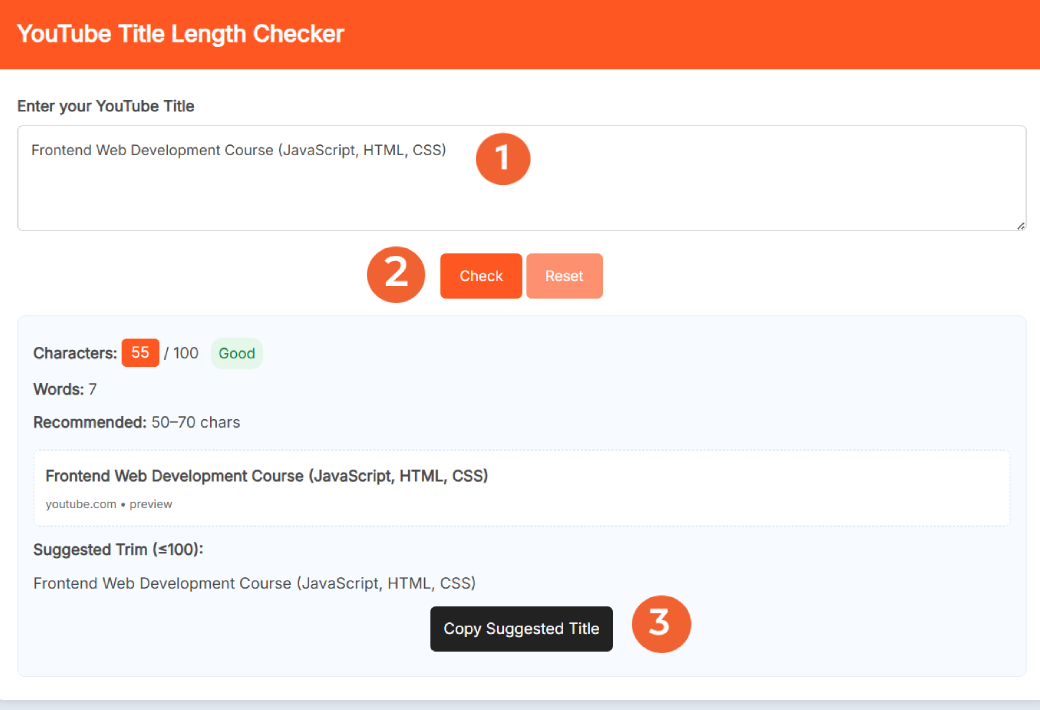
The suggested version is a length-based trim, not a complete rewrite. Read it before publishing to ensure the wording remains natural and accurately represents the video.
Understanding the Length Status
The tool uses the following thresholds when evaluating a title:
- Very short: Fewer than 20 characters
- Good: 20–70 characters
- A bit long: 71–100 characters
- Too long: More than 100 characters
The tool separately displays 50–70 characters as its recommended writing range. This range can encourage concise titles, but it should not be treated as a guarantee that the entire title will appear everywhere.
YouTube can present titles differently across search results, the home feed, suggested videos, channel pages, television apps and mobile devices. Available width, font size, thumbnail layout and screen size can all affect where a title is shortened.
YouTube Title Length Example
Example title: How to Create Stunning YouTube Thumbnails for Free Using Canva
- Characters: 62
- Words: 10
- Status: Good
- Over the YouTube limit: No
Because this title is already below 100 characters, the Suggested Trim should normally repeat the same wording.
Long example: Learn How to Create Better YouTube Videos with Simple Editing Tips, Strong Titles, Clear Thumbnails and More Views
- Characters: 114
- Words: 18
- Status: Too long
- Suggested version: Learn How to Create Better YouTube Videos with Simple Editing Tips, Strong Titles, Clear Thumbnails…
- Suggested-version length: 100 characters
The trim solves the character-limit problem, but a manually rewritten title may still sound cleaner. For example, you could remove secondary details instead of simply cutting the ending.
Is 50–70 Characters the Best YouTube Title Length?
YouTube officially documents a maximum of 100 characters, but it does not publish one universal ideal title length. The best length is the shortest version that clearly communicates the video’s topic, benefit or hook without becoming vague.
SanishTech uses 50–70 characters as a practical editing target. It leaves room for useful context while encouraging creators to put the most meaningful words near the beginning. However, a strong 42-character title can be better than a padded 65-character title.
YouTube’s own title guidance recommends being accurate, keeping titles succinct, placing important words near the beginning and saving episode numbers or branding for the end. It also advises using all caps and emojis carefully. Read the complete recommendations in YouTube’s thumbnail and title tips.
Practical Tips for Writing a Better YouTube Title
- Describe the actual video: A compelling title should still make an honest promise.
- Put the topic early: Do not hide the subject behind a long introduction.
- Remove disposable words: Phrases such as “you really need to know” often consume space without adding meaning.
- Keep branding at the end: Lead with the information viewers need when deciding whether to click.
- Use punctuation carefully: Several exclamation marks rarely make a weak title stronger.
- Review the title and thumbnail together: They should complement each other instead of repeating the same message.
- Test meaningful variations: Change the angle, benefit or wording rather than swapping one minor word.
You can place a draft beside its visual using the YouTube Thumbnail Previewer. After publishing, use actual impression and click data with the YouTube CTR Calculator instead of assuming a certain title length will perform better.
What This Checker Cannot Tell You
A title counter is useful for catching a measurable problem, but character count is only one part of video packaging.
- It cannot predict views, rankings, watch time or click-through rate.
- It does not determine whether a keyword has search demand.
- It cannot confirm how every YouTube surface will truncate a title.
- The preview is illustrative rather than an exact desktop or mobile simulation.
- The Suggested Trim does not evaluate accuracy, tone, grammar or search intent.
- A title inside the recommended range can still be unclear or misleading.
Eligible creators can also test up to three title, thumbnail or combined variations through YouTube Studio’s official A/B testing feature. YouTube evaluates those tests using watch time, which provides stronger evidence than character count alone.
Frequently Asked Questions
What does the YouTube Title Length Checker do?
It counts the characters and words in a title after you click Check. It also shows a length status, SanishTech’s 50–70 character guidance, a simple preview, a suggested title capped at 100 characters and any detected warnings.
How do I use the YouTube Title Length Checker?
Enter or paste a title, click Check and review the returned character count, word count, status, preview and warnings. If the title exceeds 100 characters, review the Suggested Trim before copying it.
What do the title-length statuses mean?
Fewer than 20 characters is Very short, 20–70 is Good, 71–100 is A bit long and more than 100 is Too long. These labels are SanishTech’s diagnostic thresholds, not official YouTube performance ratings.
What does Suggested Trim do?
Suggested Trim displays a version no longer than 100 characters. When the original title already fits, it normally repeats that title. When it is too long, the ending may be shortened and replaced with an ellipsis.
Does the preview show exactly how my title will appear on YouTube?
No. It is a simple illustrative preview. YouTube can display or truncate titles differently depending on the device, screen width and surface, including search, home, suggested videos and channel pages.
Do I need to sign in to use the checker?
No. The checker can be used in a web browser without creating an account or connecting a YouTube channel.
What is the official YouTube title character limit?
YouTube’s video-resource documentation sets the maximum title length at 100 characters. A title may still be visually shortened on some YouTube surfaces even when it is within that limit.
How long should a YouTube title be?
YouTube does not publish one universal ideal length. SanishTech uses 50–70 characters as practical writing guidance, but clarity and accuracy matter more than reaching an exact number.
Should important words appear at the beginning of a YouTube title?
Yes, when it reads naturally. YouTube advises creators to keep titles succinct and place the most important words near the beginning because viewers may see only part of a title.
Does a shorter YouTube title automatically rank higher?
No. Staying concise can improve readability, but length alone does not guarantee rankings or clicks. The title should accurately describe the video, match viewer intent and work with the thumbnail.