
YouTube URL Cleaner
Strip UTM and timestamp noise. Get a clean, canonical watch URL.
This tool just saved you time!
This tool is completely free — a small coffee helps keep it running for everyone 🙏
No subscriptions. No paywalls. Just coffee if you feel like it.
Cleaning URLs
The YouTube URL Cleaner turns cluttered YouTube video URLs into simple, consistent watch links. This YouTube link cleaner can remove extra parameters from watch links, youtu.be URLs, Shorts, embed links, live URLs and supported YouTube attribution links while keeping the video ID intact.
You can clean one URL or paste multiple links at once. By default, the tool removes duplicate results and strips extras such as timestamps and playlist information. If you actually need a timestamp or playlist ID, you can choose to preserve it before cleaning.
What Does the YouTube Link Cleaner Remove?
A YouTube video URL can contain more than the information required to identify the video. Depending on where the link came from, you may see parameters for timestamps, playlists, sharing context or other URL data.
The cleaner extracts the video ID and rebuilds the result as a standard watch URL. For example:
- Messy link: https://www.youtube.com/watch?v=dQw4w9WgXcQ&t=43s&feature=share&utm_source=test
- Clean link: https://www.youtube.com/watch?v=dQw4w9WgXcQ
The destination video ID remains the same. What changes is the URL structure surrounding it.
How to Clean a YouTube Link
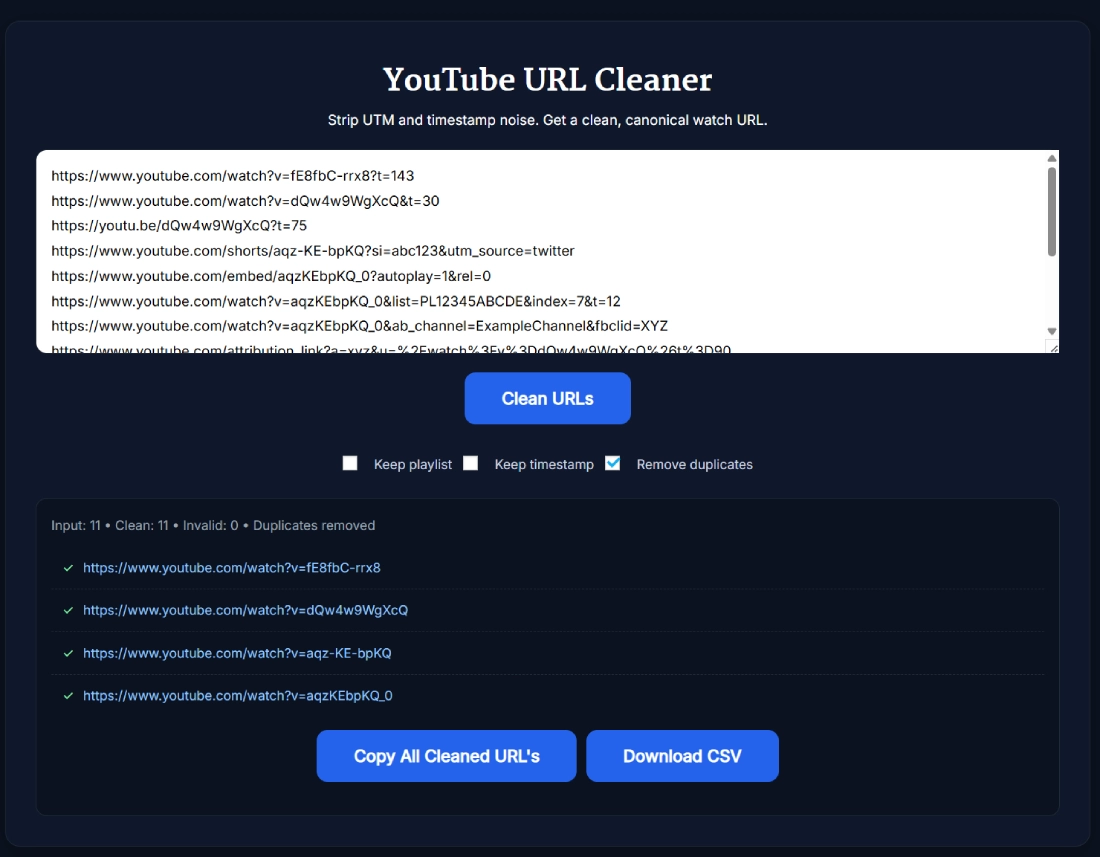
- Paste your links: Enter one YouTube URL or paste multiple URLs, one per line.
- Choose what to keep: Enable Keep playlist or Keep timestamp if those parts of the URL are important to you.
- Choose duplicate handling: Leave Remove duplicates enabled if you only want one result for each normalized video link.
- Click Clean URLs: The tool processes the input and creates standardized watch URLs.
- Review the results: Check the Input, Clean and Invalid counts before using the URLs.
- Copy or export: Use Copy All for the cleaned URLs or Download CSV for a downloadable version of the results.
Which YouTube URL Formats Are Supported?
The YouTube Link Cleaner can recognize several common video URL structures and convert them into a consistent watch URL. Supported formats verified during testing include:
- Standard watch URLs: youtube.com/watch?v=VIDEO_ID
- Short links: youtu.be/VIDEO_ID
- YouTube Shorts: youtube.com/shorts/VIDEO_ID
- Embed URLs: youtube.com/embed/VIDEO_ID
- Live URLs: youtube.com/live/VIDEO_ID
- Attribution links: Supported YouTube attribution URLs containing a video destination.
This normalization is useful when your list contains several URL formats but you want everything stored or shared in the same watch-link format.
Keep or Remove YouTube Timestamps
Timestamps such as t=43s tell YouTube to begin playback at a particular point. The cleaner removes timestamp information by default, but the Keep timestamp option lets you preserve it.
For example, when Keep timestamp is enabled, a cleaned link can retain its t parameter while unrelated parameters are removed.
If you need to create a new link that starts at a particular time rather than simply preserve an existing timestamp, use the YouTube Timestamp Link Generator.
Keep or Remove Playlist Information
Video URLs opened from playlists can include a list parameter. By default, the cleaner focuses on the individual video and removes that playlist information.
Turn on Keep playlist when you want the cleaned result to retain the playlist ID. You can also enable Keep playlist and Keep timestamp together if both pieces of information are useful.
Clean Multiple YouTube Links at Once
The tool also works as a bulk YouTube URL cleaner. Paste multiple links on separate lines and process them in one run instead of manually editing each URL.
This is useful for content inventories, research lists, spreadsheets and collections of video URLs gathered from different sources. After cleaning, you can copy the results together or use the CSV download option.
Remove Duplicate YouTube Links
The same video can appear in a list using several different URL formats. A standard watch URL, a youtu.be link and a Shorts-style URL may all contain the same video ID.
With Remove duplicates enabled, the cleaner normalizes those URLs first and removes repeated results. In testing, multiple supported URL formats containing the same video ID were reduced to one standard watch URL.
What Does It Mean to Sanitize a YouTube Link?
To sanitize a YouTube link in this context simply means removing unnecessary URL parameters while retaining the information needed to point to the video. The result is a shorter, more consistent URL that is easier to copy, save and compare with other links.
This tool can therefore be used as a YouTube link sanitizer when you want to remove extra URL data without manually editing everything after the video ID.
Sanitizing should not be confused with a security scan. The tool cleans the URL structure; it does not inspect the YouTube video's content or determine whether a video itself is safe.
Does Cleaning a YouTube URL Affect Views, SEO or Monetization?
Cleaning the URL does not give a YouTube video extra views, improve its ranking or increase monetization. The main benefits are simpler sharing, consistent URL formatting and easier management of your own link lists.
Likewise, removing extra parameters should not be presented as a way to make YouTube subscriber, revenue or engagement statistics more accurate. The cleaner changes the link format, not the underlying video's public performance metrics.
A Cleaned URL Does Not Verify the Video
The YouTube URL Cleaner works by identifying a video ID from the input and creating a standard watch URL around it. A successfully cleaned result does not guarantee that the corresponding video currently exists, is public or is available in your region.
If your main goal is to extract the ID itself rather than clean the surrounding URL, the YouTube Video ID Finder is designed specifically for that task.
Frequently Asked Questions
How does the YouTube URL Cleaner work?
The YouTube URL Cleaner identifies the video ID in a supported link and rebuilds it as a standard YouTube watch URL. Extra parameters are removed unless you choose to keep the timestamp or playlist information.
Which YouTube URL formats can I clean?
The tool supports standard YouTube watch URLs, youtu.be links, Shorts URLs, embed URLs, live URLs and supported YouTube attribution links.
Can I clean multiple YouTube links at once?
Yes. Paste multiple YouTube links on separate lines and click Clean URLs. The tool processes the links together and lets you copy the cleaned results or use the CSV download option.
Can I keep the timestamp when cleaning a YouTube URL?
Yes. Enable Keep timestamp before cleaning if you want the resulting watch URL to retain its playback start time.
Can I keep the YouTube playlist ID?
Yes. Enable Keep playlist before cleaning and the tool will preserve the available playlist ID in the resulting URL.
Does the YouTube Link Cleaner remove duplicates?
Yes. Remove duplicates is enabled by default. When multiple supported links resolve to the same normalized video URL, repeated results are removed.
Can I download the cleaned YouTube URLs?
Yes. After successful cleaning, the tool provides Copy All and Download CSV options for working with the cleaned results.
What does it mean to sanitize YouTube links?
Sanitizing a YouTube link means removing unnecessary URL parameters while keeping the video destination intact. It creates a simpler and more consistent link for sharing or storing.
Does cleaning a YouTube link improve views, SEO or monetization?
No. Cleaning a URL does not increase YouTube views, search rankings or monetization. It primarily makes the URL simpler and helps keep your own collections of links consistent.
Does a cleaned URL guarantee that the YouTube video exists?
No. The tool cleans the URL structure based on the video ID it can identify. It does not guarantee that the video currently exists, is public or is available to you.