
YouTube RSS Feed Generator
Turn a YouTube channel handle, URL, or ID into a feed URL you can copy, preview, and download.
This tool just saved you time!
This tool is completely free — a small coffee helps keep it running for everyone 🙏
No subscriptions. No paywalls. Just coffee if you feel like it.
The YouTube RSS Feed Generator creates a public feed URL for a YouTube channel. Enter an @handle, channel URL, or channel ID to view the feed address, preview its XML, copy the URL, or download the XML file.
You can add the generated YouTube RSS feed to a compatible feed reader, monitoring service, website plugin, or automation app. It provides recent public uploads in chronological feed format without requiring you to visit the channel repeatedly.
What the YouTube RSS Feed Generator Creates
This tool does not host a separate custom feed. It identifies the channel ID and retrieves the public Atom XML feed provided by YouTube. People often call this an RSS feed because most modern feed readers support both RSS and Atom URLs.
The generated address follows this structure:
https://www.youtube.com/feeds/videos.xml?channel_id=CHANNEL_ID
YouTube uses the channel ID to identify the correct creator. This is helpful because a channel’s visible @handle can change, while its underlying UC channel ID usually remains the more dependable identifier.
Supported Inputs and Available Results
The YouTube RSS Feed Generator is designed to work with these channel identifiers:
- YouTube handle: For example,
@GoogleDevelopers. - Handle URL: For example,
https://www.youtube.com/@GoogleDevelopers. - Channel URL: A YouTube address containing
/channel/UC.... - Raw channel ID: The channel’s identifier beginning with
UC.
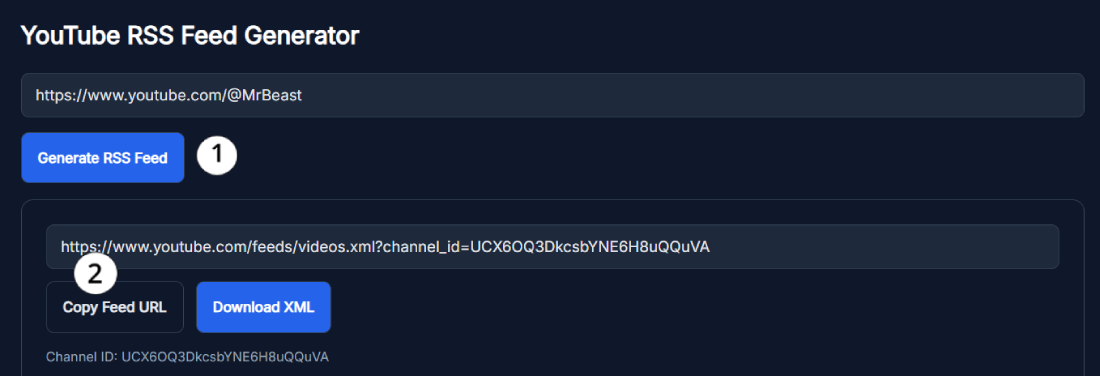
After a successful lookup, the tool displays:
- The generated YouTube channel feed URL.
- The resolved YouTube channel ID.
- A preview of the XML returned for the channel.
- A Copy Feed URL button.
- A Download XML button.
Direct video URLs are not currently a dependable input for this tool. Use the channel’s @handle, channel URL, or channel ID instead.
How to Use the YouTube RSS Feed Generator
- Copy the channel identifier: Get the channel’s @handle, full channel URL, or UC channel ID.
- Paste it into the input field: Remove any unrelated text surrounding the address.
- Select Generate RSS Feed: The tool will try to resolve the channel and retrieve its public feed.
- Review the result: Check the displayed channel ID, feed URL, and XML preview.
- Copy or download it: Select Copy Feed URL for a feed reader, or Download XML to save the current XML response.
What Information Is Included in the Feed?
A YouTube channel feed normally contains basic channel information followed by a limited set of recent video entries. Depending on what YouTube returns, an entry may include:
- Channel title and channel ID.
- Video title and video ID.
- A link to the video or Short.
- Published and updated timestamps.
- Channel author information.
- Thumbnail and video description data.
- Public engagement data included in the XML response.
The feed is intended for recent updates. It should not be treated as a complete export of every video the channel has published.
Ways to Use a YouTube Channel RSS Feed
- Follow channels chronologically: See recent uploads without relying only on YouTube recommendations.
- Monitor multiple creators: Add several channel feeds to one reader and review new uploads from a single dashboard.
- Plan content research: Follow relevant creators and observe their recent topics and publishing cadence.
- Display recent videos: Add the feed to a website plugin that supports external RSS or Atom feeds.
- Create notifications: Use the URL with an automation service that accepts feed-based triggers.
The refresh frequency depends on YouTube and the feed reader or automation service you use. The generator cannot guarantee second-by-second notifications.
Troubleshooting Channel and Network Errors
If the full channel URL produces an error, try entering only the raw @handle. You can also use the YouTube Channel ID Finder and paste the resulting UC channel ID into this generator.
- Check the spelling of the channel handle.
- Make sure you entered a channel address rather than a video URL.
- Remove tracking parameters or additional text from the URL.
- Try the UC channel ID when a custom channel URL cannot be resolved.
- Wait briefly and try again if the tool displays a network error.
Once you have the feed, you can explore more channel utilities in the SanishTech YouTube Tools Hub.
Frequently Asked Questions
What inputs can I use in the YouTube RSS Feed Generator?
Enter a YouTube @handle, a full handle URL, a channel URL, or a raw channel ID beginning with UC. Direct video URLs are not currently reliable and should not be used as the input.
How do I generate a YouTube RSS feed?
Paste the channel handle, URL, or ID into the input box and select Generate RSS Feed. When the channel is resolved, the tool displays the feed URL, channel ID, XML preview, Copy Feed URL button, and Download XML button.
Do I need a YouTube API key or account?
No. You do not need to enter a YouTube API key or sign in to SanishTech. The generated URL points to YouTube's public channel feed.
Can I download the YouTube feed as an XML file?
Yes. After a successful result, select Download XML to save the XML returned for that channel. You can also use Copy Feed URL when an RSS reader or automation app only needs the feed address.
Why does the tool say Channel not found?
The channel may be unavailable, incorrectly typed, or not resolvable from the supplied address. Try the raw @handle or find the UC channel ID, then generate the feed using that ID.
Is the YouTube RSS Feed Generator free?
Yes. The visible tool is free to use and does not require signup. A working internet connection is required because the tool must resolve the channel and retrieve YouTube's feed.
What is a YouTube channel RSS feed?
A YouTube channel feed is a public Atom XML feed containing recent channel uploads and video metadata. Many apps call it an RSS feed because standard feed readers can subscribe to it.
What is the YouTube RSS feed URL format?
The format is https://www.youtube.com/feeds/videos.xml?channel_id=CHANNEL_ID. Replace CHANNEL_ID with the channel's UC identifier. The generator builds this URL after resolving the supplied channel.
How quickly does a YouTube RSS feed update?
Availability and timing are controlled by YouTube. Your reader's refresh schedule also affects when a new item appears, so the feed should not be treated as a second-by-second notification service.
Does the feed contain every video from the channel?
No. The YouTube feed returns a limited set of recent entries, not the channel's complete video archive. Use a different extraction or API workflow when you need every historical upload.