
YouTube Like Counter
Check the latest available likes on any public YouTube video or Short, with views, comments and automatically refreshed public statistics.
Fetching like count
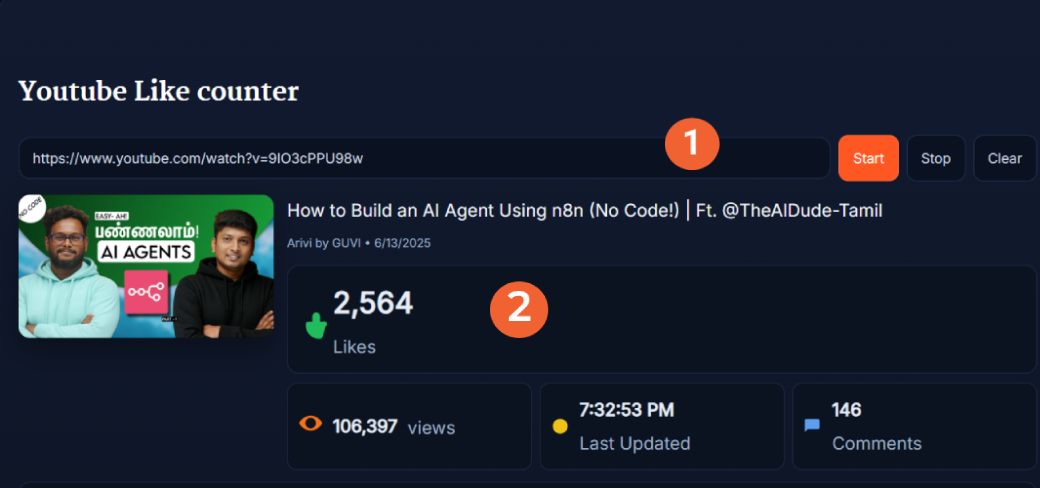
The YouTube Like Counter lets you check the latest available like count for a public YouTube video or Short. Paste the video URL and click Start to see its likes alongside views, comments, video details and recent view activity.
While tracking is active, the counter automatically refreshes the available public statistics. This gives you a convenient way to monitor a YouTube like count without repeatedly reopening or manually refreshing the video page.
What Does the YouTube Like Counter Show?
The counter puts the video's public engagement statistics and identifying information in one dashboard. After a supported video loads, you can see:
- Likes: The latest available numeric like count for the video.
- Views: The available public view count.
- Comments: The available comment count returned for the video.
- Last Updated: The most recent time the counter refreshed its displayed statistics.
- Video details: Thumbnail, title, channel and publish date.
- Recent view activity: A Live Views chart covering a 10-minute window.
- Video ID: The YouTube ID associated with the loaded video.
How to Check a YouTube Video's Like Count
- Copy the video URL: Open the public YouTube video or Short you want to check and copy its link.
- Paste the URL: Enter the link in the Paste YouTube URL field above.
- Click Start: The tool loads the video's available public information and begins tracking.
- Check the statistics: Review likes, views, comments, video information and the Last Updated time.
- Watch for updates: Keep the counter running if you want to monitor changes in the available public numbers.
- Stop or clear: Use Stop to stop tracking or Clear before loading another video.
Standard YouTube watch URLs, youtu.be links and YouTube Shorts URL formats are supported.
Is the YouTube Like Count Really Live?
The SanishTech counter automatically refreshes the available public statistics while tracking is active. The Last Updated time shows when the displayed information was most recently refreshed.
That does not mean every new like appears the instant someone presses YouTube's Like button. YouTube validates engagement activity, and its public metrics can take time to reflect new or adjusted activity. For this reason, the counter should be treated as a live view of the latest available public data, rather than a second-perfect record of every interaction.
Check Likes, Views and Comments Together
A like count makes more sense when you can see the video's other public statistics beside it. A video with 10,000 likes and 200,000 views tells a different story from one with the same number of likes and several million views.
The YouTube Like Counter therefore displays likes beside views and comments instead of presenting the number by itself. If you want to convert those numbers into a simple percentage, the YouTube Engagement Rate Calculator can calculate engagement using the available video statistics you enter.
Monitor Recent YouTube View Activity
Alongside the main totals, the tool includes a Live Views chart covering a 10-minute window. This provides short-term context when you are watching a newly published video, Short, premiere, stream or another video receiving active traffic.
The chart is intended for recent activity rather than long-term channel analytics. For a more focused view-count tracker, use the YouTube Views Live Count.
Can You Track Likes on YouTube Shorts?
Yes. The tool accepts supported YouTube Shorts URL formats in addition to standard watch URLs and youtu.be links. Paste the Short's public URL and click Start just as you would with a regular YouTube video.
The dashboard then displays the available likes, views, comments and identifying information returned for that Short.
Share or Embed the Counter
After a video loads, the Embed and Share area generates a full iframe that includes the thumbnail, title, views, likes and comments. A direct link to the counter display is also provided.
This can be useful when you want to display the public statistics outside the main YouTube Like Counter page or keep a direct link to the loaded counter.
Why Might a YouTube Like Count Change or Update Slowly?
YouTube does not necessarily finalize every engagement interaction immediately. Its systems verify activity to determine which views, likes and other interactions are legitimate. As a result, public statistics can temporarily remain unchanged or later be adjusted.
Likes, views and comments also should not be expected to change at exactly the same moment. If the SanishTech counter has refreshed but a number has not changed, that does not necessarily mean the counter has stopped working. The latest available public statistic may simply be unchanged.
Frequently Asked Questions
What does the YouTube Like Counter show?
The YouTube Like Counter shows the latest available public like count along with views, comments, the video's title, thumbnail, channel, publish date, Last Updated time and recent view activity.
Does the YouTube Like Counter update in real time?
The counter automatically refreshes the available public statistics while tracking is active. YouTube may take time to validate and update engagement metrics, so a new like, view or comment may not appear immediately.
Can I use the counter for YouTube Shorts?
Yes. The tool supports YouTube Shorts URL formats and can display the available likes, views, comments and video details for a supported public Short.
What YouTube URL formats can I use?
You can use standard youtube.com watch URLs, youtu.be short links and YouTube Shorts URL formats. Paste the link into the URL field and click Start.
Do I need to sign in to YouTube?
No. You do not need to sign in to a YouTube account to check the publicly available video statistics displayed by the tool.
Can I embed or share the YouTube like counter?
Yes. After the video loads, the Embed and Share area provides a full iframe and a direct counter link that you can copy.
How can I see the numeric number of likes on a YouTube video?
Paste the public video URL into the YouTube Like Counter and click Start. The dashboard displays the latest available numeric like count returned for that video.
Why is my YouTube like count not updating immediately?
YouTube validates engagement activity before all interactions are reflected in its metrics. This means a new like may take time to appear in the available public statistics.
Can a YouTube video's like count go down?
Yes. Public engagement numbers can be adjusted as YouTube validates activity, so a video's displayed like count is not guaranteed to only increase.
Do YouTube likes, views and comments update at the same time?
Not necessarily. YouTube processes and validates different engagement metrics, so likes, views and comments may not all change at exactly the same moment.