
YouTube CTR Calculator
Enter views or clicks and impressions to calculate click-through rate with the standard CTR formula.
This tool just saved you time!
This tool is completely free — a small coffee helps keep it running for everyone 🙏
No subscriptions. No paywalls. Just coffee if you feel like it.
YouTube CTR Benchmarks:
Use the YouTube CTR Calculator to turn impressions and the views or clicks they generated into a percentage. Enter the two totals above to see your result automatically, then compare it with your own videos or campaigns over a meaningful period.
What the YouTube CTR Calculator Measures
Click-through rate, usually shortened to CTR, measures the percentage of impressions that resulted in the action represented by your first input. The calculation uses this formula:
CTR = (views or clicks ÷ impressions) × 100
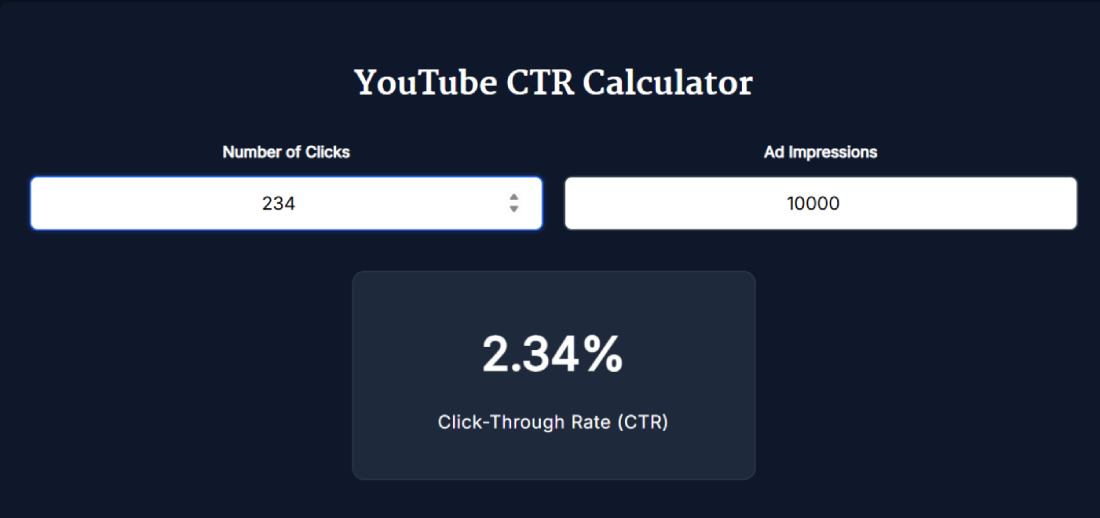
For example, 234 clicks from 10,000 impressions produce a CTR of 2.34%. The YouTube CTR Calculator performs this calculation automatically and displays the result to two decimal places.
The meaning of the numerator depends on what you are measuring. For an organic YouTube video, use views that originated from registered thumbnail impressions. For a YouTube advertising campaign, use the clicks reported for the ad. Keep organic video results and advertising results separate because they are reported and interpreted differently.
How to Use the YouTube CTR Calculator
- Choose one reporting period: Use totals covering the same dates, such as the last 28 days.
- Enter the first value: For organic videos, enter views from registered thumbnail impressions. For an ad campaign, enter ad clicks.
- Enter impressions: Add the corresponding impressions from the same report and period.
- Read the result: The calculator updates the CTR percentage automatically.
- Compare like with like: Compare the result with the same video over time or with videos that have similar formats, audiences and traffic sources.
Where to Find YouTube Impressions CTR Data
YouTube Studio already reports impressions click-through rate for eligible content. Open YouTube Studio, select a video, choose Analytics, and open the Reach tab. The impressions funnel shows registered thumbnail impressions and the views and watch time that followed.
The calculator is useful when you want to check the formula, combine compatible rows from an exported report, compare specific date ranges or calculate CTR for an advertising report. It does not connect to your channel or retrieve Analytics data automatically.
Organic YouTube CTR and Ad CTR Are Different
- Organic impressions CTR: Measures how often viewers watched after seeing a registered video thumbnail impression on YouTube.
- YouTube ad CTR: Measures ad clicks divided by ad impressions. A click generally involves an interactive element in the advertisement.
- Video ad view rate: Measures views divided by impressions and should not be confused with ad CTR.
The arithmetic may look similar, but these metrics answer different questions. Google advises advertisers to choose performance metrics according to the campaign objective. CTR may be useful for an action-focused campaign, while reach, views or conversions may be more important for other objectives.
What Counts as a YouTube Thumbnail Impression?
Not every appearance of a thumbnail counts as a registered impression. YouTube says an impression is counted when at least 50% of the thumbnail is visible for more than one second on an eligible YouTube surface.
Registered impressions can come from areas such as YouTube Search, the homepage, feeds, playlists and Up Next recommendations. They do not include every external website, mobile notification, email, card or end screen. This is why dividing total video views by registered impressions may not reproduce the CTR shown in YouTube Studio.
For the closest manual calculation, use views from thumbnail impressions instead of total views. You can review the complete counting rules in YouTube’s impressions documentation.
What Is a Good YouTube CTR?
There is no single CTR target that works for every channel. YouTube states that half of all channels and videos have an impressions CTR between 2% and 10%, but this is a broad platform range rather than a grading system.
A video’s rate can change according to its topic, audience, age, impression volume and traffic sources. Search viewers may have stronger intent, while homepage distribution can expose the thumbnail to a larger and less familiar audience. YouTube therefore recommends comparing videos over the long term while considering where their impressions came from.
New videos, new channels and videos with fewer than 100 views can show a wider range. Avoid drawing conclusions from a small sample or reacting to minor daily changes. See YouTube’s impressions CTR guidance for additional context.
How to Interpret Your CTR Result
- Compare similar traffic sources: Search, Browse, Suggested and channel-page traffic can produce different rates.
- Check impression volume: A high percentage from a small number of impressions is less informative than a stable result from a larger sample.
- Review watch behavior: A click only shows that the title and thumbnail attracted attention. Average view duration and retention show whether the video delivered on that promise.
- Watch the trend: Compare consistent date ranges rather than reacting to a single hour or day.
- Avoid clickbait: A misleading title or thumbnail can attract clicks but disappoint viewers and reduce watch duration.
If you are evaluating what happens after the click, use the YouTube Engagement Rate Calculator. When testing visual packaging, the YouTube Thumbnail Previewer can help you review how a thumbnail appears in common layouts.
Why YouTube CTR Can Fall as Impressions Rise
A falling percentage is not automatically bad. Early impressions often reach subscribers or loyal viewers who already know the channel. If YouTube later shows the video to a broader audience, impressions and total views may rise while CTR decreases.
Judge the change alongside reach, views, average view duration and traffic sources. YouTube specifically advises creators not to view CTR or impressions in isolation.
Tips for More Reliable CTR Comparisons
- Use the same date range for both input values.
- Do not mix organic YouTube Analytics data with Google Ads data.
- Compare videos with similar topics, formats and audience intent.
- Wait for a meaningful number of impressions before making decisions.
- Change one major packaging element at a time when testing titles or thumbnails.
- Consider retention and watch time before declaring a thumbnail successful.
Frequently Asked Questions
How do I use the YouTube CTR Calculator?
Enter views from impressions or ad clicks in the first field, then enter the corresponding impressions in the second field. The calculator divides the first value by impressions, multiplies the result by 100 and displays the percentage automatically.
What should I enter for an organic YouTube video?
Use views that originated from registered thumbnail impressions as the first value and registered thumbnail impressions as the second. Do not use total views because some views come from sources that are not counted as impressions.
Why does my calculation differ from YouTube Studio?
The most common reason is using total views instead of views from registered thumbnail impressions. Reporting updates, selected dates and filters can also cause temporary differences between YouTube reports.
What happens if impressions are zero?
A valid CTR cannot be calculated when impressions are zero because division by zero is undefined. Wait until the video or campaign has recorded impressions before interpreting its click-through rate.
Can I use this calculator for YouTube ads?
Yes. Enter ad clicks and ad impressions from the same Google Ads report. Keep the result separate from organic impressions CTR because ad clicks and organic views from thumbnail impressions are different metrics.
Does the calculator connect to my YouTube account?
No. The calculator does not ask you to connect a YouTube account. You enter the two reporting totals manually, and no YouTube API key is required.
How is YouTube CTR calculated?
CTR is calculated with the formula (views or clicks ÷ impressions) × 100. For example, 234 clicks from 10,000 impressions produce a click-through rate of 2.34%.
What is a good YouTube CTR?
YouTube says half of all channels and videos have an impressions CTR between 2% and 10%, but that range is not a universal target. Compare your results over time while considering traffic source, audience, content type and impression volume.
Why can CTR decrease when impressions increase?
CTR can decrease when YouTube expands a video beyond its loyal audience and shows it to broader groups of viewers. The lower percentage may still accompany substantial growth in total impressions and views.
Is a high CTR enough to make a video successful?
No. CTR measures what happened after eligible thumbnail impressions, but it does not measure whether viewers continued watching. Review retention, average view duration, watch time and total reach alongside CTR.