
The YouTube Embed Code Generator helps you quickly generate customizable HTML iframe codes for any YouTube video. Instead of editing embed parameters manually or searching for the right settings online, the tool gives you a clean interface where you paste a link, adjust a few options, and instantly get a polished embed code ready for your website.
What is the YouTube Embed Code Generator?
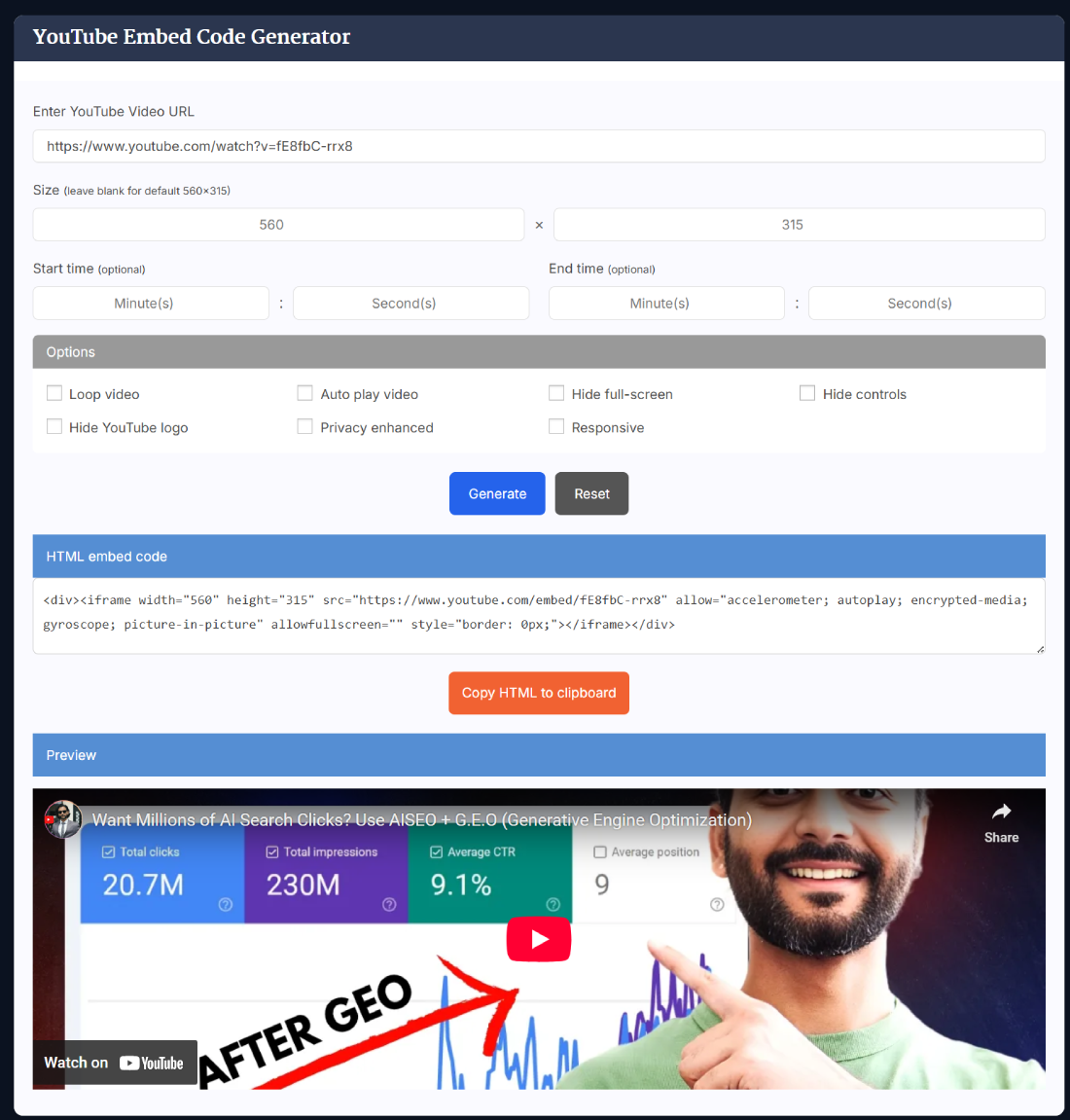
The YouTube Embed Code Generator is a simple tool that lets you generate YouTube embed code without writing HTML yourself. You paste a video URL, customize playback behavior, set your preferred dimensions, and the tool instantly creates a clean iframe snippet. This makes embedding videos on websites, blogs, landing pages, and platforms like WordPress or Wix much faster and more reliable. Anyone can generate YouTube embed code in seconds, regardless of technical skill.
Key Features of the YouTube Embed Code Generator
The tool gives you control over how your embedded YouTube videos appear and behave. Instead of relying on the default YouTube embed, you can customize important playback options and ensure your video fits perfectly into your layout. Everything is designed to streamline the embedding process and offer finer control than standard YouTube embeds.
- Custom width and height settings for perfect layout alignment
- Start and end time controls for embedding only specific video segments
- One-click options for autoplay, loop, and hiding controls
- Option to hide full-screen button and the default YouTube branding
- Responsive embed mode for mobile-friendly websites
- Privacy-enhanced no-cookie mode for GDPR-conscious websites
- Instant live preview to confirm your settings visually
- Quick “Copy to Clipboard” feature for final embed code
- Useful for bloggers, developers, and marketers who need clean embed code
- Pairs well with tools like the YouTube Thumbnail Downloader when optimizing visual presentation
How to Use the YouTube Embed Code Generator
Using the tool takes only a few seconds. Whether you're embedding a tutorial, product video, or promotional clip, the entire process is intuitive. Simply paste your link, choose your settings, and generate the final embed code with one click. You can also preview how the video will look before copying the code to your website.
- Paste the YouTube video URL into the input box.
- Adjust the width and height or keep the default proportions.
- Set optional start and end times if you need a specific segment.
- Enable features like autoplay, loop, or privacy mode.
- Click the generate button to create the HTML iframe code.
- Preview the embedded video to confirm everything looks correct.
- Click “Copy HTML” and paste the final code where needed.
When You Should Use This Tool
This tool is ideal whenever you need to embed a YouTube video with custom settings that differ from the default embed option. It is especially useful when embedding videos on landing pages, product pages, marketing funnels, or blog posts that need precise layout and playback behavior. It also helps when you want clean code that loads efficiently across devices.
Benefits of Using This Tool
The YouTube Embed Code Generator removes the complexity of handling iframe parameters manually. Instead of tweaking code, you can produce a polished embed that looks clean, loads quickly, and works perfectly across devices. It streamlines the entire workflow for embedding videos with custom behavior.
- Eliminates the need for manual HTML editing
- Ensures your video fits perfectly within your site layout
- Improves user experience by removing unwanted distractions
- Boosts privacy by blocking unnecessary tracking cookies
- Saves time for developers, marketers, and content creators
- Works seamlessly with WordPress, Wix, Squarespace, and custom HTML sites
- Allows you to embed only essential sections of longer videos
- Blends well with tools like the YouTube Thumbnail Downloader for embedding consistency across pages
Real Example of How the Tool Works
Imagine you want to embed a five-minute review video on your landing page but only want to show the portion starting at 1:10 and ending at 2:45. By pasting the video link and entering your start and end times, the tool instantly produces a clean iframe that plays only that section. You can then choose autoplay, hide controls, or switch to no-cookie mode before copying the final embed code for your website.
Helpful Tips for Better Results
Small adjustments can dramatically improve the look and performance of embedded videos. Using the right options ensures a smooth viewing experience across devices while keeping your page layout clean and responsive.
- Enable responsive mode for mobile-friendly embeds
- Use autoplay sparingly to avoid unwanted audio playback
- Hide controls for product demos or marketing sections
- Use privacy mode for GDPR-sensitive websites
- Always preview before copying the final embed code
- Use lazy loading plugins to improve page speed on media-heavy sites
- Combine with the YouTube Video SEO Checker for optimized page performance
Comparison With Other Tools
While many embed tools exist, most are either outdated, limited in features, or lack the customization required by modern websites. This generator focuses on clean output, responsive options, privacy choices, and advanced playback controls, making it a versatile option for all types of users who want more than just the default YouTube embed code.
- More customization options than standard YouTube embeds
- No coding knowledge required, unlike manual iframe editing
- Cleaner and lighter embed codes than older generators
- Supports privacy-enhanced no-cookie mode
- Allows start and end time settings for precise embedding
- Instant preview helps avoid layout issues before publishing
- Pairs well with the YouTube Timestamp Link Generator for time-specific video control
Related Tools
- YouTube Timestamp Link Generator
- YouTube Thumbnail Downloader
- YouTube Video SEO Checker
- YouTube Description Length Checker
- YouTube Title Length Checker
- YouTube URL Cleaner
- YouTube Hashtag Extractor
- YouTube Tag Generator
Frequently Asked Questions
How does the YouTube Embed Code Generator work?
The YouTube Embed Code Generator works by reading the video link you provide and applying your chosen settings, such as size, autoplay behavior, and privacy mode. It then creates an HTML iframe code that includes everything you selected. This helps you get a ready-to-use embed snippet without manually editing parameters. The final embed is clean and optimized for websites, blogs, and builders like WordPress or Wix.
Can I generate responsive YouTube embed code?
Yes, the tool includes a responsive option that adjusts the video to any device width. When enabled, the iframe automatically resizes on desktops, tablets, and mobile screens. This is especially helpful for blogs and landing pages where visitors arrive from different device types. Responsive embeds maintain visual quality and prevent layout issues caused by fixed-size videos on modern website designs.
Does the tool support autoplay and loop settings?
You can enable autoplay and loop using one-click checkboxes. Autoplay makes the video start immediately after loading, while loop repeats it continuously. These settings are useful for promotional videos and homepage demos. Keep in mind that autoplay may be muted by default on some browsers for user comfort. Looping works only when certain YouTube parameters are set, which the tool automatically includes.
Can I hide YouTube controls and branding?
Yes, the tool allows you to hide playback controls, disable the full-screen button, and reduce visible YouTube branding. This creates a cleaner and more professional appearance on websites where distractions need to be minimized. It’s especially useful for product demos, landing pages, online courses, and portfolio websites where the viewer should focus on the content rather than YouTube interface elements.
How do start and end times work when embedding?
You can specify an exact start and end time using minutes and seconds. The generated embed code tells YouTube to begin and stop playback at those times. This feature is ideal for embedding only key video sections, such as highlights, tutorials, or product demonstrations. The tool adds the correct parameters automatically so you don’t need to handle them manually.
What is privacy-enhanced mode?
Privacy-enhanced mode uses the YouTube no-cookie domain to prevent YouTube from collecting tracking data until a viewer interacts with the video. This is helpful for GDPR compliance and for websites that want to minimize user tracking. The tool has a simple checkbox to enable this mode, ensuring that your embed respects visitor privacy from the moment it loads.
Is the generated code compatible with WordPress?
Yes, the generated iframe code is fully compatible with WordPress. You can paste it into the Custom HTML block, Classic Editor, or page builders like Elementor and Divi. The tool ensures the embed is clean, lightweight, and works well across different themes. This makes embedding videos easier and avoids the formatting issues that sometimes occur when using raw YouTube embed links.
Can this tool help reduce page loading time?
The embed code itself is optimized, but page speed can improve further by combining it with lazy loading. When you use lazy load plugins or native browser settings, the video only loads when a visitor scrolls to it. This reduces initial page weight and improves performance scores. The tool allows you to generate lightweight HTML, making it easier to integrate performance-optimized video embeds.
How do I get embed code for a YouTube video?
To get embed code for a YouTube video, paste the video URL into the tool and adjust any settings you prefer, such as size or autoplay. Once done, click the generate button to receive a clean iframe code. This gives you more customization and control compared to copying YouTube’s default embed. You can then paste the generated code into any website, blog, or page builder.
Can I embed only a small section of a long video?
Yes, the start and end time settings let you embed only a specific portion of a video. This is ideal when you want to highlight a product segment, tutorial step, or key moment without showing the entire video. The generator automatically applies the correct parameters, so the playback starts and stops exactly where you set it. This makes partial embeds fast and precise.
Does this tool work for YouTube Shorts?
You can embed Shorts the same way you embed any YouTube video. Paste the Shorts link into the tool, choose your preferred dimensions, and generate the iframe code. Because Shorts are vertical, responsive mode can help them display more naturally across devices. The embed will preserve the vertical layout while ensuring compatibility across website builders and custom HTML environments.
Is looping allowed for any YouTube video?
Looping generally works for most YouTube videos, but it requires a playlist structure in the background. The tool automatically handles this by adding the necessary parameters to the embed code, making the video loop continuously. This is especially useful for background visuals, product displays, or promotional content that needs to repeat without user interaction.
Can I use this tool for commercial websites?
Yes, the embed code generated is safe and suitable for commercial websites, eCommerce stores, SaaS landing pages, and client projects. You can embed marketing videos, explainer clips, testimonials, or demos without worrying about formatting issues. The generator produces standardized HTML that works cleanly across modern browsers and responsive layouts.
Why is my embedded video not showing correctly?
Incorrect sizing, conflicting theme styles, or builder-specific restrictions can occasionally affect how embeds appear. Make sure responsive mode is enabled when embedding on mobile-heavy pages. Also check whether your website builder requires embeds inside HTML blocks rather than text blocks. Preview the video inside your layout before publishing to ensure everything aligns as expected across devices.
Can I use the generated embed code on social media?
Social media platforms don’t support iframe embed codes, so you can’t embed these videos directly into platforms like Facebook, Instagram, or Twitter. However, the embed code works perfectly on websites, blogs, forums, and custom landing pages. For social media, you would typically share the YouTube video link instead of using an HTML embed.