
YouTube Video ID Finder
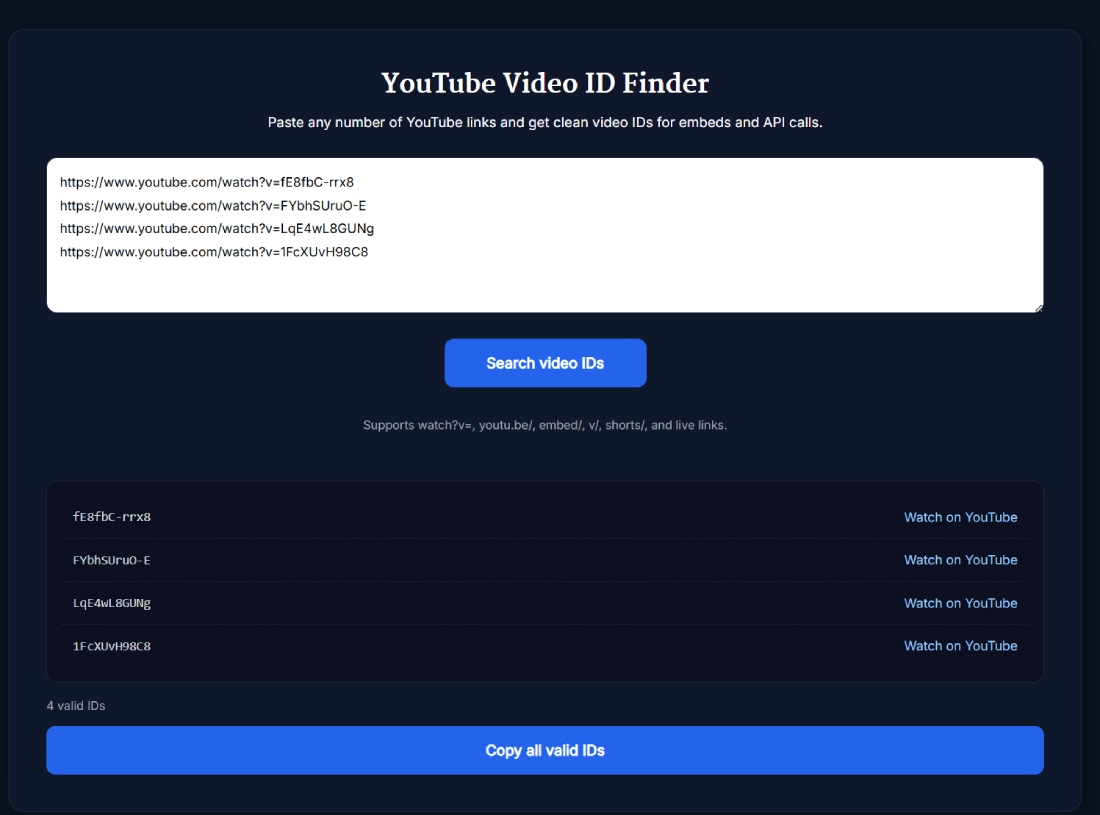
Paste any number of YouTube links and get clean video IDs for embeds and API calls.
Finding video IDs
This tool just saved you time!
This tool is completely free — a small coffee helps keep it running for everyone 🙏
No subscriptions. No paywalls. Just coffee if you feel like it.
The YouTube Video ID Finder extracts video ID-like values from common YouTube video links, including standard watch URLs, youtu.be links, Shorts, embed URLs and live links. Paste one URL or multiple inputs, run the search and copy the unique recognized IDs you need.
The tool also identifies repeated IDs and gives each recognized result a Watch on YouTube link. Keep in mind that extraction is not the same as video verification. A recognized ID does not guarantee that the corresponding YouTube video exists, is public or is currently available.
What Is a YouTube Video ID?
A YouTube video ID is the identifier YouTube uses to uniquely identify a video. You can see it inside several common YouTube URL formats.
- Watch URL: https://www.youtube.com/watch?v=dQw4w9WgXcQ
- Short URL: https://youtu.be/dQw4w9WgXcQ
- Shorts URL: https://www.youtube.com/shorts/dQw4w9WgXcQ
- Embed URL: https://www.youtube.com/embed/dQw4w9WgXcQ
In each example, dQw4w9WgXcQ is the video ID. YouTube's Data API documentation describes the video resource's ID as the identifier YouTube uses to uniquely identify the video.
How to Use the YouTube Video ID Finder
- Paste your inputs: Enter a YouTube video URL or multiple inputs on separate lines.
- Click Search video IDs: The finder parses the inputs and looks for recognizable video ID-like values.
- Review the results: Check the extracted ID and any duplicate or invalid indicators shown by the tool.
- Check the destination if needed: Use Watch on YouTube when you want to check where a recognized ID leads.
- Copy your IDs: Click Copy all valid IDs to copy the unique recognized IDs returned by the interface.
Which YouTube URL Formats Are Supported?
Live testing confirmed that the YouTube Video ID Finder recognizes several common video-link structures:
- Standard watch URLs: youtube.com/watch?v=VIDEO_ID
- Shortened links: youtu.be/VIDEO_ID
- YouTube Shorts: youtube.com/shorts/VIDEO_ID
- Embed URLs: youtube.com/embed/VIDEO_ID
- Live URLs: youtube.com/live/VIDEO_ID
- Watch URLs with additional parameters: The video ID can still be extracted when extra parameters appear in the tested watch URL.
The current parser can also accept a bare 11-character ID-like value. This is useful when you already have an ID rather than a full URL, but it also means the result should not be treated as proof that a real YouTube video exists.
Extract Multiple YouTube Video IDs at Once
You can use the tool as a bulk YouTube video ID extractor by entering multiple inputs on separate lines. This is useful when you have a list of video URLs collected from a spreadsheet, research document or content inventory and only need the identifier from each link.
The results remain visible individually, so you can review which ID came from each input before copying the unique recognized IDs.
How Duplicate YouTube Video IDs Are Handled
Different YouTube URL formats can point to the same video. For example, a standard watch URL, a youtu.be link and a Shorts-style URL can all contain the same underlying video ID.
In live testing, the finder displayed each occurrence but marked repeated IDs as duplicate. Three URLs containing the same ID produced a unique-ID count of one, and Copy all valid IDs copied only one instance.
Important: Extracting an ID Does Not Verify the Video
The finder parses the input for an ID-like value. It does not prove that the extracted value belongs to an existing, public or currently available YouTube video.
During testing, a synthetic 11-character value was accepted even though it was not being used as a confirmed YouTube video. This means you should treat the output as an extracted identifier rather than a verified video result.
Use the Watch on YouTube link when you need to check the destination. This distinction matters when you are preparing API requests, embeds or another workflow where an incorrect ID would cause the next step to fail.
YouTube Video ID vs YouTube Channel ID
A video ID and a channel ID identify different things. A video ID refers to an individual YouTube video, while a channel ID identifies the channel that publishes videos.
If your goal is to identify a creator's channel rather than one particular video, use the YouTube Channel ID Finder. Keeping these two search intents separate is especially useful when a URL contains both video and channel-related information.
What Can You Do With a YouTube Video ID?
Video IDs are useful when a workflow needs to identify a specific YouTube video without carrying around the complete sharing URL.
- YouTube Data API requests: YouTube's video resources use video IDs to identify specific videos.
- Embedded players: YouTube's IFrame Player API uses a videoId value to specify which video the player should load.
- URL normalization: Saving the ID separately gives you one identifier even when the same video appears in different supported URL formats.
- Development workflows: Developers can reuse extracted IDs when constructing video URLs or integrations that expect a video identifier.
If your next step is embedding the video on a webpage, the YouTube Embed Code Generator can create the embed markup for you.
How to Find a YouTube Video ID Manually
You do not always need a tool for a single simple URL. In a standard YouTube watch link, look for the v= parameter:
https://www.youtube.com/watch?v=dQw4w9WgXcQ
The value after v= is the video ID. With a youtu.be link, the ID follows the domain slash. Shorts and embed URLs place the identifier after /shorts/ and /embed/ respectively.
Manual extraction is straightforward for one clean link. The YouTube Video ID Finder becomes more useful when you have multiple URLs, mixed supported formats or duplicate IDs to review.
Frequently Asked Questions
What is a YouTube video ID?
A YouTube video ID is the identifier YouTube uses to uniquely identify a video. It appears inside common YouTube video URLs and is also used by YouTube APIs and embedded players.
How does the YouTube Video ID Finder work?
Paste one or more inputs and click Search video IDs. The tool extracts recognized ID-like values, marks repeated IDs as duplicates, provides a Watch on YouTube link for each result and lets you copy the unique recognized IDs.
Which YouTube URL formats can I use?
Live testing confirmed standard youtube.com/watch URLs, youtu.be links, YouTube Shorts URLs, embed URLs and /live/ URLs. The parser also accepts a bare 11-character ID-like value.
Can I find multiple YouTube video IDs at once?
Yes. Enter multiple inputs on separate lines and process them together. The interface displays each parsed result and a summary of unique recognized IDs.
Does the tool remove duplicate video IDs?
The results still show repeated IDs and label them as duplicates. The unique-ID count does not increase for repeats, and Copy all valid IDs copied only one instance of a repeated ID in live testing.
Do I need YouTube login or an API key?
No YouTube login or user-supplied API key was required during live testing. You can paste the input directly into the finder and run the search.
Does a returned ID prove that the YouTube video exists?
No. The parser can recognize an ID-like value without confirming that a corresponding YouTube video exists or is available. Use the Watch on YouTube link or another appropriate YouTube check if existence matters.
How do I get a YouTube video ID from a URL manually?
In a standard watch URL, the video ID is the value after v=. In a youtu.be link, it follows the domain slash, while Shorts and embed URLs place it after /shorts/ or /embed/.
Is a YouTube video ID the same as a YouTube channel ID?
No. A video ID identifies one video, while a channel ID identifies a YouTube channel. If you need the channel identifier, use a channel ID finder rather than this video ID tool.
What can I use a YouTube video ID for?
Video IDs are used in YouTube Data API requests, embedded-player workflows and links that need to identify a specific video. You can also store the ID separately when you want a consistent identifier across different URL formats.