
YouTube Views Ratio Calculator
Calculate views-to-subscribers, subscribers-to-views, likes-to-views, and comments-to-views percentages using manual counts or public YouTube stats.
Calculate the percent of views relative to your subscribers.
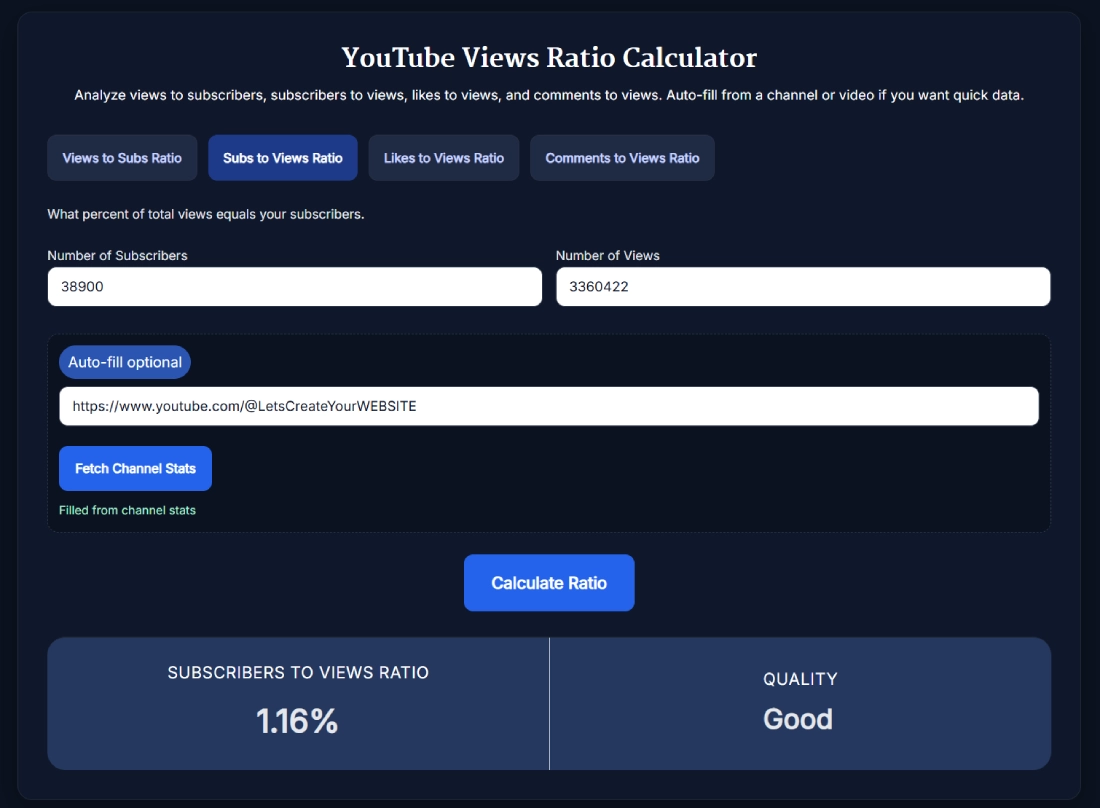
What percent of total views equals your subscribers.
Measure how many viewers hit like.
See how many viewers comment compared to views.
This tool just saved you time!
This tool is completely free — a small coffee helps keep it running for everyone 🙏
No subscriptions. No paywalls. Just coffee if you feel like it.
The YouTube Views Ratio Calculator compares views with subscribers, likes, or comments and expresses the relationship as a percentage. Enter the figures yourself or use the supported YouTube auto-fill option, then review the calculated ratio and SanishTech rating.
What the YouTube Views Ratio Calculator Measures
The tool includes four separate calculations. Each one answers a different question, so the numerator and denominator matter.
| Ratio | Formula | What the result compares |
|---|---|---|
| Views to subscribers | (Views ÷ subscribers) × 100 | Channel views relative to the current subscriber count |
| Subscribers to views | (Subscribers ÷ views) × 100 | Current subscribers relative to channel views |
| Likes to views | (Likes ÷ views) × 100 | Video likes as a share of video views |
| Comments to views | (Comments ÷ views) × 100 | Video comments as a share of video views |
These are comparison ratios, not proof that a specific subscriber watched, liked, or commented. Public channel views can come from subscribers and non-subscribers, and the same person can generate more than one view or comment.
Features Available in the Calculator
- Four ratio modes: Switch between views to subscribers, subscribers to views, likes to views, and comments to views.
- Manual entry: Type non-negative counts into the two fields and calculate immediately.
- Channel auto-fill: For the two subscriber-based ratios, paste a channel URL, @handle, channel ID, or video URL to fetch the related channel's public subscriber and view counts.
- Video auto-fill: For likes-to-views and comments-to-views, paste a video URL or video ID to fetch public video statistics.
- Two-decimal output: Results appear as percentages rounded to two decimal places.
- SanishTech quality label: Each result is assigned an internal rating such as Excellent, Good, Average, Low, or Needs work.
- No YouTube sign-in: You do not need to connect a YouTube account or supply your own API key.
How to Use the YouTube Views Ratio Calculator
- Select the ratio tab that matches the comparison you want to make.
- Enter both counts manually. Alternatively, paste a supported YouTube channel or video reference and select Fetch Channel Stats or Fetch Video Stats.
- Check the populated figures. Public counts can change over time, so save the date if you plan to compare results later.
- Select Calculate Ratio.
- Read the percentage and its SanishTech quality label together.
If a fetch returns Invalid YouTube URL, check the link or enter the public figures manually. Empty fields trigger a required-field message, and negative values are not accepted.
How the SanishTech Rating Bands Work
The quality label is a diagnostic rule built into this calculator. It is not an official YouTube grade, ranking factor, or universal industry benchmark.
Because the YouTube Views Ratio Calculator uses a different scale for each mode, read the result against the matching row below.
| Ratio | Excellent | Good | Average | Lowest label |
|---|---|---|---|---|
| Views to subscribers | 100% or more | 60% to 99.99% | 30% to 59.99% | Below 30%: Needs work |
| Subscribers to views | 2% or more | 1% to 1.99% | 0.5% to 0.99% | Below 0.5%: Low |
| Likes to views | 5% or more | 3% to 4.99% | 1% to 2.99% | Below 1%: Low |
| Comments to views | 1% or more | 0.5% to 0.99% | 0.2% to 0.49% | Below 0.2%: Low |
Use the labels as a quick reference inside this tool. For a useful performance comparison, keep the content type, age, topic, format, and measurement window similar.
Worked YouTube Ratio Examples
Suppose a channel has 4,000 subscribers and 120,000 total views. The views-to-subscribers calculation is:
(120,000 ÷ 4,000) × 100 = 3,000%
That can also be read as 30 channel views per current subscriber. The percentage is higher than 100 because channel views are not a unique count of subscribers.
Reversing the same figures produces a subscribers-to-views ratio of 3.33%. This does not mean that 3.33% of views converted into subscribers. It compares the channel's current subscriber total with its cumulative view total.
For a video with 20,000 views, 600 likes, and 40 comments:
- Likes to views: (600 ÷ 20,000) × 100 = 3.00%, which receives Good under this tool's rules.
- Comments to views: (40 ÷ 20,000) × 100 = 0.20%, which receives Average under this tool's rules.
How to Interpret the Results Without Overclaiming
A ratio is most useful as a repeatable comparison, not a complete channel diagnosis. Compare recent videos with other recent videos, long-form content with long-form content, and Shorts with Shorts. Older uploads have had more time to collect views and interactions.
Auto-filled channel subscriber counts may be rounded because YouTube reports public subscriber counts to three significant figures. That means a fetched ratio can be slightly different from a calculation based on an owner's more precise private analytics.
For a combined interaction metric, use the YouTube Engagement Rate Calculator. If you want typical reach across a selected group of uploads, the YouTube Average Views Calculator is a better fit than a lifetime channel ratio.
Practical Tips for More Useful Comparisons
- Record the calculation date because public counts continue to change.
- Use the same ratio, content format, and time window when comparing videos.
- Separate Shorts from long-form videos because view behavior differs.
- Avoid treating one viral upload as the channel's normal performance.
- Review the underlying counts before acting on a percentage with a small denominator.
- Use YouTube Studio for audience sources, unique viewers, returning viewers, watch time, and subscriber gains that public ratios cannot reveal.
FAQ
What does the YouTube Views Ratio Calculator calculate?
It calculates four percentages: views divided by subscribers, subscribers divided by views, likes divided by views, and comments divided by views. Each result is multiplied by 100 and shown to two decimal places.
Which YouTube inputs can the auto-fill feature accept?
The subscriber-based tabs accept a channel URL, @handle, channel ID, or video URL. The video engagement tabs accept a video URL or video ID. You can skip auto-fill and enter all counts manually.
Do I need to sign in or provide a YouTube API key?
No. The calculator does not ask you to sign in to YouTube or enter your own API key. When you use auto-fill, the submitted YouTube reference is used to retrieve the relevant public statistics.
Are the quality labels official YouTube benchmarks?
No. Excellent, Good, Average, Low, and Needs work are SanishTech diagnostic labels based on fixed bands in this calculator. YouTube does not assign these grades, and a suitable comparison depends on the content type, age, and audience.
What should I do if the calculator cannot fetch statistics?
Check that you entered a supported YouTube channel or video reference. If the fetch still fails or a public statistic is unavailable, enter the visible counts manually and run the same calculation.
What is the formula for views to subscribers ratio?
Divide the number of views by the number of subscribers, then multiply by 100. For example, 75,000 views divided by 5,000 subscribers equals 15, and multiplying by 100 gives 1,500%.
Why can a views-to-subscribers ratio be higher than 100%?
Views are not limited to one per subscriber. Non-subscribers can watch, subscribers can watch more than once, and a channel total combines views across videos. A result above 100% is therefore possible.
Is subscribers-to-views ratio the same as subscriber conversion rate?
No. Dividing a current subscriber count by cumulative channel views compares two public totals, but it does not track which individual views produced subscriptions. Use YouTube Studio subscriber-gain data for conversion analysis.
What is a good YouTube views ratio?
There is no universal good ratio for every channel or video. Use the calculator's rating as a quick diagnostic, then compare similar formats, topics, ages, and time windows to establish a useful baseline for your own content.
Can a views ratio prove that subscribers are watching?
No. Public view counts do not identify whether each viewer subscribed, and subscriber totals do not show who watched a particular video. YouTube Studio audience data is needed for a more direct view of viewer behavior.