
YouTube Channel Video Links Extractor
Extract available public video URLs, titles and publish dates from a YouTube channel, then download the list as CSV.
This tool just saved you time!
This tool is completely free — a small coffee helps keep it running for everyone 🙏
No subscriptions. No paywalls. Just coffee if you feel like it.
You just extracted 0 videos in seconds!
Doing this manually would've taken ~0 minutes. This tool is completely free — a small coffee helps keep it running for everyone 🙏
No subscriptions. No paywalls. Just coffee if you feel like it.
| # | Title | Link | Publish Date (UTC) |
|---|
Download Your CSV
This tool is 100% free. If it saved you time, support with a small coffee to unlock your CSV download.
One-time $3 — no account needed.
☕ Support & Download — $3✅ Thank you! Your download will start in a moment...
The YouTube Channel Video Links Extractor collects available public video links from a YouTube channel and puts them into one organized list. Enter a complete channel URL to get video titles, direct YouTube URLs and publish dates without opening and copying every video individually.
Once the extraction is complete, you can review the channel's video list on the page or download the results as a CSV file for Excel, Google Sheets, content research, channel audits or your own records.
What Can You Extract From a YouTube Channel?
For each available public video returned by the channel, the extractor displays:
- Video title: The title of the YouTube video.
- Video link: A direct YouTube watch URL.
- Publish date: The video's available publication date and time.
- CSV export: A downloadable list of the extracted results.
This is especially useful when you need to get all available YouTube video links from a channel in one place instead of scrolling through its Videos tab and copying URLs one at a time.
How to Extract Video Links From a YouTube Channel
- Open the YouTube channel: Go to the public channel whose video URLs you want to collect.
- Copy the channel URL: Copy the complete URL from your browser. A full handle-style URL such as https://www.youtube.com/@channelname can be used.
- Paste the URL: Enter the channel URL into the extractor above.
- Click Extract: Wait while the available channel videos are retrieved.
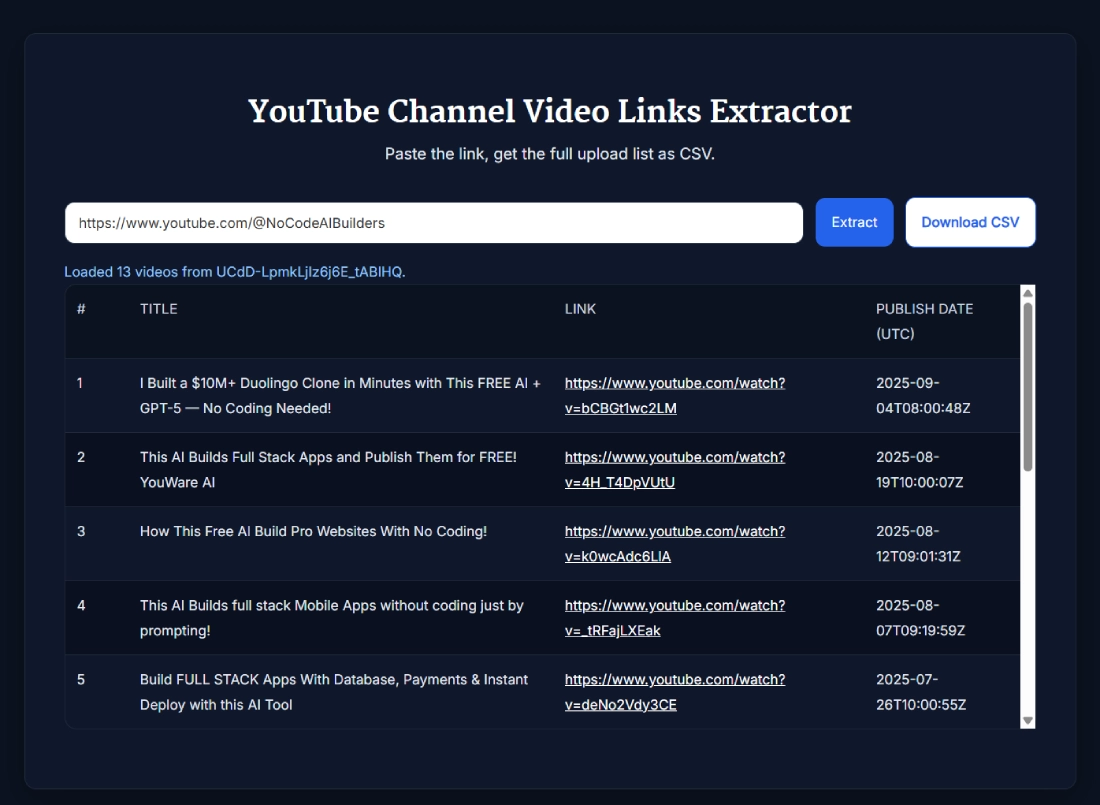
- Review the video list: The results show each video's title, direct link and publish date.
- Download the results: Click Download CSV if you want a spreadsheet-friendly copy of the list.
Use the complete YouTube channel URL when possible. A standalone @handle may be rejected, so the full handle-style URL is the safer input.
Can You Get All Video Links From a YouTube Channel?
The tool is designed to retrieve the available public uploads returned for a YouTube channel. It can therefore save a lot of manual work when a channel contains dozens or hundreds of videos.
However, the result should be treated as an available public video list, not a guaranteed archive of every video the channel has ever created. Content that is not available through the channel's public data may not appear in the extracted results.
The number returned can therefore differ from a video count you see elsewhere on YouTube.
What Does the CSV File Contain?
After a successful extraction, the Download CSV option saves three main fields for each returned video:
- Title
- Link
- Publish Date (UTC)
You can open the CSV in applications such as Microsoft Excel, Google Sheets or LibreOffice Calc. From there, you can sort videos by date, search titles, filter topics or maintain your own channel content inventory.
YouTube Channel Video List vs Playlist Video List
A channel and a playlist are different extraction targets. Use this YouTube channel video list extractor when you want available uploads associated with a particular channel.
If you only want links from one specific playlist, use the YouTube Playlist Link Extractor. A playlist may contain only a selection of videos and can also be organized separately from a channel's broader upload list.
What Can You Do With the Extracted Video URLs?
Having the URLs in a structured list makes them easier to work with outside YouTube. Common uses include:
- Channel audits: Build an inventory of available public uploads.
- Content research: Search titles for repeated topics, formats or themes.
- Publishing analysis: Sort videos by publish date to review posting patterns.
- Competitor research: Organize the available video history of a public channel for manual analysis.
- Client reporting: Keep a structured list of published YouTube videos.
- Data preparation: Create a starting set of YouTube URLs for further analysis.
If you want to examine one of those videos in more detail after extraction, you can paste its URL into the YouTube Data Viewer to inspect the available video information.
Frequently Asked Questions
How do I extract all video links from a YouTube channel?
Paste a complete public YouTube channel URL into the extractor and click Extract. The tool returns the available public videos it can retrieve with their titles, direct YouTube links, and publish dates.
What information does the YouTube Channel Video Links Extractor return?
Each result includes the video title, a direct YouTube watch link, and the publish date. The results table also numbers the returned videos for easier review.
Can I download the extracted YouTube video links as CSV?
Yes. After a successful extraction, the Download CSV button becomes available. The CSV contains Title, Link, and Publish Date (UTC) fields.
Can I use a YouTube @handle to extract channel videos?
Use the complete handle-style URL, such as https://www.youtube.com/@channelname. A standalone @handle may be rejected, so the full channel URL is the safer input.
Does it extract every video a channel has ever uploaded?
It extracts the available public uploads returned for the channel. Because the tool works with public channel data, the result should not be treated as a guaranteed archive of every video the channel has ever created.
Do I need a YouTube account or API key?
No. You do not need to sign in to a YouTube account or provide your own API key to use the extractor with supported public channel URLs.
Can it extract links from large YouTube channels?
The tool can return large public video lists. Processing time and the final number of videos returned can vary depending on the channel and the public videos available for extraction.
What is the difference between channel and playlist link extraction?
Channel extraction is for available videos associated with a public YouTube channel. Playlist extraction is for the videos contained in one specific YouTube playlist.
What time zone is used for YouTube publish dates?
The results and CSV identify the publication field as Publish Date (UTC), providing a consistent time reference for the extracted videos.
Is the YouTube Channel Video Links Extractor free?
Yes. The tool is currently free to use for extracting supported public channel video links and downloading the results as CSV.