
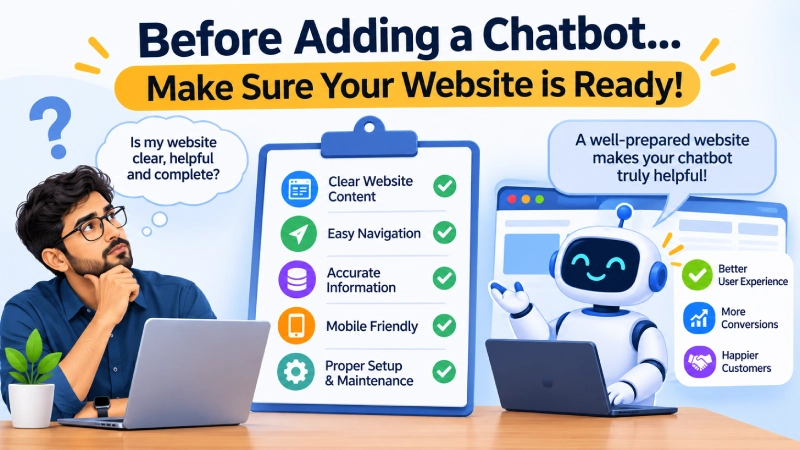
A chatbot can answer questions, but it won’t fix a website that leaves visitors confused. If people struggle to find basic information, adding another way to interact with the business won’t help. It may just give them one more thing to deal with.
Before investing in chatbot development, businesses should look at how their website guides visitors. Important pages need a clear purpose, and service descriptions should explain what the company actually offers. Contact details shouldn’t be hard to find. Navigation, meanwhile, needs to get people where they want to go without making them click through half the site.
Most visitors arrive with something specific in mind. They might be comparing services, looking for pricing, trying to understand delivery terms, or ready to request a consultation. A chatbot should make that next step easier. For businesses looking to automate customer conversations, the website itself needs to be a reliable starting point.
And the information has to be there in the first place. Someone researching a software development company should be able to understand its services and find relevant case studies without digging through unrelated pages. A chatbot can point them in the right direction, but it can’t make incomplete or unclear website content useful.
Mobile usability deserves a look, too. Small buttons and crowded menus already make navigation awkward. Add a chatbot to a cramped screen, and it may get in the way of the content visitors came to see.
Give the Chatbot Accurate Information to Work With
A chatbot is only as useful as the information behind its answers. Even a well-built system will struggle with outdated, incomplete, or conflicting content. So before implementation, businesses need to look at what information they actually have.
Start with questions customers keep asking. Sales and support teams hear them every day, and support emails or live chat records can show which topics come up often enough to warrant chatbot answers.
Then go through the website. Service descriptions, pricing, product details, and refund policies should match current business practices. If two pages contradict each other, sort that out before feeding the content to the chatbot. Otherwise, the system may end up giving visitors conflicting answers.
A structured knowledge base gives the system an approved source for answers. It might include FAQs, help articles, internal guidance, and company documents. But vague wording won’t help much. Saying “We offer flexible delivery options” gives a chatbot little to work with. Specific delivery areas and timeframes are far more useful.
Tools such as Notion and Confluence can help organize this material. Still, putting everything in one place doesn’t make it ready for chatbot use. Outdated versions need to go, and teams must decide which documents the system can access.
There’s more to consider here. Sales notes, private customer records, and draft policies may contain information that should never appear in a customer-facing response. Access rules need to keep those materials out of reach.
The website chatbot also needs to know when it doesn’t have a reliable answer. If a question falls outside the approved information, it should say so and direct the visitor to an employee. A confident guess can do more damage than an unanswered question.
Someone also needs to keep the source material current. Prices change, policies get revised, and old information doesn’t become accurate just because it’s stored in a knowledge base. That’s why content reviews need to be part of the ongoing process.
Define the Tasks the Chatbot Will Handle
A chatbot needs a clear job description. Without one, businesses risk building a tool that tries to answer every question and solve problems it was never designed to manage. That usually leads to confusing conversations and disappointed visitors.
Start with common customer needs. An online retailer might use a chatbot to answer questions about product availability and delivery times. A software company could use one to explain its services and direct potential clients to the right contact person.
Reviewing existing support requests can help identify repetitive questions that take up employees’ time. Those are often good candidates for customer support automation. But complex complaints and situations requiring personal judgment should still reach a human employee. Automating every interaction may reduce the workload, but it can also make customer service less helpful.
Lead generation is another possible goal. A chatbot can support lead capture by asking visitors for relevant details, such as their business needs or preferred contact method, before passing the inquiry to the sales team. This can save time. The catch is that asking too many questions may discourage visitors from completing the conversation. Keep the process short and explain why the information is needed.
Businesses should also decide what the chatbot must not do. It may provide general product information, but that doesn’t mean it should promise custom pricing or make commitments on behalf of the company. If an answer requires employee approval, the chatbot should direct the visitor to the appropriate person.
Before development, map a few typical conversations:
- Common questions: What information can the chatbot provide from approved company content?
- Customer inquiries: What details should it collect before forwarding a request?
- Complex situations: When should it stop answering and involve an employee?
There’s little point in measuring success by conversation volume alone. A chatbot can handle hundreds of interactions and still provide little value if visitors leave without finding answers. Track outcomes that reflect its actual purpose, such as resolved support questions or qualified inquiries.
Start small. A chatbot that handles a limited set of tasks accurately is more useful than one with a broad list of features it cannot perform reliably. Its responsibilities can expand as the business learns how customers use it.
Connect the Chatbot to the Systems Your Team Already Uses
A chatbot may collect useful information, but that information needs to reach the right people. Before implementation, businesses should look at the software their teams use to manage customer inquiries and potential sales.
For many companies, this means checking their CRM integration requirements. A customer relationship management (CRM) system stores information about prospects and existing customers, including contact details and previous interactions. Connecting a chatbot to a CRM can allow it to pass collected information directly to the sales team, reducing manual data entry and missed inquiries.
Tools such as Salesforce and HubSpot offer ways to connect external applications and transfer customer data. Still, integration doesn’t guarantee accurate records. Businesses need to decide which details the chatbot should collect, where they should go, and who is responsible for following up. Poorly planned connections can create duplicate records or send inquiries to the wrong team.
Some integrations use ready-made connectors, while others require custom development to match existing software and processes. The simpler option may be cheaper to maintain, but it can offer less control. Custom connections provide more flexibility and usually require additional development and testing. The difference matters when a business has specific workflows that standard connectors can’t handle.
Before launch, map how a typical inquiry should move from the chatbot to the employee handling it. Make sure the receiving system records the information correctly and that customers do not have to repeat everything. The chatbot should fit into the existing workflow, not create another disconnected inbox.
Test the Chatbot and Assign Someone to Maintain It
A chatbot isn’t ready for launch just because it can answer a few test questions. Businesses need to see how it handles actual customer scenarios, especially when information is missing or a request falls outside its assigned tasks.
Test common conversations from start to finish. Check answers against the website, then ask the same question in different ways. Visitors won’t always use the wording you expect. That’s often when the gaps become obvious.
Look for wrong prices, outdated policies, made-up answers, and broken links. Try less typical requests, too. When the chatbot can’t find reliable information, it should admit that and show visitors how to reach an employee.
Human handoff deserves particular attention. Someone with a billing dispute or a tricky technical problem may need an employee who can actually look into the issue. If the business promises human assistance, someone must be available to provide it. Otherwise, the chatbot just sends the frustration elsewhere.
Before launch, use a short checklist:
- Response accuracy: Do answers match approved company information?
- Human escalation: Can visitors reach an employee when necessary?
- Technical reliability: Do links, forms, mobile displays, and system connections work?
Once the chatbot is live, someone needs to own its performance. That means reviewing conversations and updating its information when business details change. Without a clear owner, outdated answers can sit there for months.
Track outcomes, not just activity. Businesses can look at whether visitors get useful answers, how often conversations need human assistance, and whether inquiries turn into qualified leads. A high conversation count on its own says very little.
Google Analytics 4 can show how visitors interact with the website, while chatbot platforms often have their own conversation reports. But analytics won’t explain every failure. Reviewing actual conversations can reveal confusing answers and recurring problems, provided customer privacy is respected.
Pricing changes, new services, and revised company policies can all make previously correct answers unreliable. Someone has to keep an eye on those changes and update the chatbot before customers start getting outdated information.