Quick verdict: Hostinger is a good fit for beginners, bloggers, portfolio sites, and small businesses that want affordable managed hosting with a simple dashboard. Its strongest advantages are low introductory prices, easy WordPress setup, included SSL, free migration, and data centers in India and other major regions. The main drawbacks are much higher renewal prices, long upfront commitments for the lowest advertised rate, no phone support, and strict resource limits behind some “unlimited” features.
That makes Hostinger good value, but not automatically the best choice for every website. The right decision depends on your expected traffic, storage needs, backup requirements, preferred control panel, and the price you will pay after the introductory term.
Last checked: August 30, 2026. Hosting prices and plan limits change regularly, and regional taxes or offers may differ. Confirm the final renewal cost and included features at checkout.
Hostinger Pros and Cons at a Glance
| Hostinger advantages | Hostinger disadvantages |
|---|---|
| Affordable introductory pricing on long plans | Lowest monthly price requires a large upfront payment |
| Beginner-friendly hPanel | No traditional phone support |
| Free SSL and automatic website migration | Renewal prices are considerably higher |
| WordPress tools and LiteSpeed-based hosting | Premium includes weekly, not daily, backups |
| Data centers in India and other global regions | hPanel may frustrate users who prefer cPanel |
| Clear resource details for comparing plans | Storage, databases, PHP workers, RAM, and CPU are still limited |
Hostinger Pricing: The Detail That Changes the Value
Hostinger’s headline prices can look unusually low because the advertised monthly figure is calculated from a long plan paid in advance. On the official Hostinger web hosting page checked for this update, the 48-month Premium plan was listed at $2.99 per month, but the customer pays $143.52 upfront. The displayed renewal rate was $10.99 per month.
| Plan | Introductory price shown | Upfront total | Renewal price shown | Useful for |
|---|---|---|---|---|
| Premium | $2.99/month for 48 months | $143.52 | $10.99/month | Up to three smaller websites |
| Unlimited | $3.99/month for 48 months | $191.52 | $16.99/month | Multiple sites, daily backups, CDN, and more resources |
| Cloud Startup | $7.99/month for 48 months | $383.52 | $25.99/month | Busier sites needing more CPU, RAM, and storage |
These are time-sensitive US prices before VAT or other taxes. Your country, billing term, and active promotion can change the amount. Check both the amount due today and the renewal total before paying.
Check current Hostinger plans and renewal prices
Seven Advantages of Hostinger
1. The introductory price is competitive
Hostinger can be inexpensive when you are comfortable paying for several years at once. The entry plan includes managed WordPress hosting, free SSL, weekly backups, a domain for the first year on an eligible annual plan, and two mailboxes per website for the first year.
The value is strongest for someone launching a blog, portfolio, or small company website who wants the essentials in one account. Just treat the advertised monthly number as a calculation, not a month-to-month bill.
2. hPanel is easy for beginners to understand
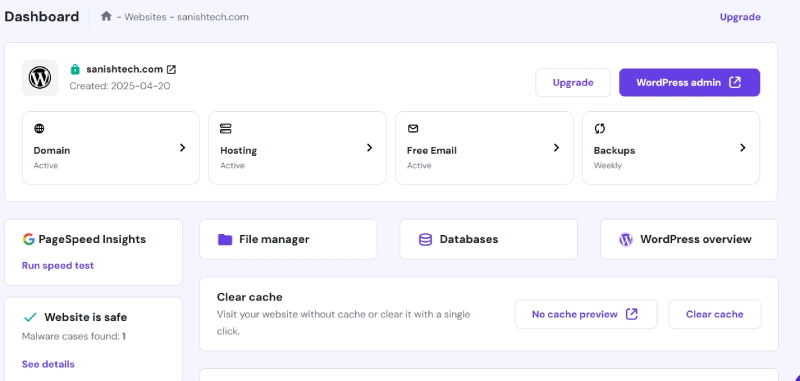
Hostinger uses its own control panel called hPanel. The main tasks are grouped clearly, including WordPress installation, domains, email, backups, file management, databases, performance, and security.
For a first-time site owner, this is often less intimidating than a crowded traditional hosting panel. The tradeoff is that experienced cPanel users need to relearn where some settings live.
3. WordPress setup includes useful managed features
Hostinger supports WordPress installation, automatic updates, SSL setup, caching, and migration tools. Its web hosting also uses LiteSpeed server technology, which works with the LiteSpeed Cache plugin commonly used on WordPress sites.
That gives beginners a sensible starting configuration. It does not guarantee a fast website by itself. Theme quality, plugins, image size, database health, caching settings, and visitor location still affect real performance.
4. Free website migration reduces switching friction
Hostinger advertises automatic website migration at no extra charge. This is useful if you already have a WordPress site elsewhere and do not want to move the files and database manually.
Before requesting a migration, create your own backup and avoid cancelling the old hosting account until the migrated site, email, SSL, forms, and DNS have been tested.
5. Its server network includes India
Hostinger’s official server-location list covers web and cloud hosting locations in Europe, Asia, North America, and South America. The Asian locations include India, Indonesia, and Malaysia. Choosing a location close to your main audience can reduce network latency.
Server availability depends on the hosting product and current capacity. Hostinger advises customers to treat the locations shown in hPanel during setup as the final available list.
6. Basic security features are bundled
Plans include SSL certificates, and Hostinger advertises malware scanning and other hosting-level protections. These features reduce setup work, but they do not remove the need for strong passwords, two-factor authentication, limited administrator access, timely updates, and an independent backup for important websites.
A hosting security layer and a WordPress security process solve different parts of the problem. Do not assume that buying hosting makes a vulnerable plugin or weak password safe.
7. The plans provide a clear upgrade path
A small site can start on Premium, move to Unlimited for more resources and daily backups, or upgrade to Cloud Startup when it needs more CPU, RAM, PHP workers, and storage. Hostinger also sells VPS and agency hosting for users who need different levels of control.
The ability to upgrade is convenient, though moving to a larger Hostinger plan is not a substitute for fixing a bloated theme, slow database queries, or poorly optimized code.
Seven Disadvantages of Hostinger
1. The best price requires a long commitment
The attractive monthly figure is normally attached to a multi-year term that is paid upfront. A four-year purchase can make sense for an established site, but it is a bigger commitment for a new project that may change direction after a few months.
Compare the total checkout amount with a one-year plan from Hostinger and alternative providers. The lowest displayed monthly rate is not always the lowest-risk choice.
2. Renewal prices are significantly higher
This is the biggest Hostinger disadvantage for many buyers. Based on the US web hosting page checked for this article, Premium moved from an introductory $2.99 per month to a displayed renewal price of $10.99 per month. Unlimited moved from $3.99 to $16.99 per month.
The renewal is disclosed on the pricing page, but it is easy to focus only on the larger discount headline. Save the renewal date and expected cost when you subscribe. That makes it easier to budget or compare alternatives before the term ends.
3. There is no phone support
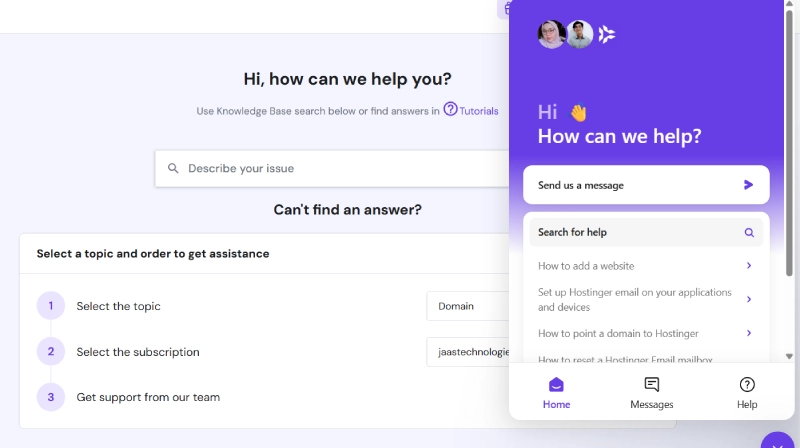
Hostinger’s phone-support policy says it does not offer phone support. Help is provided through online channels, including the support system inside hPanel and its AI assistant.
Chat-based support is practical when you need to paste an error message or attach a screenshot. It is less comfortable for a business owner who wants to call a person during an urgent outage.
4. Daily backups are not included with Premium
Hostinger’s backup documentation says that automated weekly backups are provided across its web and cloud plans. Daily backups are included on higher plans and can be purchased for some lower plans. Weekly backups are retained for six weeks, while daily backups are kept for seven days.
A weekly copy may be enough for a simple brochure site. It is a weak recovery point for a store, membership site, booking system, or frequently updated blog. Those websites should use daily backups and keep a separate off-site copy.
5. “Unlimited” does not mean unlimited server resources
The Unlimited plan allows unlimited websites and bandwidth under Hostinger’s fair usage rules, but the account still has technical limits. At the time of checking, Hostinger’s plan-parameter documentation listed 50 GB NVMe storage, 3 GB RAM, two CPU cores, 60 PHP workers, 600,000 inodes, and 150 databases for this plan.
Those limits are reasonable for many small websites. They can become restrictive if you store large media libraries, run demanding plugins, host many active sites, or receive sharp traffic spikes.
6. hPanel is not cPanel
A custom dashboard is a benefit for beginners and a disadvantage for some developers. Existing cPanel workflows, documentation, reseller processes, and habits do not map perfectly to hPanel.
Hostinger provides file management, databases, cron jobs, PHP controls, SSH on eligible plans, and other developer functions. Still, anyone who specifically needs cPanel should confirm the product before buying rather than assuming it is included.
7. Shared hosting is not suitable for every high-demand project
Premium and Unlimited are shared hosting products with defined CPU, memory, database, and PHP worker limits. They are not the right environment for every resource-heavy WooCommerce store, custom SaaS application, or workload that needs root-level server control.
There is no universal traffic number at which a site must upgrade. A cached content site and a dynamic store can use very different resources at the same visitor count. Watch actual CPU, RAM, PHP worker, database, and storage usage instead of relying on a vague monthly-visitor estimate.
Which Hostinger Plan Makes Sense?
| Your situation | Plan to consider | Reason |
|---|---|---|
| One to three blogs, portfolios, or small business sites | Premium | Lower cost and enough core features for lighter sites |
| Several websites, ecommerce, or a site needing daily backups | Unlimited | More storage, CPU, RAM, PHP workers, CDN, and daily backups |
| Higher-traffic or more resource-intensive sites | Cloud Startup | More dedicated resources and on-demand backups |
| Applications requiring root access or custom server administration | VPS or another specialist provider | Shared and managed cloud plans provide less server-level control |
Do not buy a larger plan only because it has more features. Start with the smallest tier that meets your website count, storage, backup, performance, and developer-access requirements. You can also read our guide to the best Hostinger plan for beginners.
Compare the current Hostinger plans
Who Should Choose Hostinger?
Hostinger is worth considering if you:
- Are launching a WordPress blog, portfolio, or small business website.
- Want a simpler control panel instead of cPanel.
- Prefer bundled SSL, migration, backups, email trials, and WordPress tools.
- Serve an audience near one of Hostinger’s available data centers, including India.
- Are comfortable using online support instead of telephone support.
- Understand the upfront payment and future renewal price.
Who Should Avoid Hostinger?
Consider another provider or a different hosting product if you:
- Need telephone support for urgent business issues.
- Want cPanel specifically.
- Cannot justify paying a long subscription upfront.
- Need root access, a custom server stack, or dedicated hardware.
- Run a demanding application that already exceeds shared-hosting resources.
- Need longer backup retention without maintaining your own external copies.
What to Check Before Buying
- Total due today: Ignore the monthly calculation for a moment and check the full upfront charge.
- Renewal total: Record the regular price shown at checkout.
- Website limit: Premium was limited to three websites when this article was checked.
- Storage type and amount: Premium and Unlimited do not include the same storage allowance.
- Backup frequency: Decide whether weekly backups are enough for your site.
- Data center: Confirm that your preferred location is available in hPanel.
- Email terms: Included mailboxes may be free only for the first year.
- Refund exclusions: Hosting generally has a 30-day money-back period, but domains and other products can follow different rules.
Final Verdict: Is Hostinger Worth It in 2026?
Yes, Hostinger can be worth it for a beginner, blogger, freelancer, or small business that wants simple website management at a competitive introductory price. hPanel is approachable, WordPress setup is convenient, migration is included, and the global server network is useful for sites targeting India or international visitors.
The recommendation comes with three conditions. Compare the total upfront cost, budget for renewal, and choose a plan based on real resource and backup needs. Hostinger becomes less attractive when telephone support, cPanel, advanced server control, or a short commitment matters more than the initial discount.
View Hostinger’s current offer and full plan details
Still comparing providers? See our Hostinger vs Bluehost comparison. You can also explore SanishTech’s website and hosting tools before launching your site.
Frequently Asked Questions
What is the biggest disadvantage of Hostinger?
The biggest disadvantage for many buyers is the gap between the low introductory price and the higher renewal price. The cheapest advertised monthly rate also normally requires paying for a long term upfront.
Is Hostinger good for WordPress?
Hostinger is a practical WordPress host for blogs, portfolios, and many small business sites. It includes managed WordPress tools, SSL, caching support, updates, and migration. Performance still depends on the plan, theme, plugins, optimization, and traffic.
Does Hostinger use cPanel?
Hostinger’s standard web hosting uses its custom hPanel instead of cPanel. hPanel covers common hosting tasks, but users with cPanel-specific workflows may need time to adjust.
Does Hostinger offer phone support?
No. Hostinger officially states that it does not offer phone support. Customers receive help through online support options in hPanel, including AI-assisted and human support.
Does Hostinger include daily backups?
Not on every plan. Hostinger provides weekly backups on web and cloud hosting. Daily backups are included with higher tiers and can be purchased for eligible lower plans. Check the exact plan details before subscribing.
Can I get a refund from Hostinger?
Hostinger offers a 30-day money-back guarantee for eligible hosting purchases. Domain registrations and other products can have different refund conditions, so review Hostinger’s current refund information before ordering.
Is the free domain permanently free?
No. Eligible annual hosting plans include a domain for the first year. You normally pay the domain’s renewal fee after that period.