Quick verdict: Hostinger is one of the better-value WordPress hosting options we have used for running SanishTech. We particularly like hPanel, LiteSpeed, the built-in CDN and SSL controls, and the amount of hosting functionality available without needing traditional cPanel. The biggest catch is renewal pricing. The heavily discounted introductory rate rises considerably after the initial term.
| Hosting provider | Hostinger |
|---|---|
| Our experience | SanishTech.com has been hosted on Hostinger since November 2025 |
| Best for | WordPress sites, blogs, small businesses, creators, and growing websites |
| Starting advertised US price | Premium currently starts at $2.99/month on the advertised 48-month term |
| Money-back guarantee | 30 days on eligible hosting purchases |
| Control panel | Hostinger hPanel |
| WordPress support | Yes, with WordPress-specific hosting features |
| Main drawback | Renewal pricing is significantly higher than the introductory price |
| Our verdict | Recommended, especially when the introductory long-term price makes sense for your project |
Want to see Hostinger’s current deal?
Compare the latest plans, introductory pricing, renewal rates, and features before choosing.
Check Current Hostinger PricingOur Real Experience Hosting SanishTech on Hostinger
There is a simple reason this Hostinger review is different from many hosting comparisons online: the website you are reading right now runs on Hostinger.
SanishTech.com has been hosted through Hostinger since November 17, 2025. We use WordPress and operate a growing collection of online tools, content pages, reviews, and other site features from the same website.
That gives us more useful information than installing WordPress on an empty domain, running one speed test, and calling it a hosting review.
Our current hPanel dashboard provides access to WordPress management, hosting settings, databases, files, backups, security, analytics, and performance controls. LiteSpeed, SSL, and CDN functionality are also active on our SanishTech setup.
We are not going to claim that Hostinger alone determines every PageSpeed score or Core Web Vitals result. Themes, plugins, JavaScript, images, caching, third-party scripts, and page design all affect performance.
What we can say from running SanishTech is that Hostinger has given us a practical WordPress environment that is straightforward to manage and has not forced us into a complicated server-management workflow.
What Is Hostinger?
Hostinger is a web hosting company offering managed web hosting, WordPress hosting, cloud hosting, VPS hosting, domains, email, website-building tools, and related services.
It originally became popular largely because of low pricing, but the current product is much broader than basic budget shared hosting.
WordPress.org currently includes Hostinger on its recommended hosting page .
Hostinger’s current WordPress platform includes features such as LiteSpeed infrastructure, caching, automatic WordPress updates, backups, security tooling, website migration, developer tools, and AI-assisted management features depending on the plan.
What We Like Most About Hostinger
1. hPanel Is Easier Than Traditional cPanel
Hostinger uses its own hosting dashboard called hPanel.
This was one of the biggest adjustments for us because many hosting companies rely on cPanel.
After using it regularly, we actually prefer hPanel for everyday site management. The main controls are grouped logically rather than presenting a large wall of technical icons.
From our SanishTech dashboard we can quickly reach:
- WordPress management
- Hosting plan information
- Performance settings
- Analytics
- Security
- Domains
- Files
- Databases
- Backups
- Advanced hosting controls
Beginners will probably find this easier than cPanel, while developers still retain access to the tools needed for normal WordPress management.
2. LiteSpeed Works Well With WordPress
LiteSpeed is one of the Hostinger features we value most.
Hostinger’s WordPress environment uses LiteSpeed infrastructure and works with LiteSpeed Cache for WordPress optimization.
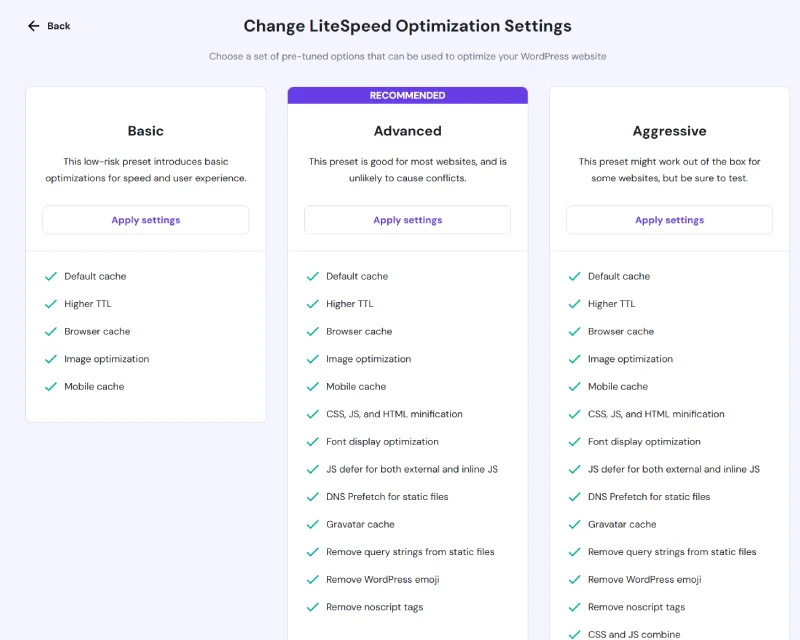
Our current SanishTech dashboard also shows LiteSpeed active on the site.
That does not automatically make every website fast. A badly optimized theme, oversized images, excessive JavaScript, or too many plugins can still make a website slow even on good hosting.
Having a hosting stack designed around LiteSpeed does, however, give WordPress owners a strong foundation without requiring them to configure their own web server.
3. SSL and CDN Management Are Built Into the Workflow
SSL and CDN functionality are active on our current SanishTech setup.
We like being able to manage core website infrastructure from the same hosting environment rather than piecing together several separate dashboards just to launch a normal WordPress website.
For a new WordPress user, fewer moving parts generally means fewer opportunities to misconfigure something.
4. WordPress Management Is Straightforward
Hostinger is particularly well suited to WordPress users.
Its WordPress hosting tools include installation, automatic WordPress updates, backups, LiteSpeed optimization, migration tools, security features, and developer functionality such as SSH, Git, WP-CLI, and PHP controls depending on the plan.
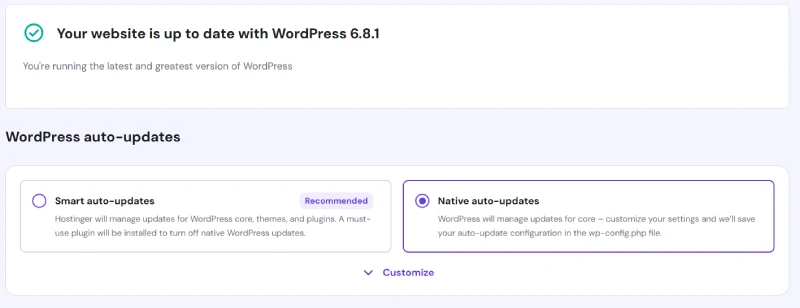
Higher plans also include WordPress staging, which lets you test changes away from the production website before pushing them live.
For SanishTech, the important benefit is not one flashy WordPress feature. It is that routine administration is accessible without requiring server-level management.
5. There Is Room to Grow Beyond Basic Hosting
Hostinger is no longer limited to entry-level shared hosting.
A smaller website can begin with Premium, while growing projects can move toward Unlimited, Cloud hosting, or VPS infrastructure when they genuinely need more resources.
That upgrade path matters because migrating to a completely different provider every time a website grows creates additional work and risk.
Hostinger Performance: What Has Our Experience Been?
Our experience running SanishTech on Hostinger has been positive, but we want to be careful about how hosting performance is discussed.
You will often see hosting reviews publish a load time such as 600 ms and present it as if that number permanently represents the hosting company.
It does not.
Performance changes according to:
- server location
- website theme
- plugins
- caching configuration
- image size
- database load
- third-party scripts
- traffic levels
- the location used for testing
We have previously run performance checks on WordPress sites hosted through Hostinger, including PageSpeed testing.
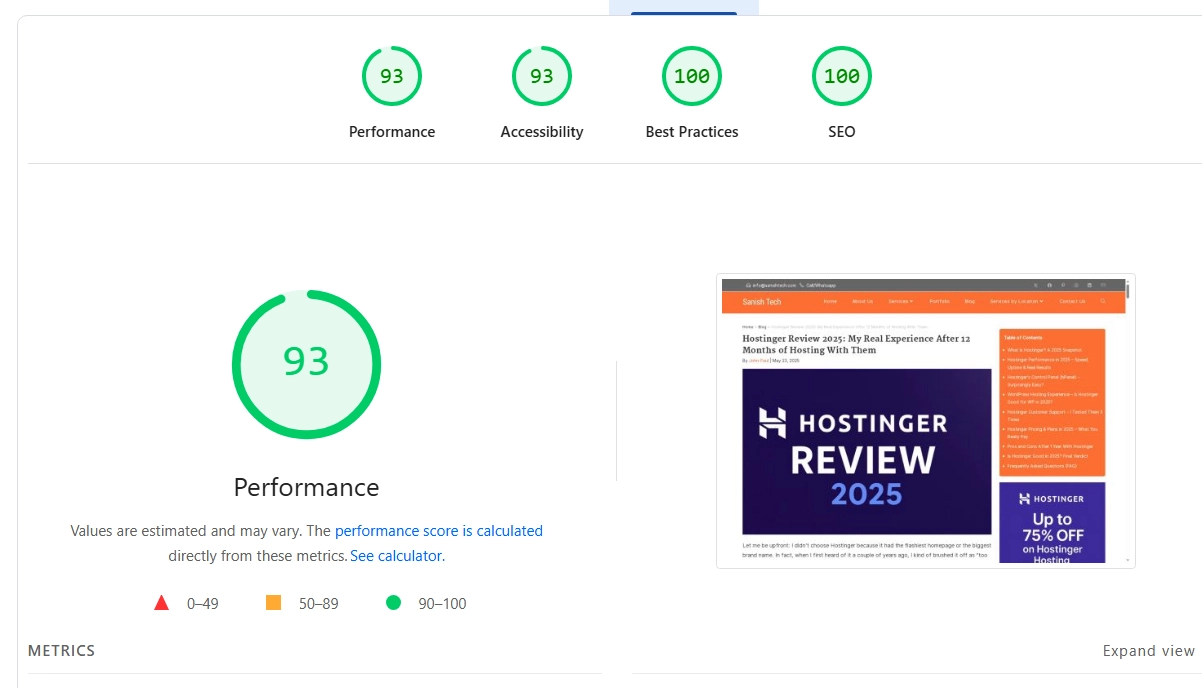
We have also monitored Core Web Vitals during optimization work.
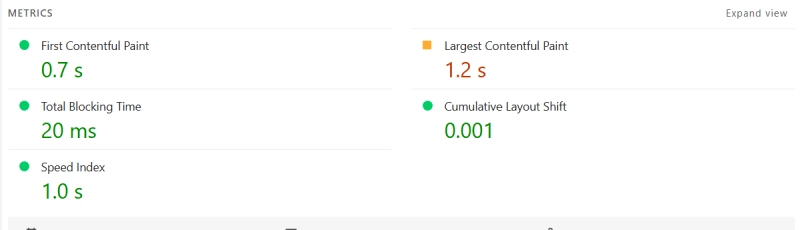
Our current SanishTech installation uses Hostinger’s LiteSpeed environment along with CDN functionality and WordPress optimization.
We have been comfortable continuing to run the production site on Hostinger rather than moving it elsewhere, which is more meaningful to us than publishing a single synthetic speed-test number.
Hostinger currently advertises a 99.9% uptime guarantee for its managed WordPress hosting. That is Hostinger’s published guarantee, not an uptime percentage independently measured by SanishTech.
Hostinger Pricing in 2026
Pricing is where Hostinger can look extremely attractive at first glance, but it is also the section buyers need to read most carefully.
The headline monthly price is usually based on purchasing a long initial term and paying for that period upfront.
The following prices were checked against Hostinger’s US pricing during our September 2026 update.
| Plan | 48-Month Intro Price | Renewal Price | Websites | Storage | Backups |
|---|---|---|---|---|---|
| Premium | $2.99/mo | $10.99/mo | 3 | 20 GB SSD | Weekly |
| Unlimited | $3.99/mo | $16.99/mo | Unlimited | 50 GB NVMe | Daily |
| Cloud Startup | $7.99/mo | $25.99/mo | Unlimited | 100 GB NVMe | Daily + on-demand |
Important: These are advertised monthly equivalents for the 48-month purchase term. You pay for the selected term upfront. Taxes, promotions, location, currency, and plan changes can alter the amount shown at checkout.
Readers in India may see different local pricing, so always verify the live price before purchasing.
Check the price available in your region
Hostinger promotions and renewal rates change, so compare the current checkout price before committing to a long term.
View Current Hostinger DealThe Biggest Catch: Hostinger Renewal Pricing
This is the part of Hostinger’s pricing we would not ignore.
The introductory discounts are large, but the renewal prices are much higher.
For example, Premium may be advertised at $2.99/month for its long introductory term while carrying a considerably higher renewal rate afterward.
That does not automatically make Hostinger poor value, but you should calculate the renewal cost rather than judging the service entirely by the large discount shown during signup.
Our recommendation is simple: choose a long introductory period only when you are comfortable paying the upfront total and expect to keep the website long enough for that commitment to make sense.
Which Hostinger Plan Should You Choose?
Choose Premium If…
Premium is the logical starting point for someone running a small number of normal websites.
We would consider it for:
- a personal blog
- a portfolio
- a small business website
- a new affiliate website
- a creator website
- a smaller WordPress project
Choose Unlimited If…
Unlimited makes more sense when you need additional websites, more storage, daily backups, staging, or a broader set of WordPress and business features.
It can be particularly interesting for freelancers, website builders, agencies, or people managing several active websites.
Choose Cloud Startup If…
Cloud Startup is aimed at heavier projects that require considerably more resources.
We would not recommend paying for cloud hosting simply because it sounds better.
Upgrade when traffic, application workload, ecommerce activity, or resource usage genuinely requires it.
Hostinger Backups: One Difference You Should Notice
Backup frequency varies by plan, and this is one feature we recommend checking carefully before buying.
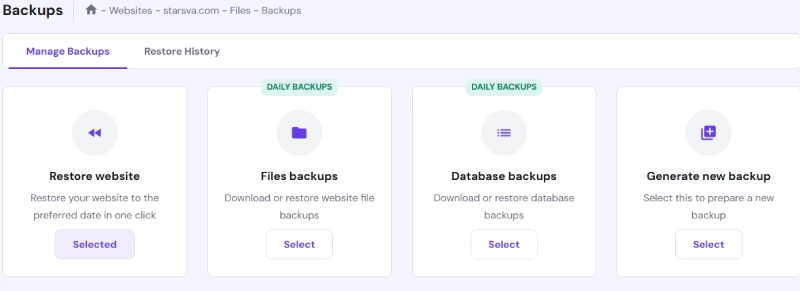
Premium currently includes weekly backups, while higher plans can include daily or on-demand backups.
That distinction matters more than many buyers realize.
If you update an active ecommerce website or business site frequently, seven days between backups can represent a lot of lost changes.
For a simple blog updated occasionally, weekly backups may be perfectly adequate.
We would therefore consider backup frequency when choosing a plan rather than looking only at storage and the number of websites.
Hostinger Customer Support: What Should You Expect?
Hostinger provides online customer support around the clock.
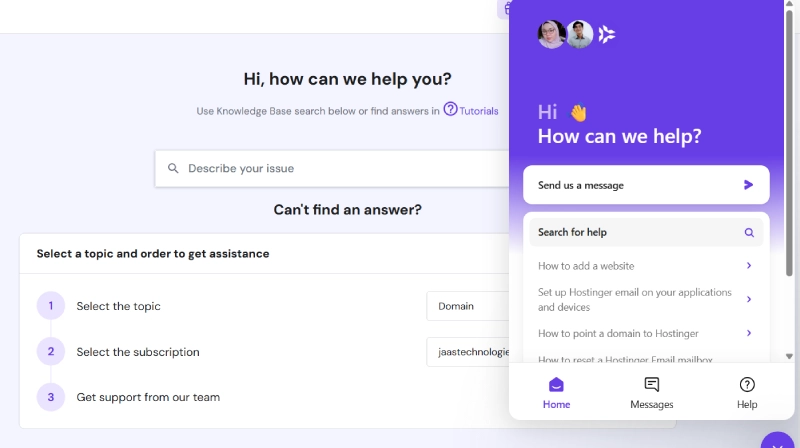
One limitation is worth knowing before purchasing: Hostinger does not provide phone support.
The company handles support online, where users can share screenshots, error messages, URLs, and other diagnostic information.
For us, that is not a deal breaker because many hosting problems are easier to explain when you can paste an error or send a screenshot.
Someone who strongly prefers speaking with a support agent by phone should consider that limitation before purchasing.
Hostinger’s 30-Day Money-Back Guarantee
Eligible Hostinger web and cloud hosting purchases are currently covered by a 30-day money-back guarantee.
That gives new customers time to install WordPress, explore hPanel, check performance, and decide whether the platform is suitable.
Not every Hostinger product or domain purchase is necessarily refundable, so check the current refund terms when your purchase includes additional services.
Is Hostinger Good for WordPress?
Yes. WordPress is one of the areas where Hostinger makes the most sense.
We run SanishTech on WordPress through Hostinger ourselves.
Current WordPress functionality includes:
- WordPress installation tools
- LiteSpeed optimization and caching
- automatic WordPress updates
- website migration
- automatic backups
- security and vulnerability-related tools
- SSL
- CDN functionality
- SSH and Git support
- WP-CLI
- PHP management
- staging on eligible plans
WordPress.org also currently lists Hostinger among its recommended hosting providers.
That does not mean it is automatically the best host for every WordPress site. A large WooCommerce operation or resource-heavy web application may eventually need cloud, VPS, or more specialized infrastructure.
For normal blogs, business sites, content websites, and many small-to-medium WordPress projects, Hostinger offers a strong balance between usability, features, and cost.
Hostinger hPanel: Our Favorite Part of the Service
If we had to choose one Hostinger feature that affects us most often, it would probably be hPanel.
Hosting dashboards are rarely exciting, but they can make everyday website maintenance either straightforward or unnecessarily frustrating.
Hostinger’s dashboard gives us quick access to the parts of SanishTech we actually need to manage.
We can move between WordPress controls, databases, files, domains, backups, performance settings, security, and analytics without navigating a traditional cPanel interface.
Experienced cPanel users may initially need time to adjust because hPanel organizes features differently.
After using both approaches, we do not consider the lack of cPanel a disadvantage for our own workflow.
Hostinger Pros and Cons
| What We Like | What Could Be Better |
|---|---|
| Competitive introductory pricing | Renewal prices rise substantially |
| Very approachable hPanel dashboard | No traditional cPanel |
| Good WordPress feature set | No phone support |
| LiteSpeed hosting environment | Lower plans may have less frequent backups |
| SSL, CDN, backups, and security tools integrated | Some useful features require higher plans |
| Easy upgrade path to cloud and VPS | Long promotional terms require a larger upfront payment |
For a more detailed breakdown, see our Hostinger pros and cons analysis.
Who Should Choose Hostinger?
We think Hostinger is particularly suitable for:
- WordPress beginners
- bloggers
- affiliate marketers
- content websites
- small businesses
- freelancers
- creators
- developers who want simple managed hosting
- site owners who prefer hPanel over server administration
Who Should Consider Another Host?
Hostinger may not be the right choice when:
- You require phone-based technical support.
- You specifically need cPanel.
- You dislike committing to a long introductory term.
- The renewal rate is outside your future budget.
- You need dedicated enterprise infrastructure from day one.
- You require server-level customization better suited to a VPS.
Hostinger vs Bluehost
Hostinger and Bluehost are both well-known WordPress hosting options.
We would not reduce the comparison to one company being universally better.
Hostinger’s appeal is particularly strong around introductory pricing, hPanel, LiteSpeed-based WordPress hosting, and its collection of integrated tools.
Bluehost may still appeal to users who prefer its hosting ecosystem or are already using Bluehost products.
We cover the decision in more detail here: Hostinger vs Bluehost .
Is Hostinger Worth It in 2026?
Yes, Hostinger is worth considering in 2026, particularly for WordPress users who value simple management and competitive introductory pricing.
Our recommendation carries more weight for us because SanishTech itself runs on the platform.
We like hPanel. We like having LiteSpeed, SSL, CDN, backups, WordPress controls, databases, files, and other hosting functions available within one environment.
Hostinger has also developed a much stronger WordPress platform than its old reputation as merely “cheap hosting” suggests.
The biggest warning is pricing.
Do not judge the purchase solely by the heavily discounted first-term monthly figure. Look at the full upfront payment and the renewal rate before deciding.
If those numbers fit your budget, Hostinger offers a compelling combination of price, usability, WordPress functionality, and room to scale.
Our Hostinger recommendation
Compare the current plans and renewal rates first. If the numbers fit your project, Hostinger is a hosting provider we are comfortable recommending because we use it for SanishTech ourselves.
Check Hostinger’s Current OfferFrequently Asked Questions
Is Hostinger good in 2026?
Yes. Hostinger remains a strong option for WordPress sites, blogs, creators, and small businesses. SanishTech.com has been running on Hostinger since November 2025, and our overall experience has been positive.
Is Hostinger good for WordPress?
Yes. Hostinger offers WordPress installation, LiteSpeed optimization, automatic updates, backups, security tools, migration, developer tools, and staging on eligible plans.
How much does Hostinger cost?
Hostinger’s pricing varies by region, promotion, plan, and billing term. Long introductory terms usually provide the lowest advertised monthly equivalent, while renewal prices are substantially higher.
Is Hostinger cheap after renewal?
It becomes considerably more expensive after the introductory term. Always compare the initial price with the renewal amount before buying.
Does Hostinger use cPanel?
No. Hostinger uses its own control panel called hPanel. We find it easier to navigate for everyday WordPress and hosting management, although experienced cPanel users may need a short adjustment period.
Does Hostinger provide daily backups?
Backup frequency depends on the plan. Entry-level options may include weekly backups, while higher plans provide daily or on-demand backup functionality.
Does Hostinger offer phone support?
No. Hostinger currently provides customer support online rather than through a telephone support line.
Does Hostinger offer a money-back guarantee?
Eligible web and cloud hosting purchases are currently covered by a 30-day money-back guarantee. Some products and domain purchases have different refund rules.
Can Hostinger handle a real production website?
Yes. SanishTech.com itself is a live production WordPress website hosted on Hostinger. The right plan still depends on traffic, resource usage, ecommerce activity, and the complexity of the website.
Which Hostinger plan is best for beginners?
Premium is generally a logical starting point for beginners managing a small number of websites. Users who need more storage, daily backups, staging, or additional resources should compare the higher plans before purchasing.