

Paying $600/month for AI video tools is unsustainable. Runway takes $97. Synthesia wants $30. Add Pika, Luma, HeyGen—the costs spiral fast.
Infinity AI Video Lab claims to fix this: one dashboard, 15+ AI video models (Veo, Sora, Runway, Kling, Luma, Pika), one-time fee.
Sounds too good to be true.
Because “all-in-one” tools usually mean watered-down access with hidden limits. But if this actually delivers real access to premium AI engines, it changes the economics completely.
So does it work? Or is this just clever repackaging? Let me break down what Infinity AI Video Lab actually does and whether it’s worth it.
Stop paying $600/month for multiple AI video tools?
If you’re tired of juggling Runway, Sora, Kling, and other subscriptions, check the current pricing for Infinity AI Video Lab and see what’s included in the early bird offer.
Get Infinity AI Video Lab Now + BonusesWhat Is Infinity AI Video Lab?
Infinity AI Video Lab is a unified AI video platform that provides access to 15+ leading AI video models through a single dashboard. Instead of subscribing to Runway, Sora, Kling, and Luma separately, you get them all in one place.
The core value proposition is consolidation plus cost savings. Rather than paying hundreds per month across multiple platforms, you pay once and access everything.
Here’s what makes it different from typical AI video tools:
- Multi-model access. You’re not locked into one AI engine. Choose Veo for cinematic storytelling, Kling for fast social clips, or Synthesia for avatar videos—all from the same dashboard.
- One-time payment. No monthly subscriptions. Pay once, use forever (according to the sales page).
- All versions included. When Veo 4 or Sora 3 launches, they claim it’s automatically added to your account.
- Commercial license included. Create and sell videos to clients without additional licensing fees.
The platform includes these AI video models:
- Google Veo (2, 3, 3.1)
- OpenAI Sora (1, 2)
- Runway AI (Gen-4, Gen-4.5)
- Kling AI (1.5 Pro, 1.6 Pro, 2.1 Standard/Master)
- Luma Labs (Dream Machine, Luma Ray 3)
- Pika Labs (2.0, 2.2)
- PixVerse (V5, V5.5)
- Synthesia (talking head videos)
- HeyGen (AI presenters)
- Plus: Seedance, LTX-2, Hailuo AI, Stable Video Diffusion, and more
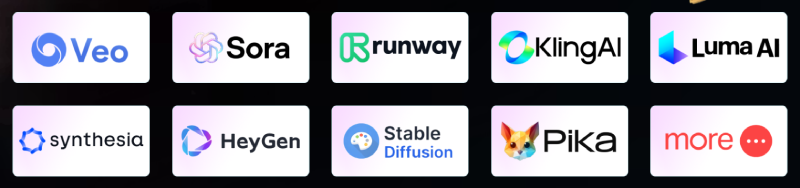
Infinity AI Video Lab also includes image generation (DALL-E 3, SDXL), voice generation (ElevenLabs), and video editing tools—all inside one interface.
The platform is cloud-based, requires no downloads, and is designed for creators, agencies, and marketers who need multiple video styles without juggling apps.
Key Features of Infinity AI Video Lab
Let me walk through what actually matters here—the features that justify the “all-in-one” positioning.
1. Access to All Major AI Video Models
This is the headline feature. You get Veo, Sora, Runway, Kling, Luma, Pika, PixVerse, Synthesia, HeyGen, and more—all accessible from one dashboard.
Why does this matter? Because different AI engines excel at different tasks:
- Veo is great for cinematic storytelling with consistent characters
- Runway handles high-end motion graphics and professional editing
- Kling is fast and perfect for social media clips
- Synthesia/HeyGen create AI avatar videos without cameras
- Luma produces realistic lighting and textures
Instead of subscribing to each separately, you pick the best tool for each project from one account.
2. Text-to-Video & Image-to-Video Generation
Describe what you want or upload an image, and the AI generates video. This works across all supported models, so you can test which engine produces the best result for your specific use case.
Text prompts like “cinematic shot of a coffee shop at sunrise” or “product demo of a smartphone rotating” get turned into video clips in minutes.
3. Multi-Format Video Support
Generate videos in vertical (Reels/TikTok/Shorts), square (Instagram), or horizontal (YouTube/ads) formats. The platform automatically adapts output based on your selected aspect ratio.
This is important for agencies or creators producing content across multiple platforms—you’re not stuck with one format.
4. AI Avatar & Presenter Videos
Through Synthesia and HeyGen integration, you can create talking-head videos, AI presenters, and avatar-based explainer content without filming anything.
This is useful for training videos, course content, product demos, or client work where you need a human presence without hiring talent.
5. Native Audio & Lip-Sync Support
Supported models can generate videos with audio, voiceovers, music, and lip-synced dialogue. This removes the need for separate audio tools or manual syncing.
The platform includes ElevenLabs voice generation, so you can create multilingual voiceovers directly inside the dashboard.
6. Long-Form & Multi-Scene Videos
Unlike tools limited to 5-10 second clips, Infinity AI Video Lab supports longer videos and multi-shot sequences. This makes it viable for more complex storytelling, not just quick social clips.
7. Built-In Video Editing Tools
Trim, merge, upscale, and enhance videos inside the platform. You don’t need to export to a separate editor for basic adjustments.
This streamlines the workflow—create, edit, and export all happen in one place.
8. 4K/HD Output with Cinematic Effects
Depending on the model you choose, you can generate 4K videos with HDR, camera motion, cinematic lighting, and smooth transitions.
This makes the output suitable for professional client work, not just personal projects.
9. Commercial License Included
Create and sell videos to clients, use them in ad campaigns, or build YouTube channels—100% commercial rights are included.
No additional fees or per-project licensing hassles.
10. SaaS Mode (Resell Capability)
The platform includes the ability to launch your own branded AI video service. You can charge users monthly for video creation access under your own brand.
This turns Infinity AI Video Lab into a business opportunity, not just a creation tool.
Want all AI video models in one dashboard?
Infinity AI Video Lab includes Veo, Sora, Runway, Kling, Luma, Pika, Synthesia, HeyGen and more—plus commercial license. Check what’s included in the launch package below.
Check Current Price & BonusesHow Does Infinity AI Video Lab Work?
The workflow is designed to be straightforward, even if you’re switching between different AI models.
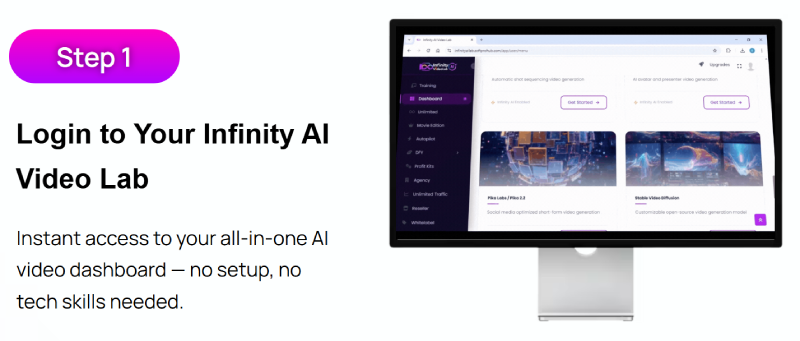
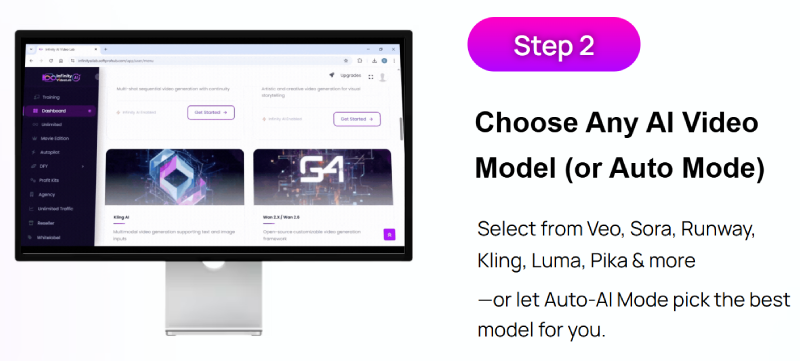
Step 1: Log In & Choose Your AI Model
You access the cloud-based dashboard from any device. Inside, you see all available AI video models—Veo, Sora, Runway, Kling, Luma, etc.
Pick the one that fits your project. If you’re not sure, there’s an “Auto Mode” that selects the best engine based on your prompt.
Step 2: Enter Your Prompt or Upload Image
Type a text description of the video you want, or upload an image to animate. For example:
- “Create a 10-second cinematic video of a mountain sunrise with drone-style camera movement”
- “Generate a product showcase video for a smartwatch with smooth rotation”
- “Create a talking-head explainer video using a female AI avatar”
The platform interprets your input and feeds it to the selected AI model.
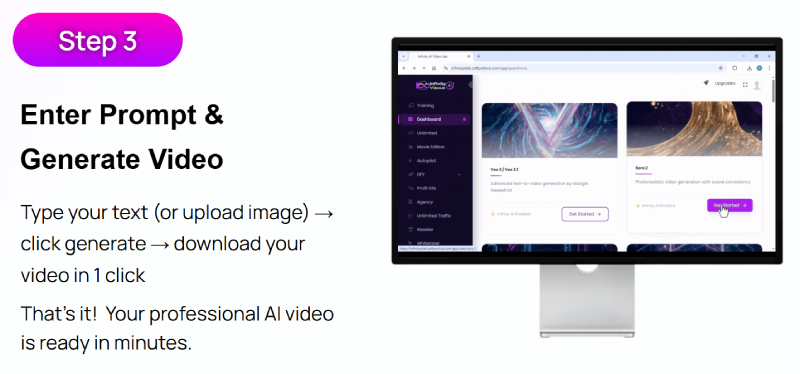
Step 3: Generate & Download Video
The AI processes your request and generates the video. Depending on length and complexity, this takes anywhere from seconds to a few minutes.
Once complete, you can preview it, make edits (trim, enhance, add audio), or download it immediately.
If you’re using avatar models like Synthesia or HeyGen, you can also add voiceovers and scripts at this stage.
The entire process is designed to minimize friction. You’re not learning different interfaces for each AI tool—everything happens through one dashboard.
This is especially valuable if you’re creating multiple types of videos (social clips, long-form content, avatars) and don’t want to log into 5 different platforms.
The real question is: does having access to all these models actually translate into better results? Or is it just overwhelming choice without meaningful differentiation?
That’s where we need to get real about use cases and limitations.
Who Is Infinity AI Video Lab Best For?
Let’s be direct: Infinity AI Video Lab isn’t for everyone. The value depends entirely on how you create video content and whether you actually need access to multiple AI engines.
Here’s who will get the most value:
1. Agencies & Freelancers Creating Video Content for Clients
If you’re producing videos for clients across different industries and formats, having access to multiple AI engines is genuinely useful.
One client needs cinematic brand videos (use Veo or Runway). Another wants quick social clips (use Kling or Pika). A third needs training videos with AI avatars (use Synthesia or HeyGen).
Instead of subscribing to each tool separately, you handle everything from one dashboard and one payment.
2. Content Creators Who Test Different Video Styles
If you’re experimenting with different video formats—YouTube explainers, TikTok clips, Instagram Reels, cinematic storytelling—you benefit from being able to switch AI models based on what performs best.
Each engine has different strengths, and Infinity AI Video Lab lets you test them without paying for each individually.
3. Marketers Running Multi-Platform Campaigns
Need vertical videos for Reels, horizontal for YouTube ads, and avatar videos for landing pages? Having all formats and styles accessible from one account speeds up campaign production significantly.
4. Entrepreneurs Wanting to Launch an AI Video SaaS
The resell/SaaS mode is interesting if you want to offer video creation services under your own brand. You can charge clients monthly for access and keep all profits.
This turns Infinity AI Video Lab into a business asset, not just a creation tool.
5. People Tired of Monthly Subscription Fatigue
If you’re currently paying for Runway ($97/month), Synthesia ($30/month), Luma ($30/month), and others—and you hate the recurring charges—consolidating everything into a one-time payment makes financial sense.
Who Should NOT Buy Infinity AI Video Lab
Now let’s flip it. Here’s who this tool is NOT for:
- People who only need one type of video. If you’re only creating social clips or only using avatars, buying access to 15 models is overkill. Just subscribe to the one you need.
- Professional video editors who prefer manual control. If you’re deeply skilled in Premiere Pro or DaVinci Resolve and want frame-by-frame control, AI video generators (even advanced ones) will feel limiting.
- Those expecting Hollywood-quality output. AI video is impressive, but it’s not replacing professional cinematography or VFX teams yet. Manage your expectations.
- Anyone who won’t use multiple models. The value here is consolidation. If you’re not going to experiment with different AI engines, you’re paying for features you won’t use.
- Skeptics of one-time-payment sustainability. If you’re wondering “how can they offer lifetime access with free updates for $14.95?”—that’s a valid concern. This pricing model often means future limitations or upsells.
If any of that describes you, save your money.
Pricing and OTO Breakdown
Here’s where JVZoo launches always get interesting—the front-end price looks amazing, then the upsells start.
Front-End Offer: Infinity AI Video Lab Core
Price: $14.95 one-time (early bird pricing)
Regular Price (claimed): $597/month
What you get:
- Lifetime access to Infinity AI Video Lab dashboard
- Access to all 15+ AI video models (Veo, Sora, Runway, Kling, Luma, Pika, PixVerse, Synthesia, HeyGen, etc.)
- All current and future model versions
- Text-to-video & image-to-video generation
- Multi-format support (vertical, square, horizontal)
- AI avatar and presenter videos
- Native audio & lip-sync support
- Built-in video editing tools
- 4K/HD output with cinematic effects
- Commercial license included
- 30-day money-back guarantee
At $14.95, this is a no-brainer if it works as described. Even if you only use it for one client project or generate a few videos, you’ve broken even compared to one month of Runway or Synthesia.
OTO 1: Infinity AI Video Business Turbo Upgrade
Price: $9.95 (normally $197, according to sales page)
This upgrade includes:
- “Turbo AI Power” (presumably faster processing)
- Advanced video motion control features
- Exclusive new AI video model every month
- 24/7 exclusive support
My take? If the core platform works well, this might be worth $9.95 for faster rendering and priority support. But test the front-end first.
Potential Additional OTOs
Based on typical JVZoo structures, expect:
- OTO 2: Done-for-you templates or video packs ($37-$67)
- OTO 3: Reseller/agency license upgrade ($97-$197)
- OTO 4: Traffic or monetization training ($47-$97)
These are speculative based on launch patterns, but likely.
My advice: Start with the $14.95 front-end. Test it. If it delivers, consider the Turbo upgrade. Skip the rest unless you have a specific need.
Pros and Cons
Let’s get brutally honest about what works and what concerns me.
Pros:
✅ Access to multiple AI video models from one dashboard. This is the core value. If you’re currently paying for several tools, consolidation saves money and time.
✅ One-time payment vs. monthly subscriptions. At $14.95, this is cheaper than one month of any premium AI video tool.
✅ Commercial license included. No additional fees to use videos for client work or monetization.
✅ Multi-format support. Generate vertical, square, or horizontal videos without exporting and reformatting.
✅ Future model updates included. If they actually add new AI engines as they launch, this becomes more valuable over time.
✅ Cloud-based simplicity. No downloads, no hardware requirements, works from any device.
✅ SaaS/resell capability. You can turn this into a business if you want to offer video services.
Cons:
❌ “All models included” might mean API access, not direct platform use. The sales page isn’t clear whether you’re getting native access to these tools or just API integration. There’s a big difference in quality and control.
❌ Sustainability of lifetime access at $14.95 is questionable. API costs for Veo, Sora, Runway, etc. are expensive. How do they offer unlimited access for a one-time fee? Either there are hidden limits, or this pricing won’t last.
❌ No real proof of output quality. The sales page shows example videos, but doesn’t clarify which were created with Infinity AI Video Lab vs. pulled from the original platforms.
❌ Aggressive JVZoo-style marketing. Countdown timers, “last chance” language, exaggerated savings claims—classic launch hype that makes me skeptical.
❌ Unclear model limitations. Are all features of each AI engine available? Or do you get limited/basic versions? The sales page doesn’t specify.
❌ Support and longevity concerns. One-time-payment tools often lack ongoing support or updates after the initial launch buzz fades.
❌ Learning curve across 15 models. Even with one dashboard, understanding which AI works best for which project takes time and experimentation.
Considering Infinity AI Video Lab for your business?
Before you decide, check the current pricing and bonuses. The $14.95 early bird offer is limited and increases after the launch period ends.
See What’s Included in Infinity AI Video LabVerdict: Is Infinity AI Video Lab Worth It?
Alright, let’s cut through the hype and get real.
Infinity AI Video Lab is NOT going to replace professional video production teams, make you a millionaire overnight, or magically solve all your content creation challenges. The sales page oversells—that’s standard for JVZoo launches.
But here’s what it MIGHT do:
It might genuinely save you hundreds of dollars per month if you’re currently paying for multiple AI video subscriptions. Having Veo, Sora, Runway, Kling, Luma, Pika, Synthesia, and HeyGen accessible from one dashboard is legitimately valuable—if it works as described.
At $14.95, the risk is minimal. Even if you only get access to 3-4 of the promised models and they work reasonably well, you’ve still saved money compared to subscribing individually.
However, temper your expectations.
The biggest unknown is how these models are actually implemented. Are you getting full native access to these platforms? Or is this just API integration with rate limits and reduced functionality?
The sales page doesn’t clarify, which is a red flag.
The real question: Do you actually need access to all these models?
If you’re creating diverse video content—social clips, long-form, avatars, cinematic—and you’re tired of juggling tools, this makes sense.
If you only create one type of video or rarely use AI video generators, paying for access to 15 engines you won’t touch is wasteful.
My take: At $14.95, it’s worth testing if you fit the target audience. The 30-day guarantee reduces risk. Just don’t expect miracles, and be prepared for potential upsells or limitations not mentioned in the sales copy.
Final Verdict
Infinity AI Video Lab is worth the $14.95 for:
- Agencies or freelancers creating multiple video styles for clients
- Content creators experimenting with different AI video formats
- Anyone currently paying $100+/month across multiple AI video tools
- People who want to test various AI engines without separate subscriptions
Skip Infinity AI Video Lab if:
- You only need one specific type of video (just subscribe to that tool)
- You’re a professional video editor who prefers manual control
- You’re skeptical of “too good to be true” lifetime access claims
- You won’t actually use multiple AI models
For me? At this price, I’d test it. The consolidation value is real if the implementation is solid. Just keep your expectations grounded and remember: AI video tools are assistants, not replacements for strategy and creativity.
Ready to consolidate your AI video tools?
If Infinity AI Video Lab fits your needs—whether for client work, content creation, or building a video SaaS—grab the early bird pricing while available. One payment, lifetime access, 30-day guarantee.
Get Infinity AI Video Lab Now + BonusesFAQs
How long will the $14.95 price be available?
The sales page claims this is an early bird launch price that will increase to $597/month after the promotional period. Typical JVZoo launches keep early bird pricing for 3-7 days, but that timeline isn’t guaranteed.
Do I really get access to all these AI video models?
The sales page lists 15+ models, but doesn’t clarify whether you’re getting native platform access or API integration. This is a critical detail that’s frustratingly vague. I’d recommend asking support before buying if this matters to you.
Is there a monthly fee after I buy?
Not according to the sales page. The $14.95 is positioned as a one-time payment with lifetime access and free future updates. However, be aware that API-based tools sometimes introduce usage limits or require credits down the line.
Can I really use this to start an AI video SaaS business?
The platform includes resell/SaaS capability, meaning you can offer video creation services under your own brand and charge users monthly. However, running a successful SaaS requires more than just software—you need marketing, support, and a clear value proposition.
What if the quality isn’t as good as using the original platforms?
This is a legitimate concern. API integrations often don’t provide the full feature set of native platforms. The 30-day money-back guarantee gives you time to test output quality and compare it to what you’d get directly from Runway, Veo, or Sora.
Will this work on Mac, PC, and mobile?
Yes. Infinity AI Video Lab is cloud-based, so it works on any device with an internet connection—Windows, macOS, iOS, Android, or tablets.
Are there any usage limits or restrictions?
The sales page claims “unlimited AI video creation,” but API-based tools often have rate limits or processing caps. This isn’t clearly addressed, which is concerning. I’d verify this with support if you plan to use it heavily.
What happens if I don’t like it?
You’re covered by a 30-day money-back guarantee. If the platform doesn’t meet your expectations, contact support for a refund. Just make sure to test it thoroughly within that window.
Is this better than subscribing to Runway or Sora individually?
Different use case. If you only use one AI video style consistently, subscribing to that specific tool gives you the most control and features. Infinity AI Video Lab makes sense if you need variety and want to avoid paying for multiple subscriptions.
