
Video Schema Generator
Create correct VideoObject JSON LD in automatic YouTube mode or manual mode.
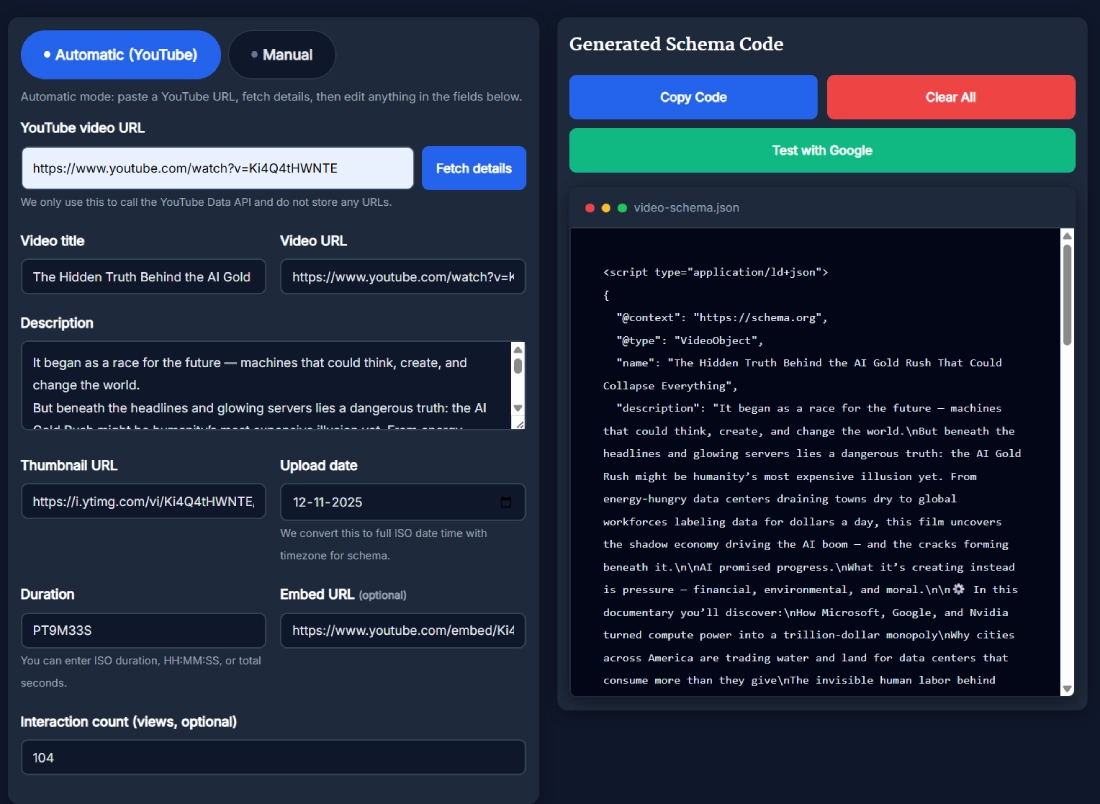
Automatic mode: paste a YouTube URL, fetch details, then edit anything in the fields below.
This video schema generator builds accurate VideoObject JSON LD markup for your videos using either automatic YouTube data or fully manual input. It converts titles, descriptions, URLs, thumbnails, upload dates, durations, and optional engagement numbers into valid schema code that search engines can understand. You get ready to paste structured data without touching code, making optimization fast and stress free.
What is the Video Schema Generator?
The video schema generator is a tool that creates VideoObject schema markup in a clean JSON LD format. It takes your video information and turns it into structured data that helps Google understand what your video is about. When search engines understand your video clearly, you get a better chance of enhanced visibility in search results. This tool makes the process simple by removing the need for manual coding or technical expertise. If the video is embedded inside a long-form blog post or review, combining it with the Article Schema Generator helps align the page’s primary content with the VideoObject markup.
Key Features of the Video Schema Generator
This tool is designed to make structured data generation simple, fast, and accurate. It includes both automatic YouTube extraction and manual mode so you can choose whichever workflow fits your project. Each field is built to match Google’s expectations for valid VideoObject markup.
- Automatic mode that fetches YouTube video details
- Manual mode for full custom input
- Video title, description, and URL fields
- Thumbnail URL input for better preview accuracy
- Upload date processor that formats ISO timestamps
- Duration support in ISO 8601 format
- Optional embed URL and interaction counts
- Clean JSON LD output ready for SEO plugins or custom code blocks
How to Use the Video Schema Generator
Using the video schema generator takes only a few seconds, and the workflow stays consistent even when switching between automatic and manual modes. You simply fill in the fields and let the tool assemble valid structured data for you.
- Choose automatic or manual mode
- Enter the YouTube URL or fill in the fields manually
- Add title, description, thumbnail, and other details
- Check the upload date and duration formats
- Click to generate the schema code
- Copy the output and paste it into your SEO plugin or site header
- Test the markup using Google’s validation tools
When You Should Use This Tool
You should use this tool whenever you publish videos on your website and want search engines to understand them correctly. Video schema markup provides context that helps Google identify the video’s content, relevance, and key details. Any time you embed a YouTube video or upload your own media file, adding structured data improves your SEO efforts. This is especially useful for tutorials, reviews, documentaries, interviews, and product demos. For tutorial-style videos, pairing this with the HowTo Schema Generator can be a strong combo because the page can describe both the process and the video that demonstrates it.
Benefits of Using This Tool
Structured data often improves how your video appears in search engines, and this tool handles the formatting so you can focus on your content. It also eliminates the risk of manual errors that commonly happen when writing JSON LD by hand.
- Helps search engines understand your video
- Supports visibility improvements in Google Search
- Reduces technical errors in JSON LD markup
- Saves time for SEO professionals and creators
- Works for both YouTube videos and custom embeds
- Fits seamlessly into any CMS including WordPress
Real Example of How the Tool Works
Imagine you have a new video review or tutorial uploaded on YouTube and want Google to see the correct context. You paste the video URL into the automatic mode, fetch the details, verify the fields, and instantly get valid VideoObject schema markup. If you prefer more control, you switch to manual mode and adjust everything according to your needs. The schema output is ready to paste into your site within seconds. If the page also includes FAQ blocks under the video, generating markup with the FAQ Schema Generator can help you earn richer SERP enhancements on the same URL.
Helpful Tips for Better Results
Generating markup is only part of the process. Adding a few small optimizations can further strengthen your video’s presence in search.
- Keep your video title and description clear and keyword focused
- Add accurate upload dates so crawlers can understand freshness
- Use a high quality thumbnail URL
- Match your duration correctly in PT format
- Embed the video on a page with relevant content
- Revalidate the schema after major edits
Comparison With Other Tools
Many tools that generate video schema markup either restrict fields or produce incomplete JSON LD. This tool is designed to give full customization, especially for people who prefer precision over shortcuts. It supports both structured automatic extraction and full manual mode without locking you into preset limits.
- More customization than most free generators
- Designed for SEO workflows rather than simple copy paste
- Supports additional optional fields like embed URL and interactions
- Cleaner output compared to generic schema generators
Frequently Asked Questions
How does the video schema generator help with SEO?
The video schema generator strengthens your video SEO by producing valid structured data that search engines can interpret easily. When Google understands your video details like title, duration, description, and upload date, it becomes easier for them to display rich snippets. These enhanced listings often attract more clicks. The tool also reduces formatting errors and provides precise schema output you can copy directly into your website.
Does the video schema generator support YouTube links?
Yes, the tool supports YouTube links through automatic mode. When you paste a YouTube URL, the tool fetches title, description, thumbnail, and other details so you don't need to manually fill them. This makes the process fast and helps avoid data entry mistakes. You can still edit any field if required. For more flexibility, manual mode lets you override or customize all inputs.
Can I use this tool for videos that are not hosted on YouTube?
You can use the manual mode to generate schema for any video, including self hosted files or embedded videos from other platforms. You only need to enter the required fields like title, description, URL, thumbnail, upload date, and duration. The tool then outputs valid VideoObject JSON LD that works with any website. This makes it suitable for various CMS platforms and content types.
Do I need coding skills to generate VideoObject schema?
No coding skills are required because the tool handles all the technical JSON LD formatting for you. You simply fill in the fields, and the generator provides the final output in the correct structure. The goal is to make schema creation accessible to anyone, whether they are beginners or experienced SEO professionals. You can copy the code directly into your SEO plugin or template.
Why should I include video schema on my website?
Video schema gives search engines additional context about your video. This can improve indexing and help your content appear more prominently in search results. When Google understands your video's metadata clearly, it may show enhanced listings that attract more engagement. Using schema also helps maintain consistency across your pages and supports long term SEO performance. It is a simple addition with meaningful impact.
Does the tool generate valid JSON LD every time?
The tool is designed to follow Google’s structured data guidelines and produce valid JSON LD consistently. Each field is formatted to match VideoObject schema expectations, helping you avoid errors. For best results, you should still run the output through validation tools. This helps ensure that your content is correctly understood by search engines and remains error free after publishing.
Can video schema help my video appear in rich snippets?
Video schema increases the chances of appearing in rich snippets by giving Google structured information about your content. While it does not guarantee placement, it does improve eligibility. Rich snippets often include thumbnails, durations, and other useful details that draw more attention. Adding schema is one of the simplest ways to strengthen your video’s presence in search without advanced SEO work.
What fields are most important in VideoObject schema?
The most important fields include the video title, description, URL, thumbnail, upload date, and duration. These elements help search engines understand the core information about your video. Including additional fields like embed URL and interaction count can provide even more context. The video schema generator supports all essential fields so you can create a complete and accurate JSON LD output.
What is VideoObject schema markup?
VideoObject schema markup is structured data that helps search engines understand the content of your video. It includes metadata such as title, description, thumbnail URL, upload date, and duration. By adding this markup to your website, you improve how search engines interpret your video. This can make your content eligible for enhanced search displays and potentially increase visibility.
What is video schema markup used for?
Video schema markup is used to describe your video in a structured format that search engines can read. This markup improves clarity for crawlers and supports better indexing. When implemented properly, it may enable rich snippets and highlight important details about your video. Website owners often use it to optimize tutorials, reviews, training content, and product demonstrations.
How do I add video schema to WordPress?
You can add video schema to WordPress by generating the JSON LD with this tool and pasting it into your SEO plugin or header scripts. Many site owners place the markup inside the schema section of plugins like Rank Math, AIOSEO, or Yoast. You can also add it in a custom HTML block if needed. Just make sure the JSON LD code remains intact and unmodified.
What is the best way to validate VideoObject schema?
The best way to validate your VideoObject schema is to use Google’s structured data testing tools. They check whether your JSON LD contains the correct fields and formatting. These tools also highlight warnings or issues you may need to fix. Validating your markup helps ensure that search engines can interpret your video accurately and improves the reliability of your structured data.
Why isn't my video schema appearing in search results?
Even with valid schema, Google decides when to show enhanced video results based on factors like relevance, page quality, and search intent. Sometimes it takes time for Google to crawl and process new pages. Ensuring that your page has strong content around the embedded video and follows SEO best practices can improve your chances. Patience is key because schema does not guarantee instant results.
Do videos need structured data to rank better?
Videos can rank without structured data, but adding schema gives search engines more clarity. This can indirectly support better performance because Google can categorize your content more accurately. When your video information is clear and complete, search engines may index it faster and display richer details. Structured data is a simple way to strengthen your video SEO and improve long term visibility.
Can I generate video schema for multiple videos on one page?
Yes, you can generate separate schema blocks for each video and place them on the same page. Each JSON LD script should describe one video clearly. Keeping them separate avoids confusion and helps search engines understand the details individually. The video schema generator lets you create as many markup snippets as needed, making it easier to manage multiple video embeds.