
Bulk H1 Checker Online
Scan up to 200 URLs, extract every H1, identify missing or multiple headings, and export your results to CSV.
This tool just saved you time!
This tool is completely free — a small coffee helps keep it running for everyone 🙏
No subscriptions. No paywalls. Just coffee if you feel like it.
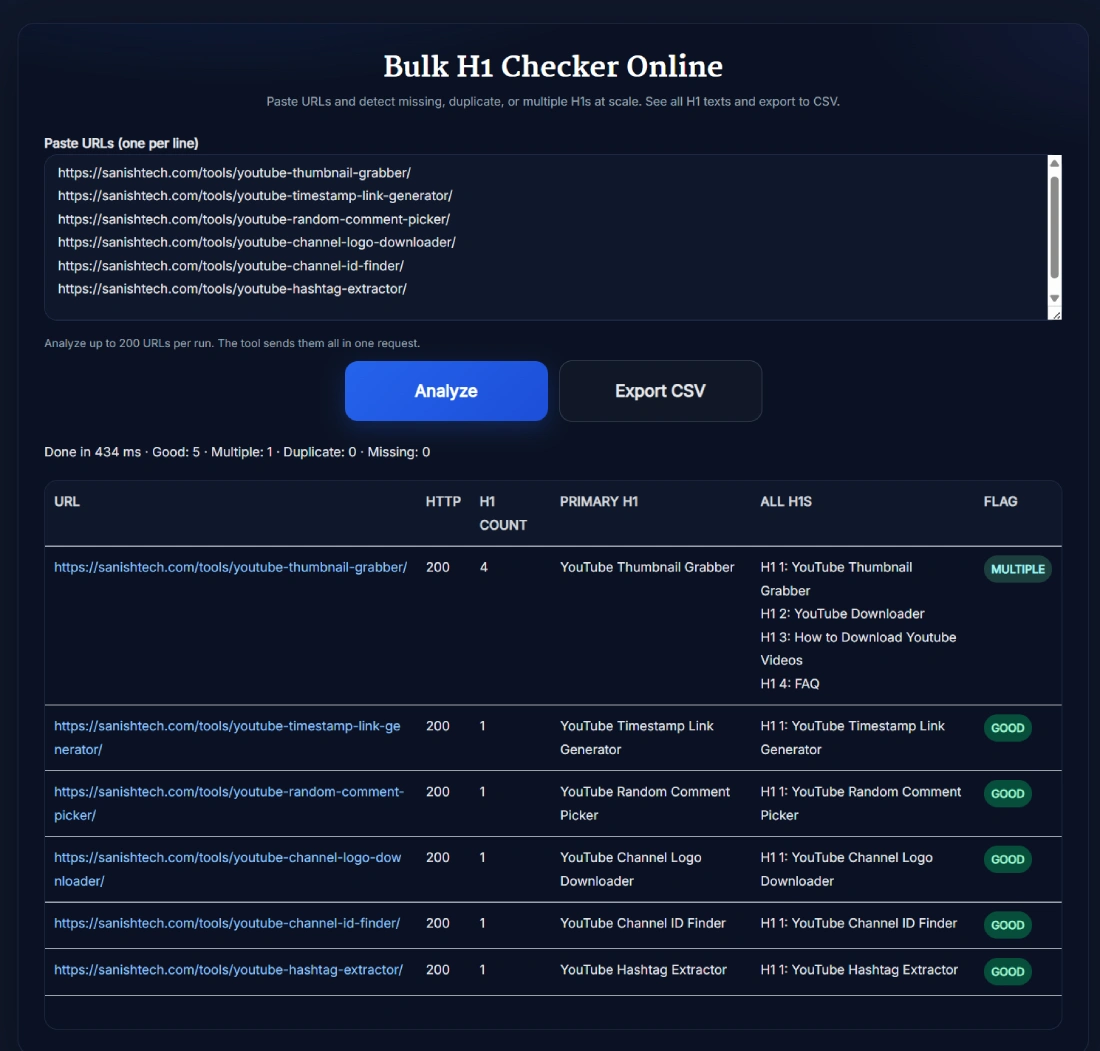
| URL | HTTP | H1 Count | Primary H1 | All H1s | Flag |
|---|
The Bulk H1 Checker Online scans up to 200 public URLs in one run. It reports the HTTP response code, H1 count, Primary H1, every detected H1 and a status flag for each page. Once the check finishes, you can export the results to CSV. No account is required.
What the Bulk H1 Checker Does
Checking headings manually is manageable for one page. It becomes painfully slow when you are reviewing an entire blog, product catalogue or migrated website. This bulk H1 checker processes a list of URLs together and places the results in one audit table.
For every URL, the report includes:
- HTTP: The response code returned when the page is requested.
- H1 Count: The number of H1 elements found in the fetched page.
- Primary H1: The heading displayed as the primary result for that URL.
- All H1s: Every H1 text detected on the page.
- Flag: A quick status such as GOOD, MULTIPLE, MISSING or CLIENT_RENDERED.
The table helps you separate genuine heading problems from URLs that need technical investigation. For example, a missing H1 result combined with a 403 response may mean the website blocked the request. It does not automatically prove that the visible page has no H1.
Why Use a Bulk H1 Extractor?
A bulk H1 extractor gives you the exact heading text instead of returning only a pass or fail message. This is useful when reviewing templates, checking recently published pages, validating a migration or preparing an on-page SEO report.
The current tool focuses specifically on H1 elements. It does not extract the complete H1 to H6 heading hierarchy. That narrow focus makes the report easier to scan when your immediate task is finding missing or multiple main headings across many URLs.
How to Use the Bulk H1 Checker Online
- Prepare your URLs: Place one complete URL on each line. Include the http or https protocol.
- Select Analyze: The checker validates the entries, removes repeated copies of the same URL and processes up to 200 valid URLs.
- Review the HTTP column: Check whether each page returned a successful response before judging its H1 result.
- Inspect the headings: Compare the H1 Count, Primary H1, All H1s and Flag columns.
- Export the report: Select Export CSV to download the results for further filtering or client reporting.
How to Interpret the H1 Status Flags
- GOOD: The checker found one H1 in the fetched page.
- MULTIPLE: More than one H1 was detected on that URL. Review the All H1s column to decide which heading should represent the page.
- DUPLICATE: The checker returned a duplicate condition for that individual URL. Review the H1 texts shown in the same row. This is not a sitewide comparison of headings across different URLs.
- MISSING: No H1 was extracted from the fetched response. Check the HTTP code and visible page before making changes.
- CLIENT_RENDERED: The initial response did not provide an extractable H1, while the visible heading may be inserted later with JavaScript. Review the page manually.
If several URLs return 403, 404, 500 or another unexpected response, confirm them separately with the Bulk HTTP Status Checker. Heading results from an inaccessible page should not be treated as a final diagnosis.
Multiple H1 Tags and Google Search
One descriptive H1 is a sensible default because it gives the page a clear main heading. However, finding multiple H1 elements does not prove that Google has penalized the page.
Google uses several sources when generating title links, including the title element, the main visual title, H1 elements and other prominent page text. Google also explains that when a page contains multiple equally prominent headings, it may use the first one when generating a title link. You can read the details in Google's title-link documentation.
Treat a MULTIPLE result as a prompt for review. If one H1 clearly names the page and the others were accidentally generated by a theme, page builder or reusable component, changing the extra headings to suitable H2 or H3 elements can make the structure clearer. Do not change headings solely because an SEO tool displayed a warning.
What This Tool Does Not Check
Understanding the limits of an H1 audit prevents unnecessary fixes:
- It does not compare headings across every URL to identify the same H1 reused on different pages.
- It does not extract H2, H3, H4, H5 or H6 elements.
- It cannot access private pages that require a login.
- A website may block automated requests even though the page works in a normal browser.
- JavaScript-generated headings may require manual verification.
- The status flags are diagnostic labels, not Google penalties or ranking scores.
Useful Bulk H1 Audit Workflows
- Website migrations: Check whether new templates preserved the main headings from important pages.
- WordPress theme updates: Find templates that accidentally output the post title and another component as separate H1 elements.
- Ecommerce audits: Review category and product pages without opening each URL manually.
- Content inventories: Export the Primary H1 column and compare it with page topics or editorial records.
- Quality assurance: Recheck affected page types after developers update a shared template.
For a broader template review, compare the exported headings with the Bulk Meta Title and Description Length Checker. The H1 and title tag do not need identical wording, but they should describe the same page topic.
A Practical Order for Reviewing Results
- Review non-200 HTTP responses first.
- Manually inspect CLIENT_RENDERED pages.
- Check pages with no detected H1.
- Review MULTIPLE or DUPLICATE rows and compare the actual heading text.
- Confirm that the main H1 accurately describes the visible page.
- Fix the relevant template or page and run the affected URLs again.
This order keeps you from editing a heading when the real problem is a blocked request, broken URL or JavaScript-rendered page.
FAQ
How many URLs can I check at once?
You can check up to 200 unique, valid URLs in one run. Enter one full URL per line. If you paste more than 200, the tool processes the first 200 valid unique URLs.
What information does the bulk H1 checker return?
For each URL, the report shows the HTTP response code, H1 count, Primary H1, all detected H1 text and a status flag. The table can also be exported as a CSV file.
What happens to invalid or repeated URLs?
Invalid entries are ignored. Repeated copies of the same URL are combined so that the URL is checked once. If the list contains no valid URL, the tool asks you to add at least one valid URL.
What does CLIENT_RENDERED mean in the results?
CLIENT_RENDERED means the fetched response did not provide an H1 that the checker could extract, while the page may load its visible content with JavaScript. Review that URL manually before treating it as a confirmed missing H1.
Can I download the H1 audit results?
Yes. After a successful scan, select Export CSV to download the URL, HTTP code, H1 count, Primary H1, all H1 text and flag for each result.
Does the tool find the same H1 repeated across different URLs?
No. The current report evaluates each URL individually. If you need to find the same H1 across several pages, export the CSV and compare the Primary H1 column separately.
What is an H1 tag?
An H1 is an HTML heading element commonly used for the main visible heading of a webpage. It helps readers and search systems understand the page's primary topic.
Does Google penalize a page for having multiple H1 tags?
Multiple H1 tags do not prove that a page has a Google penalty. Still, one clear main H1 is a practical convention because it gives users, assistive technology and search systems an unambiguous page heading.
Should the H1 and title tag be identical?
They do not have to be identical. They should describe the same page topic and set consistent expectations. The title tag is used for the browser and may influence the search result title, while the H1 is the main visible heading on the page.
What should I check before changing an H1?
Confirm the HTTP response first, review the visible page and compare the H1 with the title tag and page topic. If a template creates extra H1 elements, fix the template carefully and test several page types before publishing the change.