
Product Schema Generator
Generate Product JSON-LD with clean Offers and Reviews, ready to paste into your product pages or test in Google.
A quick way to create accurate product markup without touching code. This tool builds clean JSON-LD schema based on the details you enter, helping your product pages stand out in search and improving how search engines understand your listings.
What is the Product Schema Generator?
The Product Schema Generator is a simple utility that turns your product information into valid JSON-LD markup. It organizes details like name, images, price, reviews, and availability so search engines can present your listings with richer visuals and clearer data. Everything is generated automatically, so you won’t have to write schema syntax manually. If your product page also includes long-form explanations or buying guides, pairing this with the Article Schema Generator helps search engines understand both the product and the supporting content.
Key Features of the Product Schema Generator
This tool keeps the whole process surprisingly easy. It gives you full control over your product details while handling all the technical formatting in the background. You get search-friendly JSON-LD output based on the fields you fill in.
- Generates clean product schema instantly
- Supports price, currency, availability, and offer types
- Includes review details with rating, date, author, and publisher
- Accepts SKU, GTIN fields, MPN, images, and product URLs
- Outputs Google-friendly JSON-LD in a single copyable block
- Free product schema markup tool with no login required
- Works for ecommerce, affiliate pages, and catalog listings
How to Use the Product Schema Generator
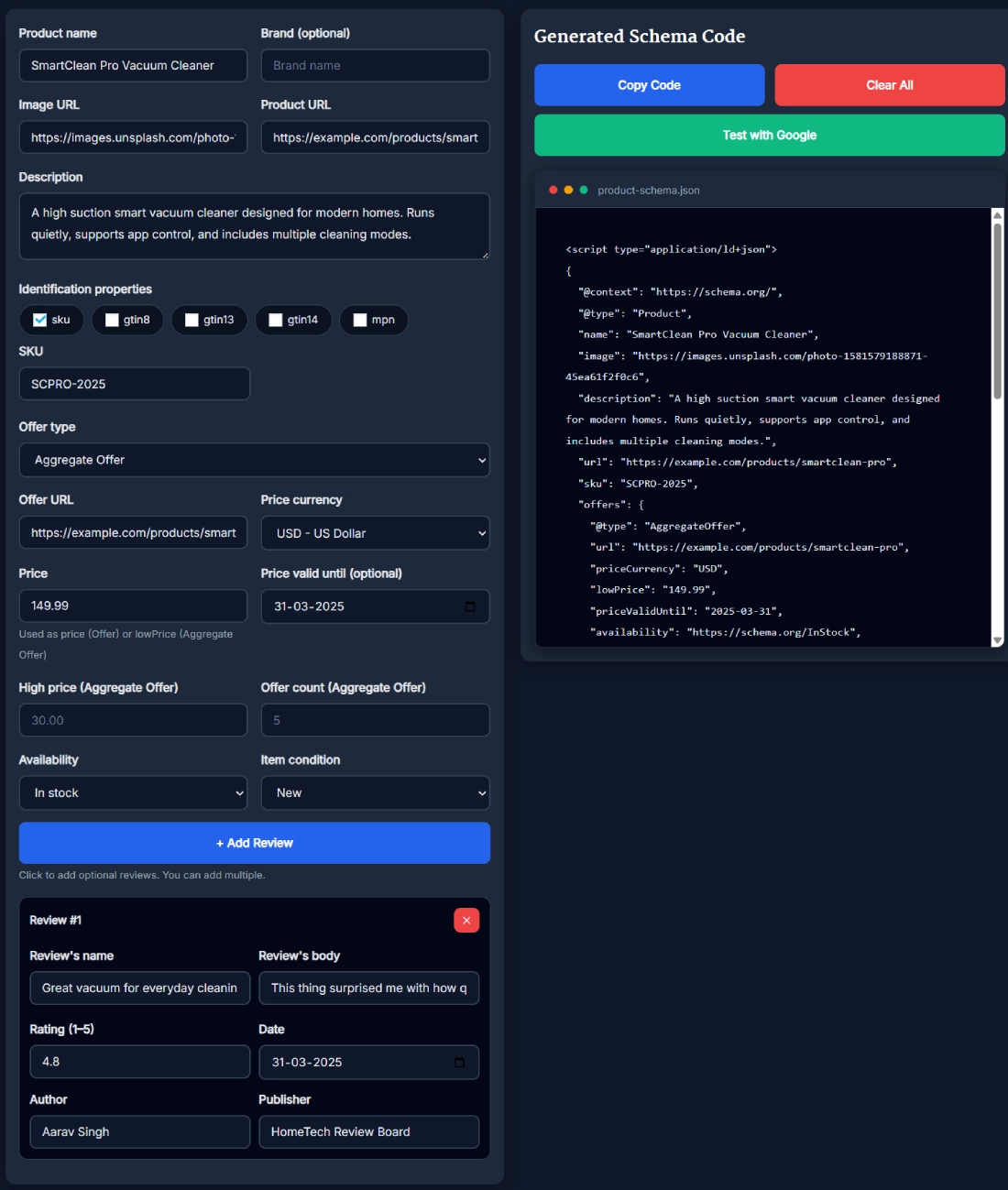
Using this tool feels natural, even if you have never worked with structured data before. You fill out the product fields, check the preview, and the JSON-LD adjusts instantly.
- Enter your product name, brand, image URL, and product URL.
- Add the product description along with SKU, GTIN codes, or MPN.
- Choose the offer type, pricing details, and availability.
- Add reviews by filling in the reviewer name, rating, date, and publisher.
- Check the generated schema in the code box on the right.
- Click Copy Code and paste it into your page’s head section or schema plugin.
When You Should Use This Tool
This tool helps any time you want your product pages to look more polished in search results. It supports new listings, updated listings, promotional pricing, and multi-variant items. If you run ecommerce stores, comparison sites, catalog pages, or product review blogs, adding proper schema markup improves visibility and clarity for both search engines and users. If your product page includes setup instructions or tutorials, adding structured data with the HowTo Schema Generator can further strengthen the page.
Benefits of Using This Tool
The generator saves time and prevents the usual schema mistakes. Instead of worrying about JSON-LD formatting, you focus on entering the right product details while the tool keeps everything valid.
- Faster than writing schema manually
- Reduces validation errors in Google’s Rich Results Test
- Improves search result appearance
- Helps Google understand your product attributes
- Makes updates easy when prices or availability change
- Works with any CMS or custom site setup
Real Example of How the Tool Works
Imagine you’re listing a smart vacuum cleaner. You drop in the product name, upload the photo link, add the description, set the availability to In Stock, and include a customer review. The generator instantly builds polished JSON-LD with your pricing, SKU, review rating, and offer type. Copy that code to your page, and search engines immediately get clearer signals about your product. If the listing also includes an embedded demo video, pairing it with the Video Schema Generator helps connect visual content with product data.
Helpful Tips for Better Results
A few small tweaks can make your schema even more effective. You can use high-resolution images, consistent pricing formats, and realistic review details to build trust with search engines.
- Use complete product descriptions
- Always include SKU or GTIN when available
- Match price and currency exactly as shown on your product page
- Add at least one review for better depth
- Use original image URLs instead of compressed versions
- Make sure availability matches your live store data
Comparison With Other Tools
Many schema generators require logins or only support basic fields. This one keeps the workflow more flexible. It focuses heavily on product-specific fields and outputs JSON-LD immediately without slowing you down.
- More product field options than generic schema apps
- No registration required
- Supports review fields that many free tools skip
- Cleaner code output compared to plugin auto-generation
- Works easily across multiple product categories
Frequently Asked Questions
What does the Product Schema Generator actually create?
The Product Schema Generator creates structured JSON LD markup that helps search engines understand your product. It formats details like name, price, reviews, and availability so they display more accurately in search. You simply enter your information and the tool outputs ready to use schema you can paste onto your website without touching code.
Do I need coding knowledge to use this tool?
You do not need any coding experience. Everything is handled through simple input fields. When you fill them out, the tool automatically builds clean JSON LD. You just copy the final output and place it on your product page. It works for beginners, developers, bloggers, and ecommerce owners without requiring technical setup.
Will this schema help my product appear as a rich result?
Using proper schema can increase your chances of qualifying for rich results. Search engines look for structured data to understand key product information such as price and availability. While results are never guaranteed, adding accurate schema generally improves visibility and clarity in search, making your product more competitive.
Can I generate multiple product schemas in a single session?
Yes, you can generate as many schemas as you want. Each time you update the fields, the tool refreshes the JSON LD instantly. This makes it easy to create markup for several products in one sitting without needing separate accounts, limits, or time delays. Everything happens directly in the browser.
Does this support review and rating fields?
It fully supports review content. You can add reviewer name, body text, rating, date, author, and publisher. The tool structures this information into the correct schema format. Adding reviews can make your product listings appear more complete and help search engines understand customer sentiment.
Is this tool suitable for affiliate product pages?
Yes, affiliate sites often use schema to enhance product listings. This tool helps generate markup even if you do not sell the product directly. You can include price ranges, availability, and reviews along with outbound product URLs. It keeps your pages compliant with structured data guidelines.
How accurate is the JSON LD generated by this tool?
The JSON LD is structured according to schema.org standards. The tool builds each field in the correct format based on your inputs. As long as you provide accurate product information, the final schema will stay valid. You can also test the code with Google’s Rich Results Test for confirmation.
Can I update the schema later if my product changes?
You can return to the tool anytime to regenerate updated schema. If prices, availability, or product descriptions change, just adjust the fields and copy the new code. Because the generator works instantly, keeping your structured data current only takes a few seconds.
What is product schema used for in SEO?
Product schema is used to provide structured data about items you sell or promote. It tells search engines exactly what the product is, its price, condition, ratings, and availability. Clear structured data helps improve search understanding and can lead to more informative search results.
How does JSON LD differ from Microdata?
JSON LD is a cleaner and more modern approach compared to Microdata. It lets you place all structured information in one script block, rather than mixing it throughout your HTML. This reduces errors and makes editing much easier. Search engines widely recommend JSON LD for structured data.
Does schema markup improve rankings directly?
Schema does not provide a direct ranking boost, but it can improve how your pages are understood and displayed. Better presentation often leads to higher click through rates, which can indirectly support rankings. Clear data also helps search engines categorize your products more effectively.
Why is availability important in product schema?
Availability tells search engines whether a product can be purchased at the moment. Search engines often show availability information directly in results. Having accurate details helps prevent user confusion and improves trust. It also allows search engines to filter products more intelligently.
Should I include the product image in schema?
Including an image is recommended because visual details help search engines generate rich previews. A high quality image can also increase user engagement when your product appears in search. Using a proper image URL strengthens the completeness of your structured data.
Does Google require GTIN or MPN fields?
Google strongly prefers GTIN when available, especially for retail products. These identifiers help match your item with global product databases. If you do not have GTIN, MPN or SKU can still help. Filling out at least one identifier field generally makes schema more accurate and beneficial.
How do I test the schema before publishing?
Copy the generated JSON LD and paste it into Google’s Rich Results Test. The tool analyzes your structured data and checks for errors or warnings. You can fix issues directly by adjusting the fields in the generator. This gives you confidence before placing the schema on your live page.