

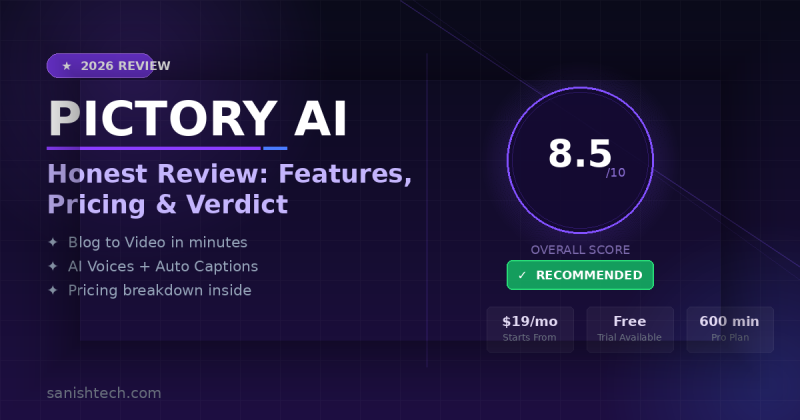
Paying $50–$200/month stacking separate tools for video creation, captioning, and content repurposing is unsustainable for most solo marketers. Pictory AI claims to replace that entire stack with one platform.
The pitch: turn any blog post, script, or long-form video into polished, shareable content — automatically, no editing skills required.
Sounds almost too clean.
I’ve spent time across enough AI video tools to know that “automated” usually means “mediocre with extra steps.” But Pictory has been around long enough to earn a second look. Here’s the full breakdown.
Ready to turn your blog posts and scripts into videos automatically?
Pictory AI lets you create professional videos from any text or URL — no editing skills needed. Check the current pricing and see if it fits your workflow.
Get Pictory AI Now + BonusesWhat Is Pictory AI?
Pictory AI is a cloud-based video creation and repurposing platform built specifically for content marketers, bloggers, coaches, and agencies who need consistent video output without touching a traditional video editor.
The core premise is straightforward: feed it text or existing video, and it handles the heavy lifting — stock footage selection, captions, voiceover, music, and formatting — while you focus on the content strategy.
It’s not competing with Premiere Pro or DaVinci Resolve. Pictory is squarely positioned in the content repurposing lane — a tool for people who already produce written or recorded content and want to extend that content’s reach into video without hiring an editor or learning a new software ecosystem.
That positioning is important. It’s why the tool works exceptionally well for certain users and feels limiting for others.
Key Features of Pictory AI
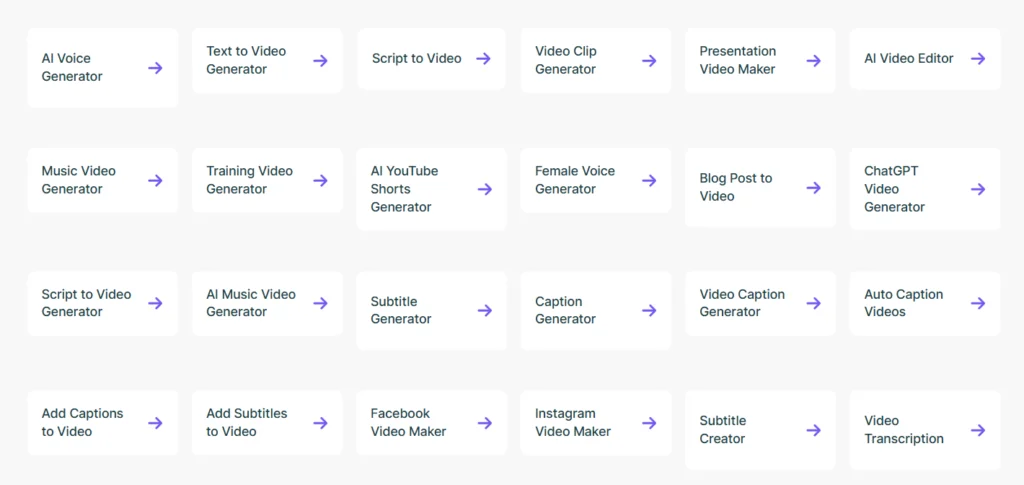
Based on what’s currently on the platform, Pictory packs in a surprisingly wide feature set for a content-focused tool.
Text to Video Paste any script or written content, and Pictory automatically matches it with stock footage, adds captions, syncs audio, and structures it into scenes. The AI-powered matching isn’t flawless — but the speed advantage over manual editing is significant.
URL to Video (Blog to Video) Enter any webpage URL and Pictory converts the article content into a video slideshow. Solid for repurposing SEO articles into YouTube Shorts, LinkedIn posts, or Instagram Reels.
Script to Video Turn written scripts into dynamic videos with automated visuals, voiceovers, and narration. This one’s particularly useful for faceless YouTube channels.
AI Video Editor Edit existing videos using AI-powered tools that streamline trimming, captioning, and scene adjustments — without a steep learning curve.
PPT to Video Convert PowerPoint slides into shareable videos with voiceovers, transitions, and music. Useful for educators, consultants, and anyone repurposing presentation content.
Image to Video Transform photos and existing video clips into polished video slideshows with transitions, music, and captions.
Smart Record Capture screen activity for tutorials, demos, or presentations. It records on-screen actions in high quality, ready to share or edit.
ChatGPT Video Generator Convert AI-generated text into engaging videos with seamless automation — a direct integration with ChatGPT output that speeds up script-to-video workflows considerably.
AI Voice Generator Instantly convert text into AI-powered voiceovers with realistic speech. Pictory uses ElevenLab’s voices — noticeably better quality than generic TTS tools.
AI Avatars Add a realistic on-screen AI presenter to your videos without appearing on camera yourself. Useful for product explainers and training content.
AI Studio Create custom images and short clips from text prompts, directly integrated into the video editing workspace.
Auto Captions Accurate, well-styled captions for social content. You can customize fonts, colors, and positioning to match your brand.
Brand Kit Upload your logo, color palette, and intro/outro clips. Every video produced follows that template automatically — essential for agencies managing multiple clients.
Pictory AI packs a lot into one platform — and pricing is surprisingly reasonable.
From AI Avatars to ChatGPT video integration, see exactly what’s included in each plan before committing.
See What’s Included in Pictory AIHow Does Pictory AI Work?
Pictory keeps the workflow straightforward — four steps from idea to finished video.
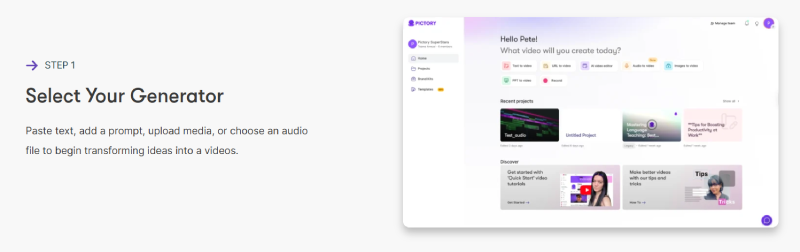
Step 1: Select Your Generator Choose how you want to start. Paste text, add a prompt, upload media, or drop in an audio file. Pictory supports multiple input types, so whether you’re starting from a blog post, a script, or a raw recording, there’s a direct path in.
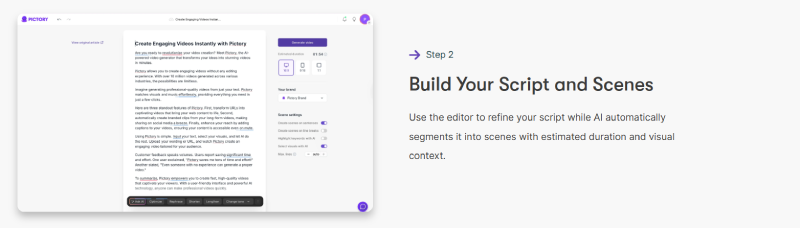
Step 2: Build Your Script and Scenes The editor lets you refine your script while the AI automatically segments it into scenes. Each scene gets an estimated duration and visual context assigned — so you’re not manually deciding where cuts happen. You just review and adjust where needed.
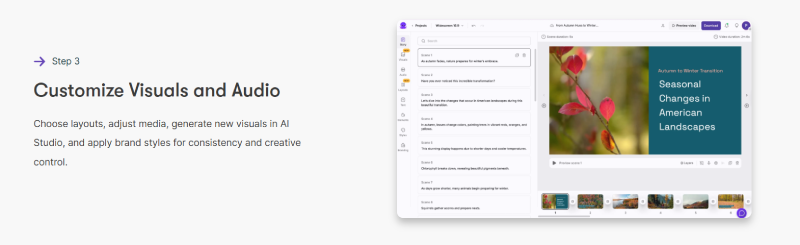
Step 3: Customize Visuals and Audio This is where you shape the final look. Choose layouts, swap or adjust media, generate new visuals directly inside AI Studio, and apply your brand styles for consistency across every video. It’s more creative control than most automated tools offer at this stage.
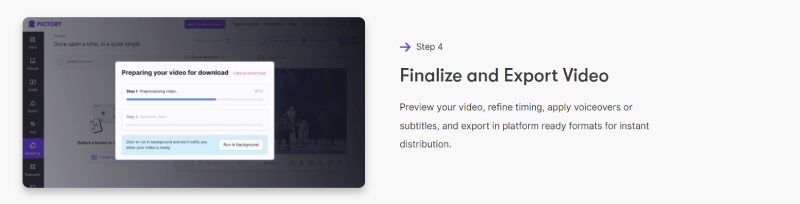
Step 4: Finalize and Export Preview the full video, fine-tune timing, apply voiceovers or subtitles, and export in platform-ready formats. Whether it’s YouTube, Instagram, LinkedIn, or a client deliverable — you’re exporting once, not reformatting manually for each channel.
The entire process — from input to exported video — typically takes 15 to 30 minutes depending on length and how much customization you do. Compare that to 3–5 hours in a traditional editor for equivalent output, and the value proposition becomes clear fast.
Who Is Pictory AI Best For?
Pictory hits its sweet spot with a specific type of content creator. If you fall into one of these categories, it’s likely a strong fit.
Bloggers and content marketers who publish regularly and want to extend their reach into video without hiring an editor. Repurposing a 1,500-word article into a 60-second YouTube Short takes under 20 minutes.
Faceless YouTube channel owners — the script-to-video workflow with AI voiceover and stock footage is practically built for this niche. It’s one of the cleaner tools for this use case on the market right now.
Course creators and coaches who record long Zoom sessions or webinars and need highlight clips for social promotion. The video highlight extraction feature alone justifies the subscription for this group.
Agencies managing video content for multiple clients. The brand kit system and team collaboration features make it practical to systemize production across accounts without per-project overhead.
ChatGPT power users who generate written content with AI and want a fast pipeline from text to finished video. The ChatGPT Video Generator integration makes this workflow genuinely seamless.
Here’s who should probably look elsewhere.
If you need cinematic storytelling, complex motion graphics, or precise audio mixing, Pictory isn’t your tool. It also won’t work well for talking-head videos — there’s no teleprompter, camera recording, or on-camera editing workflow. Descript handles that better.
And if you’re brand new to content marketing with no existing blog posts, scripts, or recordings to work from, you’ll get limited immediate value here. Pictory multiplies output from existing content — it doesn’t replace a content strategy.
Pricing and OTO Breakdown
Pictory runs on a straightforward SaaS subscription model — no aggressive OTO funnel, no bolt-on upsells stacked at checkout. The pricing page shows INR by default, but here’s the equivalent in USD on annual billing:
Starter Plan — ~$19/month (billed annually)
- 1 User
- 200 video minutes/month
- 5 GB storage
- 1 Brand Kit
- 60 minutes of ElevenLab’s AI voices in 29 languages
- Good for solo bloggers or creators just getting started
Professional Plan — ~$29/month (billed annually) (Most Popular)
- 1 User
- 600 video minutes/month
- 20 GB storage
- 5 Brand Kits
- Unlimited standard voices in 7 languages
- Best value for individual marketers and content creators
Team Plan — ~$99/month (billed annually)
- 3+ Users
- 1,800 video minutes/month
- 100 GB storage
- 10 Brand Kits
- Unlimited standard voices in 7 languages
- Built for small agencies and content teams
Enterprise Plan — Custom Pricing
- 10+ Users
- Custom video minutes and storage
- Unlimited Brand Kits
- Unlimited standard voices
- Priority support and dedicated account management
Annual billing saves up to 40% compared to monthly pricing — worth committing to if you’ve tested the free trial and confirmed the workflow fits.
The free trial is available on all plans. It’s limited in output and adds watermarks to exports, but it’s enough to run a real test — put your best blog post through the URL-to-video feature and see what comes out.
Pros and Cons
Pros:
- Genuinely fast content repurposing — the URL-to-video and highlight extraction features deliver on their core promise
- Wider feature set than most competitors: AI Avatars, AI Studio, PPT to Video, Smart Record, and ChatGPT integration go beyond basic script-to-video tools
- ElevenLab’s AI voices are noticeably higher quality than generic TTS
- Brand Kit system makes it scalable for agency use without design overhead
- Clean, professional output achievable without any design or editing skills
- No steep learning curve — functional within the first session
- Free trial available on all plans before committing
Cons:
- AI stock footage matching can miss the mark on niche or technical topics
- Output has a recognizable pattern that experienced video viewers may notice
- Not built for camera-based content, talking-head videos, or complex narrative editing
- Free trial is limited and watermarked — harder to fully evaluate premium features before buying
- Starter plan’s 200 video minutes/month can feel restrictive for high-volume creators
Is Pictory AI the right video tool for your content workflow?
If you’re a blogger, faceless YouTube creator, or agency looking to scale video output without hiring an editor, check the current deal below before the pricing changes.
Check Current Price & BonusesVerdict: Is Pictory AI Worth It?
For the right use case, yes — and that’s not a hedge. It’s just context.
If you’re publishing written content regularly and not converting any of it into video, you’re leaving real traffic and engagement on the table. YouTube, LinkedIn, and short-form platforms consistently reward video. Pictory lowers the barrier enough that there’s no practical reason to keep ignoring that channel.
The Professional plan at ~$29/month is the one most individual creators should start with. Six hundred video minutes per month is more than most solo marketers will use, the brand kit system handles visual consistency, and the ElevenLab voice quality makes output feel polished rather than robotic.
What Pictory won’t do is make your content look custom-produced. The automation shows to trained eyes. That’s not a dealbreaker for organic social and YouTube — but it’s worth being clear-eyed about before you pitch it to a client expecting broadcast-quality results.
The feature set has also expanded meaningfully since the tool launched. AI Avatars, AI Studio, ChatGPT integration, and PPT-to-video weren’t part of the original product. That trajectory matters — you’re not betting on a launch-week tool that disappears in six months.
Final Verdict
Pictory AI earns its place as a legitimate content repurposing platform for bloggers, marketers, faceless YouTube creators, and agencies who need consistent video output without video production expertise.
The free trial is the right starting point. Run your best blog post through URL-to-video, test the AI voiceover quality, and put a long recording through the highlight extractor. If those three outputs save you meaningful time — and they likely will if your use case fits — the subscription pays for itself quickly.
At ~$29/month on the Professional plan, it’s one of the more fairly priced tools in this category given the feature breadth.
Start with the free trial — no risk, no credit card commitment.
Test the URL-to-video and highlight extractor features yourself. If it saves you time, the paid plan pays for itself fast.
Try Pictory AI Free Trial TodayFAQs
Is Pictory AI good for beginners?
Yes, with one caveat. The platform is easy to navigate from day one, but you’ll get significantly more value if you already have content to repurpose — blog posts, scripts, or long-form recordings. Pure beginners with no existing content should build their content foundation first, then use Pictory to scale it into video.
Does Pictory AI produce watermarked videos?
Only on the free trial. All paid plans — Starter, Professional, and Team — export without watermarks.
Can Pictory AI make faceless YouTube videos?
It’s one of the better tools for exactly this. The script-to-video workflow combined with ElevenLab’s AI voiceover and a large stock footage library is a natural fit for faceless channels. The ChatGPT Video Generator integration makes the content pipeline even faster.
How accurate are Pictory’s auto-captions?
Accurate enough for most English-language content. General conversational speech and clearly structured scripts transcribe well. Heavy accents, fast speech, or highly technical jargon may need a manual correction pass before publishing.
What AI voices does Pictory use?
Pictory integrates ElevenLab’s AI voice technology, offering realistic speech in 29 languages on the Starter plan and unlimited standard voices in 7 languages on Professional and Team plans. The voice quality is noticeably above generic text-to-speech tools.
Does Pictory AI have a money-back guarantee?
Pictory has offered refund policies previously, but terms can change. Always verify the current refund policy directly on their pricing page before subscribing.
How does Pictory compare to InVideo or Lumen5?
All three sit in similar territory — AI-assisted video creation from text. Pictory has stronger highlight extraction, better voice quality via ElevenLab, and a more complete feature set including AI Avatars and AI Studio. InVideo offers more template variety. Lumen5 is simpler but more limited in output options. Your choice depends on which specific workflow matters most.
Can I use Pictory AI for client work?
Yes. The Brand Kit system and Team plan are specifically designed for agency use. You can maintain separate brand profiles for different clients and collaborate with team members on the same account.
Is there a free trial available?
Yes — all plans include a free trial option. Exports are watermarked and project limits apply, but it’s enough to test the core workflows before committing to a paid subscription.
