
Bulk Meta Description Length Checker
Paste URLs and audit meta description length in bulk. Choose whether to use OG/Twitter fallback, then export a clean CSV.
| URL | HTTP | Description | Desc Len | Desc Flag |
|---|
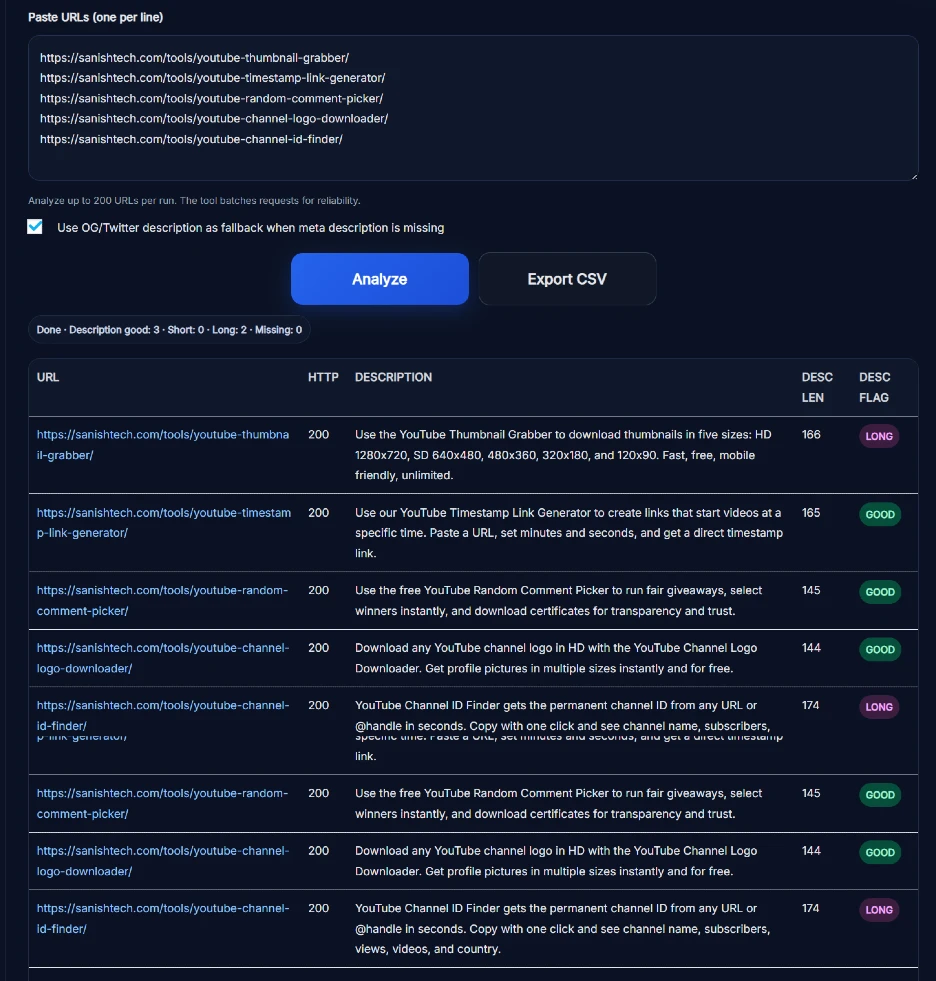
The bulk meta description checker scans up to 200 URLs in one run. It retrieves each page's description, counts its characters, shows the HTTP status, and labels the length as Short, Good, Long, or Missing. You can then export the complete result as a CSV file.
This is useful when you need to review a blog, ecommerce catalogue, client website, or migrated site without opening every page manually. The checker gives you a practical list of URLs to investigate. Its length flags are SanishTech diagnostic labels, not Google scores or ranking signals.
What the Bulk Meta Description Checker Reports
Enter one complete URL per line and select Analyze. The results table contains:
- URL: The page that was checked.
- HTTP: The status code returned while the page was processed.
- Description: The extracted description text.
- Desc Len: The description's character count.
- Desc Flag: A Short, Good, Long, or Missing length label.
Results are shown in pages of 25 rows, while CSV export includes the analyzed results in a single report. If you also need to inspect title tags, use the bulk meta title and description checker.
What the Length Flags Actually Mean
The flags help you sort a large list quickly, but they should start a review rather than finish it:
- Short: The extracted description is below the checker's preferred range.
- Good: Its character count falls within the checker's preferred range.
- Long: The description exceeds the checker's preferred range and may be shortened when displayed.
- Missing: No usable description was returned under the selected fallback setting.
A Good result does not mean Google will display the description exactly as written. Google says meta descriptions have no fixed maximum length, and search snippets are shortened when needed to fit the device. Google may also create a different snippet from visible page content when that better matches the search. See Google's official snippet guidance for the current details.
How to Use the Bulk Meta Description Checker
- Prepare the URLs: Add one valid, complete URL per line. The checker accepts up to 200 URLs in a run.
- Choose the fallback setting: Leave the OG/Twitter option selected if you want a social description used when the HTML meta description is unavailable. Clear it when you want to focus on the standard meta description.
- Select Analyze: The tool processes the URLs in batches and displays progress.
- Review the result: Sort your work by Missing, Short, and Long flags, then read the actual text before changing the page.
- Export the audit: Select Export CSV to download the URL, HTTP status, description, character count, and flag.
How the OG and Twitter Fallback Works
The bulk meta description checker includes an optional social-description fallback. Some pages do not provide a standard <meta name="description"> tag but do include an Open Graph or Twitter description for social sharing. When the fallback checkbox is selected, the tool can use one of those descriptions instead.
That makes the report more useful, but read the result carefully. A fallback value does not prove that the page has a standard meta description. If your audit specifically requires the HTML meta description, clear the fallback checkbox before running the URLs.
Important Limits of a Character-Length Audit
This bulk meta description checker measures extracted text and character count. It does not:
- predict the exact snippet Google will show for every query or device;
- measure the displayed pixel width of a search snippet;
- identify duplicate descriptions across the submitted URLs;
- judge whether the copy accurately represents the page;
- guarantee higher rankings, traffic, or click-through rate.
A page that blocks external requests, requires a login, times out, or returns an error may not provide a usable description. When the HTTP result needs a closer look, check the URL with the bulk HTTP status checker.
How to Prioritize the Results
Start with important URLs marked Missing, especially home pages, service pages, product pages, and articles that already receive search impressions. Next, review Long and Short results, but do not rewrite a description only to satisfy a character range.
Read the page and its current search queries first. A useful description should summarize that specific page, include the details a searcher needs, and avoid lists of repeated keywords. Google recommends accurate, page-specific descriptions and may use visible page content when it produces a better query-specific snippet.
When to Run a Bulk Meta Description Audit
- after a redesign, CMS change, migration, or metadata import;
- before launching a large set of product, category, or location pages;
- when templates may have removed or replaced description tags;
- when search snippets no longer match the page's message;
- as part of a scheduled technical SEO review.
For a frequently updated site, run the bulk meta description checker after meaningful publishing or template changes. A fixed quarterly schedule can be useful for some teams, but the right frequency depends on how often the site's pages and templates change.
Frequently Asked Questions
How many URLs can I check at once?
The bulk meta description checker can process up to 200 URLs in one run. Enter one complete URL per line and select Analyze.
What information does the tool show for each URL?
It shows the URL, HTTP status, extracted description, description character count, and a Short, Good, Long, or Missing flag.
What do the Short, Good, Long, and Missing flags mean?
They compare the extracted description with SanishTech's built-in length rules. They are diagnostic labels, not Google scores, ranking factors, or guarantees about snippet display.
Can the checker use an Open Graph or Twitter description?
Yes. When the fallback checkbox is selected, the checker can use an OG or Twitter description if the standard meta description is unavailable. Clear the option when you only want to assess the standard meta description.
Can I export the meta description results?
Yes. After the URLs are analyzed, Export CSV downloads the URL, HTTP status, description, character count, and description flag.
Do I need an account to use the checker?
No. The live tool can be used without creating an account or signing in.
What is the ideal meta description length for Google?
Google does not set a fixed maximum length for meta descriptions. Search snippets are shortened as needed to fit the device, so use the character flag as a review prompt and focus on writing a concise, accurate summary.
Does Google always display the page's meta description?
No. Google may use the meta description when it describes the page well, or generate a different snippet from visible page content to better match a particular search.
Do meta descriptions affect Google rankings?
Google has stated that it does not use the description meta tag in web ranking. An accurate description can still make a search result more useful and appealing when Google chooses to show it.
Does this tool detect duplicate meta descriptions?
No. This checker reports each URL's description and character length but does not add a duplicate-description flag. Compare the exported CSV separately if duplicate detection is part of your audit.