
Image to Base64 Converter
Upload an image and get instant Base64, HTML image code, and CSS background snippets in a clean copy ready format. No upload to server, everything happens in your browser.
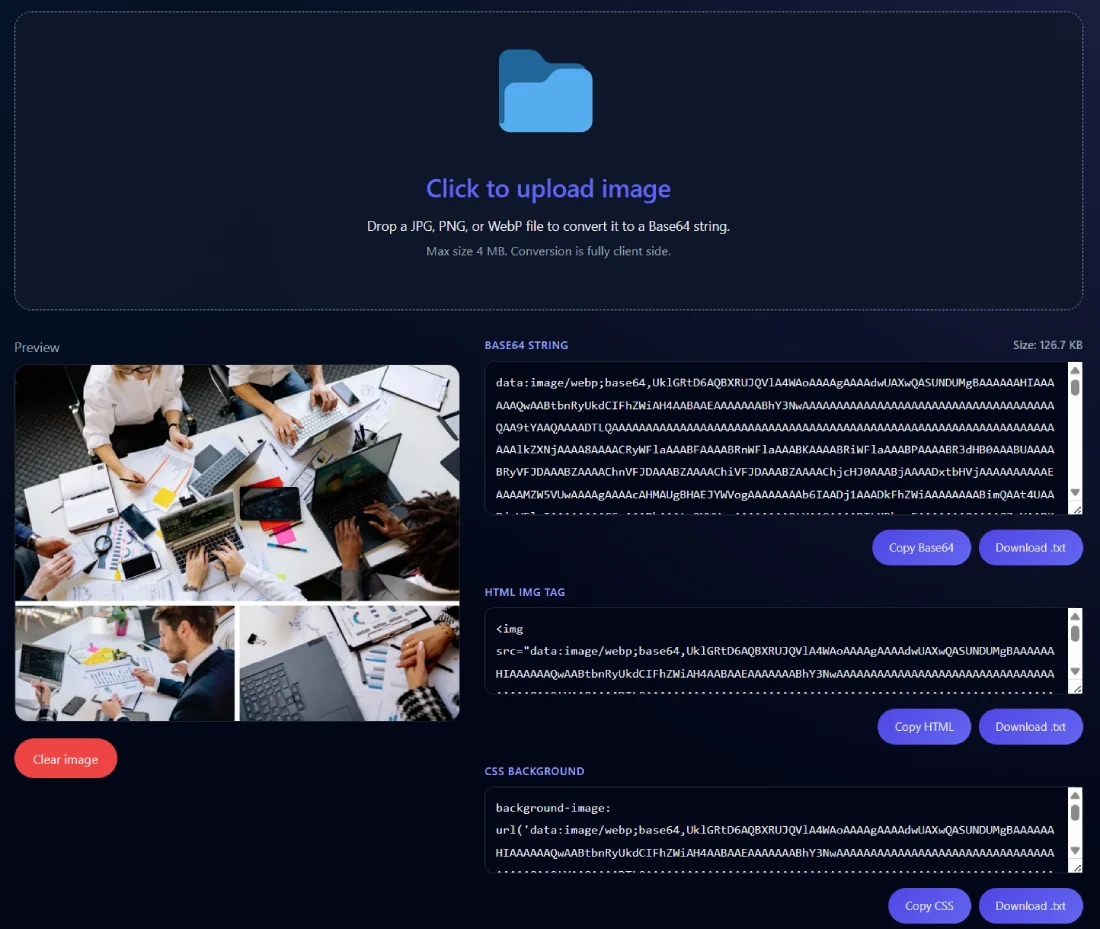
Click to upload image
Drop a JPG, PNG, or WebP file to convert it to a Base64 string.
Max size 4 MB. Conversion is fully client side.
The Image to Base64 Converter lets you instantly turn any image into Base64 code, HTML, or CSS format — all done securely inside your browser without uploading anything.
What the Image to Base64 Converter Does
This tool helps you convert images like JPG, PNG, or WebP into Base64-encoded text that you can directly use in your web code. Everything happens locally in your browser, ensuring complete privacy and zero data tracking.
Developers use this converter when they want to embed logos, icons, or small graphics inside HTML or CSS without hosting them separately. It saves time, reduces extra HTTP requests, and ensures images always load properly — even when external links fail.
Once you upload your image, the converter instantly generates the Base64 output, the HTML <img> tag, and the CSS background-image property — all ready for you to copy or download.
Key Features for Fast Image Conversion
The Image to Base64 Converter is built to be simple yet powerful. Everything you see on the interface serves a purpose.
- Instant image preview appears the moment you upload a file.
- You can copy Base64, HTML, or CSS output with a single click.
- Each section includes a download button for saving the result.
- The conversion happens entirely on your browser — no uploads.
- Works perfectly with JPG, PNG, and WebP image types.
- Automatically scrolls to the output section after image upload.
- Features a minimal, clean, dark layout that feels modern and distraction-free.
The idea is simple: give developers and designers a reliable, private, and quick Base64 encoder they can use without worrying about data storage or third-party servers.
How to Use the Image to Base64 Converter
Step 1: Upload your image by clicking the input box or dragging and dropping it into the upload area.
Step 2: Within a second or two, you’ll see a live preview and Base64-encoded output appear below.
Step 3: Choose whether you want the Base64 string, HTML <img> tag, or CSS background code, then copy or download it.
That’s it. The conversion process is instant and doesn’t require any internet upload. Your image never leaves your system, and the page auto-scrolls to the output area so you can see results right away.
Benefits of Using This Tool
There’s a reason developers love this Image to Base64 Converter. It’s private, lightweight, and extremely easy to use. You don’t need to install software or use command-line encoders — everything happens instantly in your browser.
By using Base64 images, you can:
- Reduce server requests and speed up page loading.
- Embed images inside emails or offline pages.
- Ensure logos and icons always render properly.
- Avoid dependency on external hosting or broken links.
This tool is perfect for developers, digital marketers, and anyone creating responsive, self-contained designs.
Real Example of Base64 Conversion
Let’s say you have a file called brand-logo.png. After converting it, you can use it directly in your code without hosting it elsewhere.
Example in HTML:<img src="data:image/png;base64,iVBORw0KGgoAAAANSUhEUg..." alt="Brand Logo">
Example in CSS:background-image: url('data:image/png;base64,iVBORw0KGgoAAAANSUhEUg...');
The result? The image loads instantly because it’s embedded directly inside your web page or stylesheet. No external requests, no broken image icons, and no delay.
Related Tools for Developers
If you work with web graphics regularly, you might also find these tools handy:
- Image to Link Converter – instantly converts images into shareable URLs.
- Remove EXIF Data – cleans hidden image data before uploading.
- Image to PDF Converter – turns multiple images into a single PDF document.
All are available for free in the SanishTech Tools Hub and are designed to help web creators save time while keeping their workflow consistent.
Pro Tips for Best Results
Keep your image under 4 MB for smooth and fast conversion. Use Base64 encoding mainly for smaller visuals like icons, backgrounds, and logos. Large Base64 files can slow down your website.
When embedding for email templates, Base64 ensures brand assets always display — even when image blocking is turned on.
If your image is large or high-resolution, host it externally instead. Base64 adds about 30% extra data size, so it’s not ideal for big photos. Always balance page performance and convenience when deciding between Base64 and traditional image URLs.
FAQ
What is an Image to Base64 Converter?
It’s a free online tool that converts image files into Base64-encoded text. You can use the generated code directly inside HTML or CSS. The entire process runs in your browser without uploading anything online.
How do I convert an image to Base64 online?
Just upload your image, and the converter will instantly generate Base64, HTML, and CSS outputs. You can copy or download the results right away — no registration, no delay.
Is this image to Base64 encoder tool safe?
Yes, completely. The tool doesn’t upload or store your files. All the conversion happens locally in your web browser, so your data stays private and secure.
What image formats are supported?
The Image to Base64 Converter supports JPG, PNG, and WebP files — the most widely used formats for web graphics and application development.
Can I download the Base64 code as a file?
Yes. You can easily download your Base64 string, HTML tag, or CSS background code as a text file for later use in your projects.
Why use Base64 instead of linking an image?
Embedding Base64 eliminates the need for separate hosting and reduces server calls. It’s perfect for small visuals that must load instantly, like email graphics or icons in landing pages.
Does this tool modify my image?
No. It doesn’t resize, compress, or alter your file. It simply encodes your image into Base64 format so that you can use it directly in code.
What is Base64 encoding used for?
Base64 converts binary image data into readable text format. This lets you embed images or other files inside HTML, CSS, or JSON without external references.
Can I decode Base64 back to an image?
Yes. You can use a Base64 decoder or another online tool to reverse the process and recover your original image exactly as it was.
Does Base64 impact SEO performance?
Not directly, but embedding too many large Base64 images can affect page load times, which might influence user experience metrics like Core Web Vitals.
Is Base64 supported in all browsers?
Yes, every modern browser supports Base64-encoded images. They work across Chrome, Safari, Edge, and Firefox without issues.
What’s the maximum image size for conversion?
You can upload up to around 4 MB for smooth results. Larger images may still work but could take longer depending on your device’s performance.
Can I use this converter offline?
Yes, after the page is loaded once, you can even use it offline. Since everything runs in your browser, no server communication is needed.
Does Base64 increase image size?
Yes, by roughly 30%. It’s best for smaller assets like icons or logos rather than high-resolution photos.
How do I embed Base64 into HTML or CSS?
For HTML, place it inside an <img> tag’s src attribute. For CSS, use it within background-image: url('data:image/...');. Both methods will render your image inline, without linking externally.
Why do developers prefer Base64 for icons and logos?
Because it keeps designs portable and self-contained. Icons or logos stored as Base64 load instantly and never break due to missing file paths or external server issues.