
JPG to WebP Converter
Upload JPG convert it into WebP instantly. Smaller file size, same dimensions.
Drop your images here
or click to browse from your device
Support JPG • Max 5MB each
This Image to WebP Converter allows you to convert JPG images into modern WebP format instantly. The tool focuses on reducing image file size while keeping the same visual quality and dimensions, making images lighter, faster to load, and easier to manage across websites, apps, and content platforms. For handling mixed formats, you can also use the dedicated Image to WebP Converter to convert both JPG and PNG files in one place.
What is the Image to WebP Converter?
The Image to WebP Converter is an online utility designed to convert JPG images into WebP format with minimal effort. WebP is a modern image format that delivers smaller file sizes compared to JPG while preserving clarity and sharpness. This tool works fully online, requires no installation, and handles conversions quickly, making it suitable for website owners, developers, marketers, and content creators who need performance-focused image optimization. If your workflow includes PNG files, the PNG to WebP Converter offers the same compression benefits for that format.
Key Features of the Image to WebP Converter
The Image to WebP Converter is built to handle practical image optimization needs without unnecessary complexity. It supports fast processing, clean output, and reliable compression results that align with real-world SEO and performance goals.
- Converts JPG images into WebP format instantly
- Maintains original image dimensions after conversion
- Produces significantly smaller file sizes
- Supports multiple JPG uploads in one session
- No login, signup, or account required
- Fast conversion with minimal waiting time
- Allows individual image download or bulk ZIP download
- Works smoothly on desktop, tablet, and mobile devices
How to Use the Image to WebP Converter
Using this JPG to WebP converter is straightforward and does not require any technical knowledge. The workflow is designed to be simple while delivering consistent and optimized WebP outputs.
- Upload one or more JPG images into the tool
- Click the upload and convert button to start the process
- Wait briefly while the images are converted to WebP format
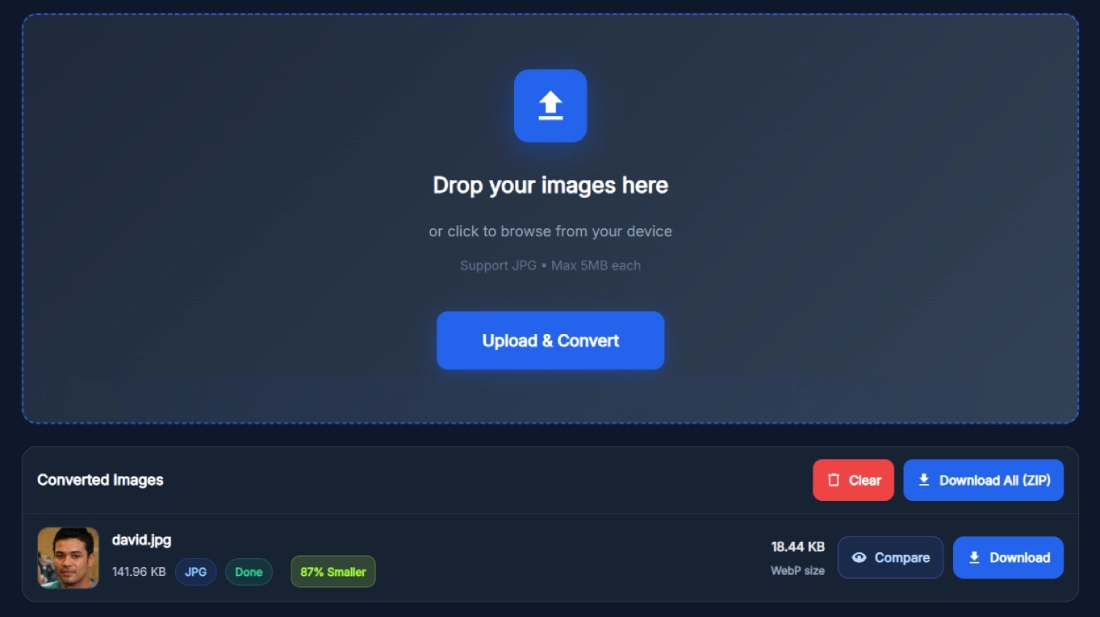
- Review the converted images and their reduced file sizes
- Download individual WebP images or use the download all option to get a ZIP file
When You Should Use This Tool
This tool is ideal when image size affects website loading speed, SEO rankings, or user experience. It is useful during website launches, redesigns, performance optimization tasks, or ongoing content publishing. Developers managing large image libraries, bloggers uploading visuals regularly, and marketers working on Core Web Vitals improvements benefit from converting JPG images to WebP online instead of relying on heavier formats that slow pages down.
Benefits of Using This Tool
The Image to WebP Converter offers more than just a format change. It supports faster websites, better SEO outcomes, and smoother browsing experiences without sacrificing image quality.
- Improves page load speed
- Reduces overall image file weight
- Helps meet Core Web Vitals performance metrics
- Enhances mobile browsing experience
- Saves bandwidth and server resources
- Keeps images visually sharp and clear
- Simplifies bulk image optimization workflows
Real Example of How the Tool Works
A website owner uploads several high-resolution JPG images used across landing pages and blog posts. Each image is over one hundred kilobytes in size. After converting them using the JPG to WebP converter, the resulting WebP files drop to under twenty kilobytes each while keeping the same dimensions and visual quality. Replacing the original JPG files with WebP improves page speed scores and reduces load time without affecting design or appearance.
Helpful Tips for Better Results
Using the Image to WebP Converter effectively can lead to even better optimization results when paired with smart image handling practices.
- Upload original high-quality JPG images for optimal compression balance
- Avoid reconverting images that are already in WebP format
- Use bulk upload when optimizing large image collections
- Test converted WebP images across major browsers
- Combine WebP images with proper lazy loading
- Replace images site-wide for consistent performance improvements
Frequently Asked Questions
What does the Image to WebP Converter do?
The Image to WebP Converter transforms JPG images into WebP format while keeping the same dimensions and visual clarity. WebP files are significantly smaller than JPG files, which helps improve website loading speed and performance. The tool processes images online, delivers instant results, and allows users to download optimized WebP files without installing software or creating an account.
Is this JPG to WebP converter free to use?
Yes, the JPG to WebP converter is completely free to use. There are no hidden charges, subscriptions, or usage limits during normal use. Users can convert single images or multiple JPG files in one session without logging in. This makes it suitable for individuals, businesses, and agencies that need frequent image optimization without additional costs.
Can I convert multiple JPG images at once?
The Image to WebP Converter supports multiple JPG uploads in a single session. This bulk conversion feature saves time when optimizing large sets of images. After conversion, users can download each WebP file individually or choose the download all option to receive a ZIP file containing all converted images.
Does the tool change image quality after conversion?
The tool is designed to preserve visual quality while reducing file size. Converted WebP images maintain clarity, sharpness, and dimensions comparable to the original JPG files. While file size is reduced significantly, the visual difference is minimal, making the images suitable for professional websites and design use.
Are image dimensions preserved during conversion?
Yes, the Image to WebP Converter maintains the original image dimensions during conversion. Width and height remain unchanged, ensuring the converted WebP images fit perfectly into existing layouts without requiring design or CSS adjustments.
Is any software installation required to use this tool?
No software installation is required. The JPG to WebP converter works entirely online through the browser. Users can upload images, convert them, and download WebP files directly without installing plugins, desktop software, or browser extensions.
Is this tool safe for converting personal or business images?
Yes, the tool processes images securely during conversion. Uploaded images are used only for conversion purposes and are not stored permanently. This makes the Image to WebP Converter suitable for personal projects, client work, and business websites where data safety matters.
Can I use the converted WebP images on all browsers?
Most modern browsers support WebP images, including Chrome, Edge, Firefox, and Safari. For older browsers, developers can use fallback image formats if needed. Using WebP images generally improves performance across modern devices and platforms.
Why should I convert JPG images to WebP format?
Converting JPG images to WebP reduces file size significantly while maintaining visual quality. Smaller images load faster, improve user experience, and help websites meet performance benchmarks. WebP images also reduce bandwidth usage and improve SEO-related metrics such as page speed and Core Web Vitals.
Does converting images to WebP improve SEO?
Yes, using WebP images can indirectly improve SEO by enhancing page speed and user experience. Faster-loading pages tend to perform better in search rankings. Reduced image size also improves mobile performance, which is an important ranking factor for search engines.
Is WebP better than JPG for websites?
WebP is generally better for websites because it delivers smaller file sizes with comparable quality. This leads to faster loading pages and improved performance metrics. JPG may still be useful in specific cases, but WebP is preferred for modern, performance-focused websites.
Can I convert JPG to WebP online without losing quality?
Yes, this tool is designed to convert JPG to WebP online while preserving visual quality. Compression is optimized to reduce size without noticeable quality loss, making it suitable for professional use.
How fast is the JPG to WebP conversion process?
The conversion process is fast and typically completes within seconds, depending on image size and quantity. The tool processes images efficiently, allowing users to convert and download optimized WebP files without long waiting times.
Does the tool work on mobile devices?
Yes, the Image to WebP Converter works smoothly on mobile devices, tablets, and desktops. The interface is responsive, and users can upload, convert, and download images directly from their mobile browser.
Can I use this JPG to WebP compression tool for large websites?
Yes, this JPG to WebP compression tool is suitable for large websites that require bulk image optimization. The ability to upload multiple images and download them in a ZIP file makes it practical for developers, agencies, and site owners managing extensive image libraries.
Will WebP images reduce website bandwidth usage?
Yes, WebP images consume less bandwidth due to their smaller file size. This reduces server load, speeds up content delivery, and improves overall site performance, especially for image-heavy pages and mobile users.