


YouTube creators spend an average of 4-6 hours per video on scripting, ideation, and optimization. That’s before filming or editing. TubeMagic promises to cut that to 30 seconds using AI.
Big promise.
The tool claims to write full video scripts, generate unlimited video ideas, create instant Shorts, optimize titles and tags, and even produce complete videos—all powered by AI.
If that actually works, it changes the content production equation completely. You’d spend less time staring at blank pages and more time actually creating.
But here’s the question: does AI-generated content actually perform on YouTube? Or does it produce generic scripts that audiences ignore?
Let me break down exactly what TubeMagic does, who it’s for, and whether AI content automation is worth paying for.
Tired of spending hours scripting YouTube videos?
If you want AI to generate scripts, video ideas, and optimized metadata in seconds, TubeMagic offers a trial period. Test the AI quality and see if it fits your workflow.
Try TubeMagic Free TrialWhat Is TubeMagic?
TubeMagic is an AI-powered YouTube automation tool that generates scripts, video ideas, keywords, titles, descriptions, tags, and complete videos using artificial intelligence. It’s designed to speed up content production by handling the “thinking and writing” part of YouTube creation.
The core promise is simple: spend less time stuck in writer’s block or researching what to create, and more time actually filming and publishing videos.
Here’s what makes TubeMagic different from tools like VidIQ or TubeBuddy:
- AI script writer. Generate full video scripts (intro, body, outro) in seconds based on a topic or keyword.
- Unlimited video ideas. AI suggests trending, searchable video topics tailored to your niche.
- Instant Shorts creator. Type a prompt, and TubeMagic generates a YouTube Short with AI voiceover and stock footage.
- Instant Videos. Create full-length videos automatically using AI-generated scripts and stock footage.
- Warp Upload. Auto-generate optimized titles, descriptions, and tags for any video you’re uploading.
- Keyword research. Find high-volume, low-competition keywords for your niche.
- Thumbnail generator. AI creates thumbnail designs based on your video topic.
TubeMagic operates entirely in the cloud (web-based platform). No browser extensions or downloads needed. You log in, enter prompts, and the AI generates content you can use, edit, or publish directly.
The tool is subscription-based (monthly pricing) and targets creators who want to scale content production without hiring writers or spending hours scripting videos themselves.
Key Features of TubeMagic
Let me walk through what actually matters—the AI-powered features that separate TubeMagic from traditional YouTube tools.
1. Instant Script Writer
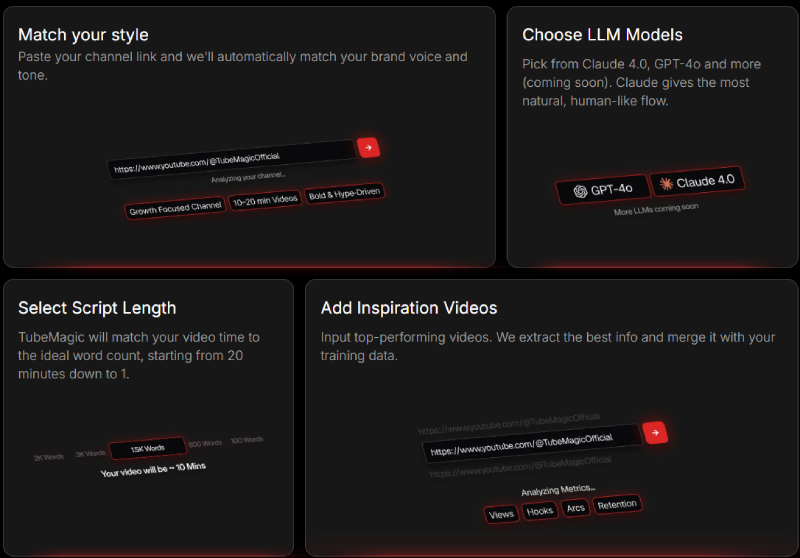
This is the headline feature. Type a video topic or keyword, select your preferred tone (educational, entertaining, storytelling), and TubeMagic’s AI writes a full video script in 30-60 seconds.
The script includes:
- Hook/intro
- Main content sections with talking points
- Transitions between sections
- Call-to-action and outro
You can specify script length (short, medium, long) and customize the output. The AI understands YouTube best practices—hooks that grab attention, natural pacing, engagement cues.
This is valuable if you struggle with writing scripts or want to produce content faster.
2. Unlimited Video Ideas Generator
Type your niche or channel topic, and TubeMagic generates dozens (or hundreds) of video ideas based on trending topics, search demand, and what’s working in your category.
Each idea includes:
- Suggested title
- Target keyword
- Why it’s trending or searchable
- Estimated competition level
If you’re stuck in “I don’t know what to make next” mode, this removes the guesswork.
3. Keyword Research Tool
TubeMagic’s AI analyzes YouTube search data to find keywords with good search volume and low competition. It’s similar to VidIQ’s keyword tool but integrated into the content creation workflow.
You get:
- Search volume estimates
- Competition scores
- Related keywords
- Long-tail variations
This helps you create videos around topics people are actually searching for.
4. Warp Upload (Auto-Optimization)
Before uploading a video, paste your script or topic into Warp Upload. TubeMagic instantly generates:
- SEO-optimized title
- Full video description with timestamps
- Relevant tags
- Suggested thumbnail text
This saves 10-15 minutes per upload and ensures you’re not leaving SEO opportunities on the table.
5. Instant Shorts Creator
Type a topic or hook (e.g., “3 productivity hacks for students”), and TubeMagic generates a complete YouTube Short:
- AI-written script
- AI voiceover
- Stock footage or visuals
- Text overlays and captions
You can download the video and upload it directly to YouTube. No filming, no editing.
This is designed for faceless channels or creators who want to test Shorts without production effort.
6. Instant Videos
Similar to Instant Shorts, but for full-length videos (3-10 minutes). TubeMagic generates:
- Complete script
- AI voiceover
- Stock footage matching the script
- Basic editing and transitions
The output quality depends on your niche—topics with good stock footage (tech, finance, productivity) work better than personality-driven content.
7. Content Optimizer
Upload your existing video URL, and TubeMagic analyzes it for optimization opportunities:
- Better titles
- Missing keywords
- Description improvements
- Tag suggestions
Useful for refreshing older videos that aren’t performing.
8. AI Thumbnail Generator
Describe your video or paste the title, and TubeMagic creates thumbnail designs with:
- Bold text overlays
- Background images
- Color schemes optimized for CTR
The thumbnails are functional starting points but usually need customization to match your brand.
9. Templates & Prompts Library
TubeMagic includes pre-made prompts for different video types:
- List videos (“Top 10…”)
- How-to tutorials
- Product reviews
- Storytelling formats
- Motivational content
You can customize these templates for your niche instead of starting from scratch.
10. Bulk Content Creation
Generate multiple scripts, video ideas, or titles in one batch. Useful if you’re planning a month’s worth of content at once.
Need unlimited scripts and video ideas?
TubeMagic includes AI script writer, Instant Shorts, video ideas generator, keyword research, and thumbnail creation. See the Premium plan features and pricing below.
Get TubeMagic NowHow Does TubeMagic Work?
TubeMagic’s workflow is designed to move you from idea to upload as fast as possible.
Step 1: Log In and Choose Your Tool
Access the TubeMagic dashboard from any browser. You’ll see options for:
- Script Writer
- Video Ideas
- Keyword Research
- Warp Upload
- Instant Shorts/Videos
- Thumbnail Generator
Pick the tool that fits your current need.
Step 2: Enter Your Topic or Prompt
For scripts, type your video topic (e.g., “How to start a podcast in 2026”).
For video ideas, enter your niche (e.g., “personal finance for millennials”).
For keyword research, enter a broad topic (e.g., “home workouts”).
The AI processes your input and generates content based on YouTube trends, search data, and successful formats.
Step 3: Review and Customize the Output
TubeMagic generates:
- Full scripts you can read, edit, or use as-is
- Video ideas with titles and keywords
- Optimized metadata for uploads
- Complete videos (Shorts or long-form) ready to download
You can:
- Edit the AI output to add your personality
- Regenerate if you don’t like the first version
- Export and use immediately
Step 4: Use the Content
For scripts: Read it on camera, record voiceover, or use it as an outline.
For Instant Videos/Shorts: Download the generated video and upload directly to YouTube.
For metadata: Copy-paste titles, descriptions, and tags into your YouTube upload.
For ideas: Pick a suggested topic and create the video yourself.
The entire workflow is built around speed. TubeMagic assumes you want content fast and removes friction from ideation, scripting, and optimization.
But speed comes with tradeoffs—which is where realistic expectations matter.
Who Is TubeMagic Best For?
TubeMagic isn’t for everyone. The value depends entirely on how you create content and whether you actually need AI-powered automation.
Here’s who will get the most value:
1. Creators Who Struggle with Writer’s Block or Scripting
If you constantly stare at blank pages wondering what to say or how to structure videos, TubeMagic’s script writer removes that barrier. You get a starting point in 30 seconds instead of spending an hour outlining.
2. High-Volume Content Creators
If you’re publishing 5-10+ videos per week and need to scale production without hiring writers, AI automation makes sense. TubeMagic helps you maintain consistency without burning out.
3. Faceless YouTube Channels
If you’re running channels focused on stock footage, AI voiceovers, and compilation-style content (finance tips, productivity hacks, motivation), TubeMagic’s Instant Videos and Shorts features are built for this model.
4. Creators Comfortable Using AI as a Starting Point
If you view AI as a tool to speed up your process—not replace your creativity—TubeMagic works well. You use the generated scripts as drafts, then add your personality, stories, and unique insights.
5. Monetized YouTubers Who Publish Frequently
If you’re already making money from YouTube and publish 5+ videos per month, the time savings justify the cost. Cutting scripting time from 2 hours to 30 minutes per video adds up fast.
Who Should NOT Subscribe to TubeMagic
Let’s be equally clear about who this tool is NOT for:
- Creators who prefer 100% original, human-written content. If you pride yourself on unique voice and storytelling, AI-generated scripts will feel generic and limiting.
- Those expecting AI to replace creativity and strategy. TubeMagic generates content—it doesn’t understand your audience, your brand voice, or what makes your channel unique. You still need creative direction.
- Beginners with under 500 subscribers. Focus on learning YouTube basics first. AI tools won’t fix fundamental content quality issues. Master the craft before automating it.
- Personality-driven channels focused on personal storytelling. If your channel is about your unique perspective, experiences, and voice, AI scripts will feel soulless. TubeMagic works better for informational/educational content.
- Budget-conscious creators. At $97/month, this is a significant recurring cost. If you’re not monetized or making money from YouTube, that’s a tough expense to justify.
- Channels that value authenticity over volume. If your audience connects with you because you’re real and unfiltered, AI-generated content might damage that trust.
- Low-volume creators publishing 2-3 videos per month. At $97/month, you’re paying $32-48 per video for AI assistance—hard to justify unless you’re making significant revenue.
If any of that describes you, save your money.
Pricing and Plans Breakdown
TubeMagic offers a single Premium plan with two billing options:
Premium Plan – Monthly Billing
Price: $97/month
What you get:
- Unlimited words/month (no generation caps)
- AI script generator (unlimited)
- Title, description, and tags generator
- Video ideas generator
- Keyword research tools
- Instant Shorts creator
- Instant Videos creator
- Thumbnail generator
- Content optimizer
- Templates & prompts library
- Bulk content creation
- Priority support
Who it’s for: Creators who want to test TubeMagic month-to-month without long-term commitment.
Premium Plan – Annual Billing (Save 20%)
Price: $83/month (billed annually at $997/year)
What you get:
- Everything in the monthly plan
- Tube AI System Course (exclusive bonus training)
- 20% savings ($168/year discount)
- Priority support
Who it’s for: Serious creators committed to AI-assisted content production who want to save money and get the bonus training course.
Best value if you plan to use TubeMagic for 6+ months.
Pricing Breakdown:
| Plan | Monthly Cost | Annual Cost | Savings | Bonus |
|---|---|---|---|---|
| Monthly | $97/month | $1,164/year | — | None |
| Annual | $83/month | $997/year | $168/year (20% off) | Tube AI System Course |
My recommendation:
If you’re unsure whether AI scripting fits your workflow, start with monthly billing ($97/month) so you can test for 1-2 months and cancel if it doesn’t work for you.
If you’re confident you’ll use TubeMagic long-term (6+ months), go with annual billing ($83/month) to save $168/year and get the Tube AI System Course as a bonus.
Is $97/Month Worth It?
Here’s the honest math:
If TubeMagic saves you:
- 2 hours per video on scripting
- You publish 8 videos per month
- That’s 16 hours saved per month
If your time is worth $20/hour, that’s $320 in value.
If your time is worth $50/hour, that’s $800 in value.
At $97/month, it pays for itself if you actually use it consistently and publish 5+ videos per month.
But if you’re only publishing 2 videos per month, you’re paying $48.50 per video for AI assistance—which might not justify the cost.
Bottom line: TubeMagic makes financial sense for high-volume creators who are already monetized or making money from YouTube. For beginners or low-volume creators, $97/month is a tough expense to justify.
Pros and Cons
Let’s get brutally honest about what works and what doesn’t.
Pros:
✅ Saves massive time on scripting. Going from 2 hours to 30 minutes per script is a real productivity gain.
✅ Unlimited generation on Premium plan. No caps on scripts, ideas, or AI usage—create as much content as you need.
✅ Removes writer’s block. Even if you rewrite the AI output, having a starting point beats staring at a blank page.
✅ Unlimited video ideas. Never run out of content ideas if you’re stuck.
✅ Instant Shorts creator is genuinely useful. For testing Shorts without filming, this speeds up experimentation significantly.
✅ Warp Upload saves upload time. Auto-generating titles, descriptions, and tags cuts 10-15 minutes per video.
✅ Keyword research integrated into workflow. You find searchable topics while creating content, not as a separate step.
✅ Works well for educational/informational content. Topics like “how to” tutorials, productivity tips, finance advice, tech reviews work well with AI scripts.
✅ Cloud-based, no downloads needed. Access from any device, no technical setup required.
✅ Annual plan includes bonus training course. Tube AI System Course adds value if you commit to yearly billing.
Cons:
❌ Single pricing tier at $97/month is expensive. No cheaper starter plan for beginners or low-volume creators testing AI tools.
❌ AI-generated scripts need heavy editing. The output is generic and lacks personality. You must add stories, examples, and your unique voice.
❌ High cost for beginners or non-monetized channels. $97/month is steep if you’re not making money from YouTube yet.
❌ Quality varies by niche. Informational content works better than personality-driven or storytelling content.
❌ Instant Videos feel automated. Stock footage + AI voiceover = obvious faceless content. Audiences can tell.
❌ No strategy replacement. TubeMagic generates content—it doesn’t tell you what your audience wants or how to build a loyal following.
❌ Risk of sounding like everyone else. If thousands of creators use the same AI tool for the same niche, content starts feeling repetitive.
❌ Ethical concerns about AI content. Some audiences value human creativity. Overusing AI might damage trust if viewers figure it out.
❌ Learning curve for prompts. Getting good results requires learning how to prompt the AI effectively. Generic prompts = generic output.
❌ Hard to justify at low volume. Publishing 2-3 videos per month means paying $32-48 per video for AI assistance.
TubeMagic vs VidIQ (Brief Comparison)
Since VidIQ is the other major YouTube tool, here’s a quick breakdown:
TubeMagic Strengths:
- AI-first tool focused on content creation (scripts, videos, automation)
- Unlimited video ideas and script generation
- Instant Shorts/Videos for faceless channels
- Better for high-volume creators who need speed
- No generation caps or limits
VidIQ Strengths:
- Data-first tool focused on analytics, SEO, competitor research
- Trending video alerts and keyword tracking
- Thumbnail A/B testing (Boost plan)
- Better for creators who want insights, not automated content
- Cheaper entry point ($7.50-10/month Pro plan)
Pricing Comparison:
| Tool | Entry Price | Focus |
|---|---|---|
| TubeMagic | $97/month | AI content generation |
| VidIQ | $7.50/month (Pro) | SEO, analytics, optimization |
Which Should You Choose?
- Choose TubeMagic if: You struggle with scripting, need content volume, or run faceless channels. You want AI to generate ideas and scripts. You publish 5+ videos per month and value time savings.
- Choose VidIQ if: You need data and analytics to optimize content. You’re good at scripting but want to understand what’s working and trending. You’re on a tighter budget.
Honest verdict: They serve different needs. TubeMagic is about creation automation. VidIQ is about optimization and insights.
Some creators use both, but that’s $100+/month combined. For most people, pick the one that solves your biggest bottleneck.
Thinking about TubeMagic for your channel?
Before you decide, check the current pricing options. Monthly at $97 or annual at $83/month with bonus training course. See which plan fits your content volume.
See TubeMagic Pricing & FeaturesVerdict: Is TubeMagic Worth It?
Let’s cut through the hype.
TubeMagic is NOT going to magically make you go viral, replace your creative process, or turn you into a YouTube star overnight. AI doesn’t understand your audience, your brand, or what makes your content unique.
But here’s what it WILL do:
It will significantly reduce the time you spend on scripting, ideation, and upload optimization—if you’re willing to edit and personalize the AI output.
If you’re struggling with:
- Constant writer’s block or scripting anxiety
- Finding video topics that balance search demand and trends
- Producing content fast enough to stay consistent
- Optimizing titles, descriptions, and tags for every upload
TubeMagic solves those problems.
However, temper your expectations.
AI-generated content is:
- Generic out of the box (needs personalization)
- Obvious to audiences if you don’t add your voice
- A starting point, not a finished product
- Better for informational content than storytelling
TubeMagic is best for creators who view AI as a speed tool, not a replacement for creativity.
The pricing question:
At $97/month (or $83/month annual), TubeMagic is expensive if you’re:
- Not monetized yet
- Publishing less than 5 videos per month
- Still figuring out your content strategy
- On a tight budget
But if you’re already consistent, monetized, and stuck on scripting time, the time savings can justify the cost.
Think of it this way: if TubeMagic saves you 16 hours per month on scripting, and your time is worth $20/hour, that’s $320 in value. The $97/month pays for itself.
But if you’re only publishing 2 videos per month and not making money yet, $97 is hard to justify.
Final Verdict
TubeMagic is worth paying for if you:
- Publish 5-10+ videos per month and struggle with scripting time
- Run faceless YouTube channels focused on informational content
- View AI as a tool to speed up your process (not replace creativity)
- Are monetized or making money from YouTube
- Need unlimited video ideas and script drafts fast
- Value time savings over cost (your time is worth $20+/hour)
Skip TubeMagic if you:
- Have under 1,000 subscribers (focus on quality and learning first)
- Prefer 100% original, human-written content
- Run personality-driven channels where voice and authenticity matter most
- Aren’t monetized and can’t justify $97/month
- Publish fewer than 5 videos per month (poor cost-per-video ratio)
- Expect AI to replace your creative strategy
For me? If I were running a high-volume informational channel (tech tutorials, productivity tips, finance advice) and publishing 8-10 videos per month, I’d pay for the annual plan without hesitation. The time savings on scripting alone would be worth it.
But if I were running a personal vlog, storytelling channel, or just starting out, I’d skip it and focus on developing my voice first. At $97/month, TubeMagic is a tool for established creators who are already consistent and making money—not beginners experimenting with YouTube.
Ready to speed up your YouTube content production?
If TubeMagic fits your needs—whether for scripting, video ideas, or Instant Shorts—start with a trial to test AI quality. Best for high-volume creators publishing 5+ videos per month.
Start Your TubeMagic TrialFAQs
Does TubeMagic have a free trial?
TubeMagic typically offers a trial period (7-14 days) or money-back guarantee. Check their current offer on the pricing page. This lets you test the AI script quality and workflow before committing to monthly payments.
Is there a cheaper TubeMagic plan?
No. TubeMagic only offers one Premium plan at $97/month (or $83/month annual). There’s no free plan or lower-tier option. This makes it one of the more expensive YouTube AI tools, so it’s best suited for creators who are already monetized or serious about high-volume content production.
Can AI-generated scripts actually perform on YouTube?
Yes, but only if you edit and personalize them. Raw AI scripts are generic and lack personality. Successful creators use AI as a starting point, then add stories, examples, and their unique voice. Pure AI content without human editing rarely performs well.
Is TubeMagic better than hiring a scriptwriter?
Different use cases. Freelance scriptwriters cost $50-150 per script but deliver personalized, high-quality content. TubeMagic costs $97/month for unlimited scripts but requires you to edit them. Choose TubeMagic if you publish frequently and want speed. Hire writers if you want premium quality for fewer videos.
Does TubeMagic work for all YouTube niches?
It works best for informational/educational content: how-to tutorials, productivity tips, finance advice, tech reviews, list videos. It’s less effective for personality-driven content, storytelling, vlogs, or comedy where your unique voice matters most.
Can YouTube detect AI-generated content?
YouTube doesn’t currently penalize AI content, but audiences can often tell when scripts are generic or lack personality. The bigger risk is viewer engagement—AI content without human editing feels robotic and gets lower watch time.
How long does it take to generate a script?
30-60 seconds for most scripts. Instant Shorts take 1-2 minutes. Instant Videos (full-length) take 3-5 minutes depending on complexity. The generation is fast—editing and personalizing takes longer.
Can I cancel TubeMagic anytime?
Yes. TubeMagic subscriptions can be canceled anytime. You’ll keep access until the end of your paid period, but you won’t be charged again after cancellation.
Is TubeMagic worth it for small channels?
Probably not. If you’re under 1,000 subscribers, focus on content quality and finding your voice first. AI tools won’t fix fundamental quality issues. Once you’re consistent and growing (5K-50K subs), TubeMagic makes more sense for scaling production.
Does TubeMagic replace VidIQ or TubeBuddy?
No. TubeMagic focuses on content creation (scripts, ideas, videos). VidIQ/TubeBuddy focus on analytics, SEO, and optimization. They solve different problems. Some creators use TubeMagic for scripting and VidIQ for data, but that’s $100+/month combined.
What’s the Tube AI System Course included in annual plan?
The Tube AI System Course is a bonus training included with the annual plan ($997/year). It teaches strategies for using AI effectively in your YouTube workflow, optimizing prompts, and building a content system around AI tools. This adds value beyond the software itself.
