
Screenshot to PDF Converter Free
Convert screenshots to PDF documents instantly. Perfect for tutorials, documentation, and presentations.
Supports JPG, PNG, WEBP, BMP files up to 20MB each
⚙️ PDF Options
Screenshots to convert
0 filesThe Screenshot to PDF Converter Free Tool instantly turns your screenshots into a polished PDF document. Upload multiple screenshots, set margins, orientation, and page size, then download your PDF in seconds—no software installation needed.
What the Screenshot to PDF Converter Free Does
This tool converts your screenshots into a professional PDF file, ready for sharing or archiving. Whether you’re documenting a tutorial, saving chat proofs, or compiling product demos, it handles the heavy lifting. Instead of juggling multiple image files, you get one neat PDF that’s easier to store, email, and print.
Unlike clunky desktop software, this converter runs directly in your browser. That means no downloads, no bloatware, and no risk of malware. It’s lightweight, quick, and optimized for images from phones, laptops, or external monitors.
Key Features for Screenshot to PDF Converter Free
At a glance, here’s what you can do with the tool:
- Multi-format support: Works with JPG, PNG, WEBP, and BMP screenshots.
- Batch upload: Add several screenshots at once; they’ll merge into one document.
- Custom page orientation: Switch between Portrait (perfect for mobile screenshots) or Landscape for wide captures.
- Margin control: Add small, medium, or large margins depending on how much white space you want around images.
- Auto-fit sizing: Match each PDF page size to your screenshot resolution, or pick standard A4/Letter.
- Screenshots per page: Place one per page or multiple if you’re creating side-by-side tutorials.
- Privacy-first design: All processing happens in your browser session—your files never leave your device.
- Free, unlimited use: No paywalls, no daily caps, no signup forms.
How to Use Screenshot to PDF Converter Free
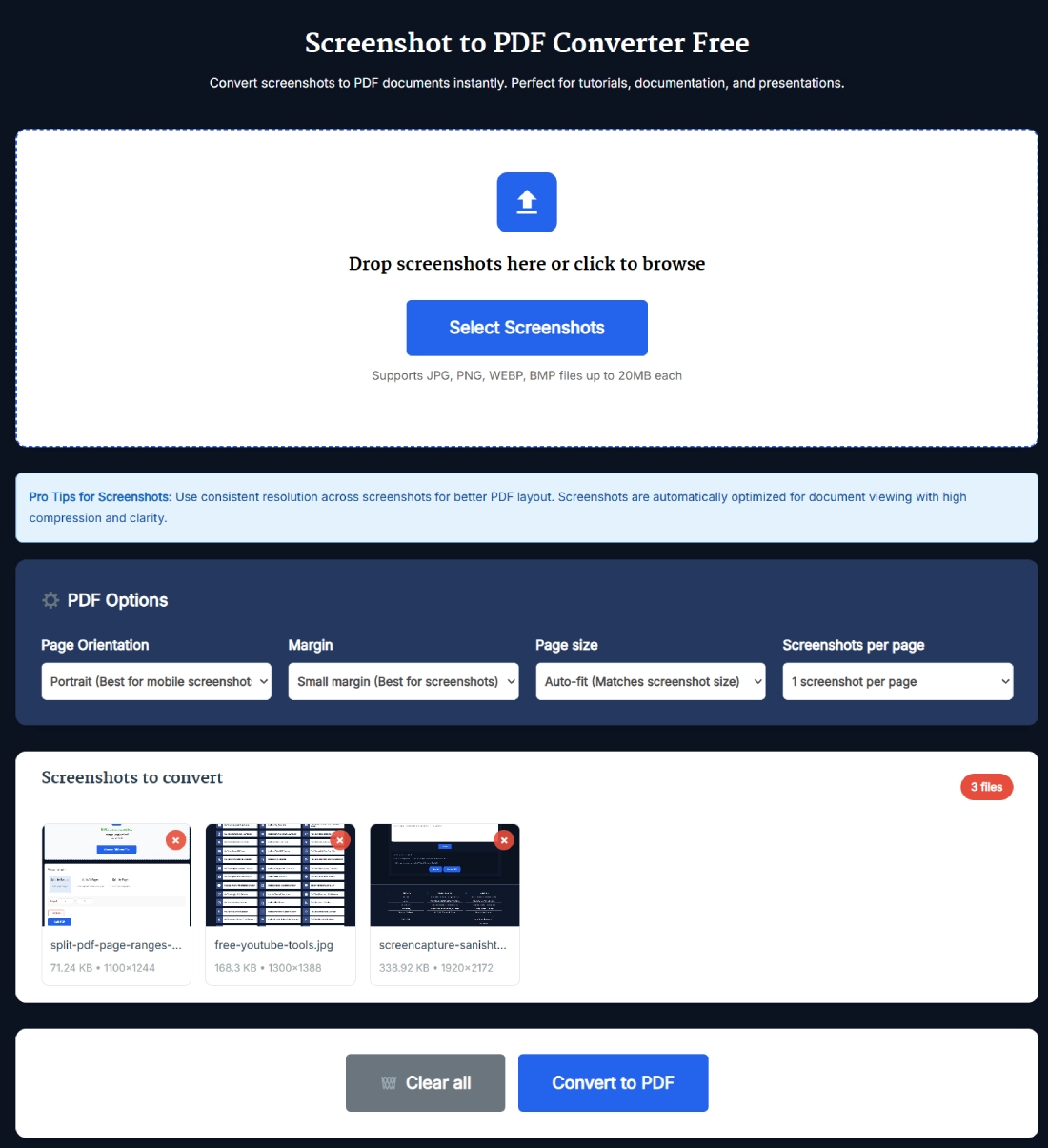
Using the tool feels almost effortless. Here’s the exact step-by-step based on the UI you see above:
- Upload your screenshots
- Drag and drop files into the big upload box, or click “Select Screenshots.”
- You can add JPG, PNG, WEBP, or BMP up to 20MB each.
- Preview your images
- Thumbnails appear in a grid. You can remove any by clicking the red “x.”
- The file count shows at the top right (e.g., “3 files”).
- Adjust PDF options
- Choose Page Orientation (Portrait or Landscape).
- Set Margins (Small, Medium, Large).
- Pick Page Size (Auto-fit or standard like A4).
- Decide Screenshots per Page (1, 2, or more).
- Convert
- Hit the big blue Convert to PDF button.
- The tool processes instantly and downloads your merged PDF.
- Clear if needed
- Use the “Clear All” button to reset and upload new screenshots.
Micro-tip: If you’re compiling a tutorial, keep screenshots in the exact order before upload. The tool maintains that sequence in the final PDF.
Benefits of Using Screenshot to PDF Converter Free
Why bother converting screenshots into PDF instead of just sending image files?
- Professional look: A PDF feels cleaner when sharing presentations, client deliverables, or official documents.
- Compact storage: Instead of 20 separate files, you get one compressed PDF.
- Easy sharing: PDFs work seamlessly across devices, browsers, and email clients.
- Organized documentation: Perfect for reports, bug tracking, or archiving step-by-step flows.
- No installation: Works 100% online in your browser—ideal if you’re on a shared or locked-down computer.
In short, this tool solves the pain of juggling images by bundling everything into one polished document.
Real Example of Screenshot to PDF Conversion
Imagine you’re creating a user guide for a new SaaS dashboard. You take 12 screenshots showing each feature. Sending those as raw images looks messy, and the order might get mixed up.
Instead, you upload all 12 screenshots into the Screenshot to PDF Converter Free. You pick “Portrait orientation,” “Small margins,” and “Auto-fit.” In seconds, you download a single PDF where each page is a clean step in your guide. Now, when you share it with teammates or clients, it reads like a proper manual—not a random image dump.
Another example: Let’s say you need proof of online payments. Instead of attaching 6 images in an email, merge them into one PDF and send a single, tamper-proof file.
Pro Tips for Getting the Best Results with Screenshot to PDF Converter Free
A few small tweaks can make your PDFs look much better:
- Keep screenshot resolution consistent: Mixing 1080p with low-res shots makes the PDF look uneven.
- Use Portrait for mobile, Landscape for desktop: This aligns better with how screenshots are typically taken.
- Adjust margins smartly: Small margins are best for filling pages; large margins help if you plan to annotate.
- Use multi-screenshot per page for comparisons: Perfect if you’re showing “before vs after” changes.
- Leverage Auto-fit: This ensures your screenshots aren’t cropped or stretched unnaturally.
FAQ
How do I convert screenshots to PDF for free?
Upload your screenshots, adjust options like orientation and margins, and click “Convert to PDF.” The tool instantly merges them into a single PDF file you can download—completely free. No signups or watermarks.
Can I add multiple screenshots at once?
Yes. You can upload several screenshots in one go. The tool merges them into a single document, maintaining the order of upload. Perfect for tutorials, case studies, or reports.
What file types are supported?
The converter works with JPG, PNG, WEBP, and BMP screenshots. Each file can be up to 20MB, which covers most smartphone and desktop captures without issue.
Is my data safe while using this converter?
Absolutely. All processing happens directly in your browser session. No files are uploaded to a server, so your screenshots remain private and secure.
Can I adjust how the PDF looks?
Yes. You can set page orientation, margins, page size, and even how many screenshots appear per page. These options give you control over the final PDF design.
How is this different from an Image to PDF Converter?
The Screenshot to PDF Converter is built for images captured as screenshots. It assumes higher resolution and keeps proportions intact. An Image to PDF Converter may work with photos, scans, or mixed image types.
Can I delete or rearrange pages after converting?
The tool itself doesn’t reorder pages. However, you can re-upload screenshots in the desired sequence, or use a PDF editor afterward to split, delete, or rearrange.
Will the PDF size be too large?
Not usually. The tool applies smart compression for web and print. If you still find the PDF heavy, you can run it through a PDF compressor tool to shrink it further.
Do I need to install software to use this tool?
No installation required. The converter runs 100% in your browser. This makes it platform-independent, working on Windows, Mac, Linux, Android, and iOS.
Can I share the converted PDF directly?
Yes. Once you download the PDF, you can share it via email, messaging apps, or cloud services. Since it’s in universal PDF format, the recipient can open it without issues.